
How to find domain name ideas with AI search
- AI search is a free domain name generator: describe your business or idea in a sentence, in any language, and get names for it.
- Open “Domains” → “AI search”, or the “AI search” tab under the search box.
- Every name is checked with its registry before it is shown as free. Searching is free and needs no account.
- Add the names you like to the cart, or save them with the heart.
AI search is the free domain name generator of Gatehills. You describe your business in one or two sentences, in any language, and get a list of domain name ideas. Each idea is checked live with its registry and shown with its price, so you only see names you can actually register.
It helps when you do not have a name yet. Instead of guessing names one by one, you describe what you do. The ideas come from the .ae name generator of TDRA, the UAE domain authority, and Gatehills combines them with other popular extensions.
How do I use the domain name generator?
Get name ideas from a description
- Open AI search
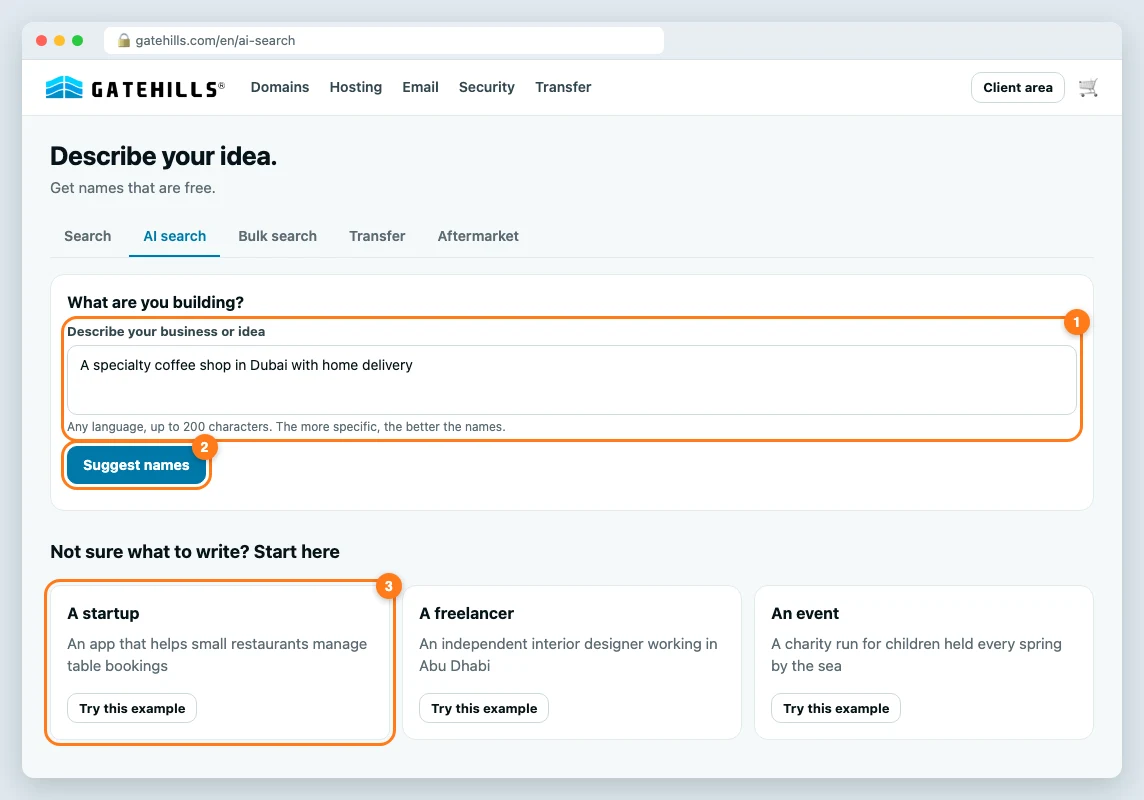
In the site menu choose “Domains” → “AI search”, or click the “AI search” tab under any search box.
- Describe your idea
In “Describe your business or idea” (1) write one or two sentences: what you do, for whom and where. For example: a specialty coffee shop in Dubai with home delivery. You can write in Arabic, English, Chinese or any other language. The maximum length is shown under the box.
- Or start from an example
Not sure what to write? Under “Not sure what to write? Start here” click “Try this example” (3): the box fills in and you can change the text to fit your idea.
- Ask for suggestions
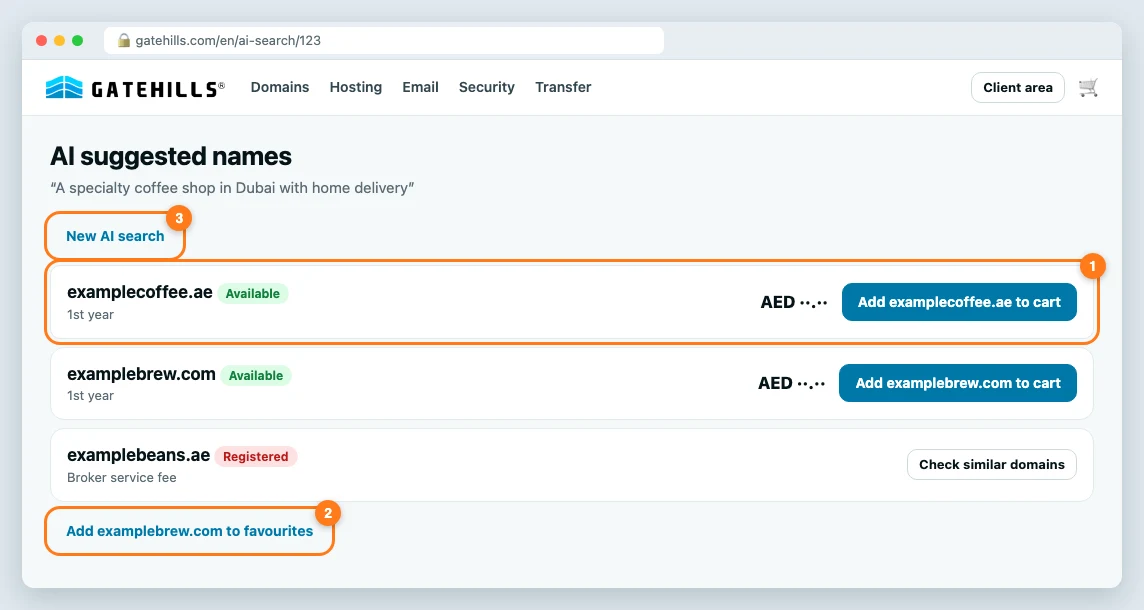
Complete the short security check if it appears, then click “Suggest names” (2). After a few seconds the page “AI suggested names” opens, with your description at the top.
- Choose your names
Each name is checked live: “Available” names show the first-year and renewal price, “Registered” names offer the same options as the normal search. Click the cart button to add a name, or the heart to keep it in your “Favourites”.
- Try again
Not convinced? Click “New AI search” and describe your idea differently, for example by adding the city or your audience. Every search brings new names.
How does AI search choose the names?
AI search works in three steps:
- You write a description of your business or idea.
- The TDRA name generator reads it and proposes names. Gatehills adds the same names on other popular extensions.
- Gatehills checks every name live with its registry and shows the status and the price.
The AI only proposes names. The registry decides if a name is free, exactly as in the normal domain search. The results of your last five AI searches stay in your browser session, so you can go back to them.
How do I write a good description?
Say what you do, for whom and where: every detail makes the names more relevant. One or two sentences are enough, within the limit shown under the box.
| Instead of | Write |
|---|---|
| shop | a shop selling handmade leather bags in Abu Dhabi |
| coffee | a specialty coffee shop in Dubai with home delivery |
| consulting | tax consulting for small businesses in Sharjah |
AI search or normal search: which one should I use?
| AI search | Normal search | |
|---|---|---|
| What you type | A description of your business | A name, with or without the extension |
| Who proposes the names | The TDRA name generator | You |
| Availability | Checked live with each registry | Checked live with each registry |
| Best when | You do not have a name yet | You already have a name in mind |
Which languages can I write in?
Any language, including Arabic, Chinese and Russian. The more details you give, the more relevant the names.
Who suggests the names?
The .ae name generator of TDRA, the UAE domain authority. We combine its ideas with other popular extensions and check every name with its registry.
Is it free?
Yes. You do not need an account to search: you pay only if you register a name.
Are the names really available?
Each name is checked live before it is shown as free. Availability can still change in the minutes before you pay, so it is checked again at checkout.
What do you do with my description?
We use it to suggest and check names and to improve the service. It is never published.
AI search is not available. What can I do?
Sometimes the service is busy or paused. Click Search by name to use the normal domain search.
Related guides