
How to check many domain names at once with bulk search
- Bulk domain search: paste a list of full domain names, one per line, and check them all at once.
- Without an account use “Domains” → “Bulk search” on the site; signed in, use “Bulk search” in the client area for longer lists.
- Checks run in the background: you can leave the page and come back.
- Add all the free names to the cart with one button. Checking is free.
Bulk domain search on Gatehills checks a whole list of domain names in one go. Paste up to 100 names without an account, or up to 500 when signed in. Gatehills checks each name live with its registry in the background. Then one button adds all the free names to the cart. Checking is free.
Use it when you need to check multiple domains: brand variants, names for several countries, or ideas collected over time. Instead of searching them one by one, you paste the domain list and Gatehills does the rest.
How do I run a bulk domain search?
Check a list of domain names
- Open bulk search
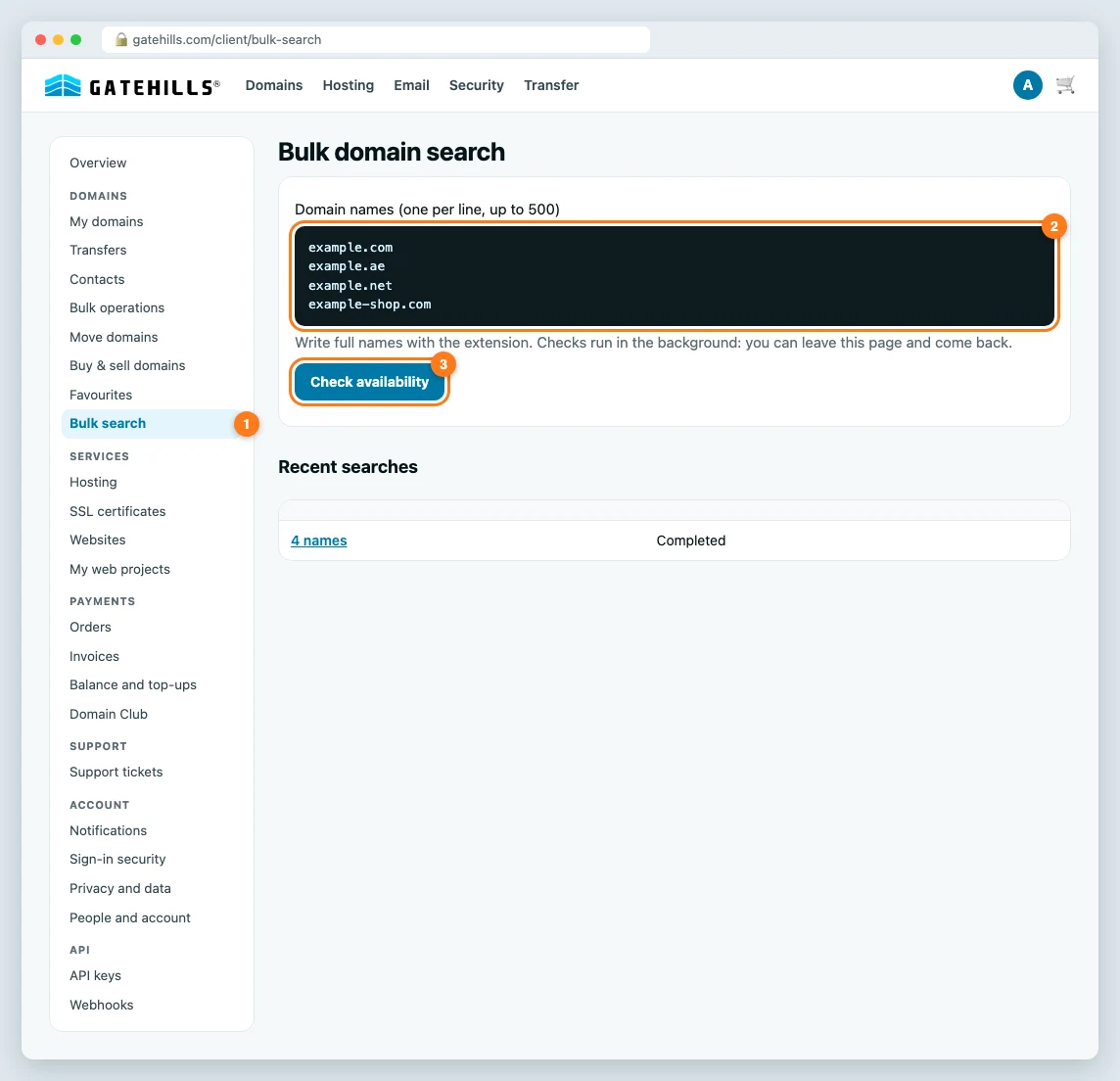
Signed in, choose “Bulk search” in the client area menu (1), under “Domains”. Without an account, open “Domains” → “Bulk search” on the site, or the “Bulk search” tab under the search box.
- Paste your list
In “Domain names (one per line, up to 500)” (2) paste the names with their extension, for example “example.com” and “example.ae”. Duplicates are removed. Web addresses are fine too: “https://”, “www.” and the path are dropped. Names in Arabic, Chinese or Cyrillic are accepted.
- Start the check
Click “Check availability” (3). Without an account, complete the short security check first. The results page opens and shows “In progress” with a percentage.
- Wait or come back later
The check runs in the background. You can leave the page: your list stays under “Recent searches”, marked “Completed” when it is done.
- Add the free names to the cart
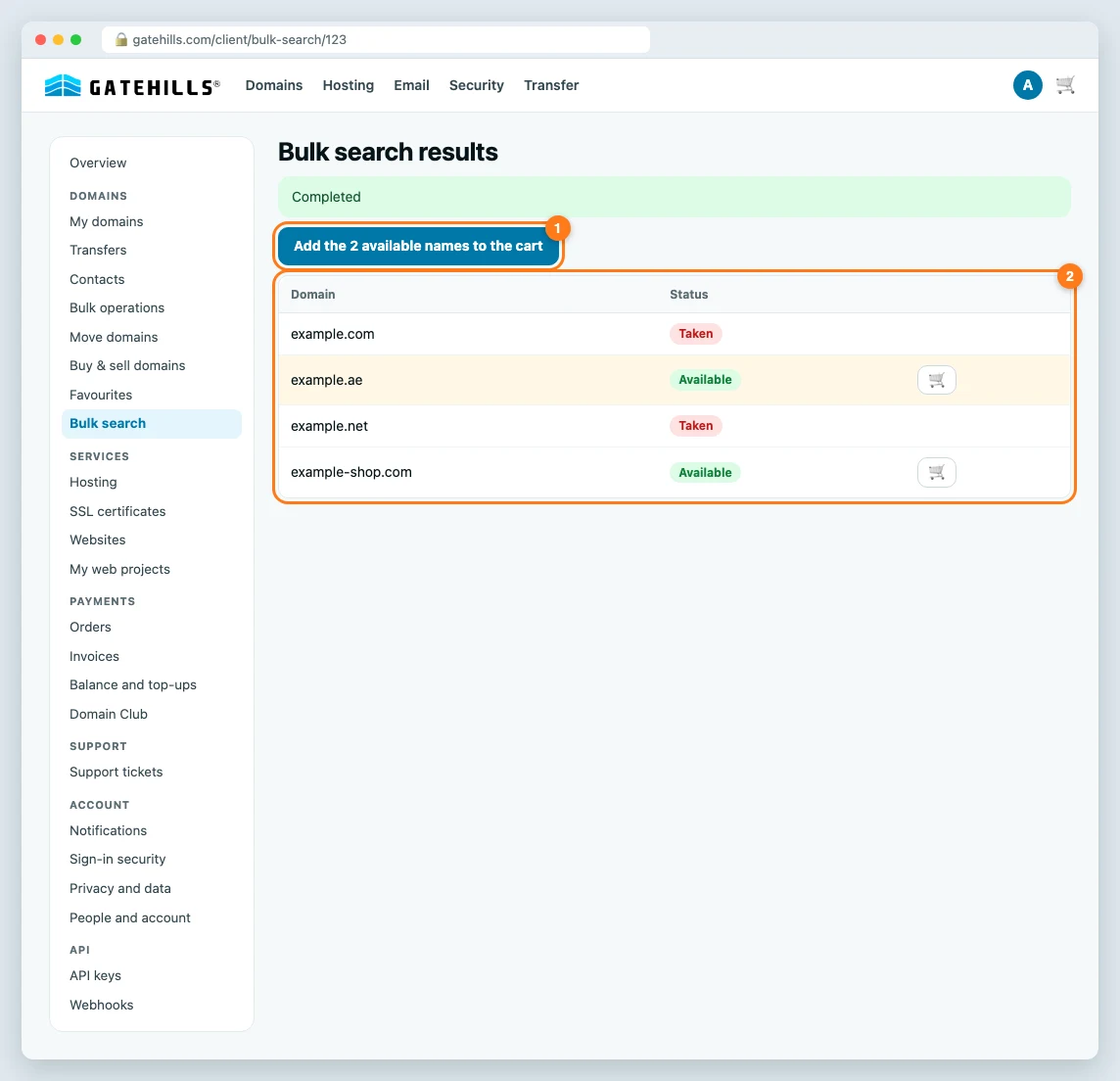
When the check is finished, click the button that adds all the free names to the cart (1), for example “Add the 2 available names to the cart”, or use the cart button on a single row (2). Prices are shown in the cart before you pay.
| Without an account | With an account | |
|---|---|---|
| Where | Domains → Bulk search | Client area → Bulk search |
| Names per search | up to 100 | up to 500 |
| Hourly limit | per connection | per account |
| Security check | yes | no |
| Who sees the results | only you, in this browser | the people of your account who can view domains |
What the statuses mean
- Available: free, you can register it.
- Taken: already registered by someone. Search it in the normal search to see the options, such as a broker or a transfer.
- Waiting: not checked yet.
- Check unavailable, try again later: the registry did not answer in time.
- Extension not sold: we do not offer that extension.
How is my list read?
You can paste one name per line, or separate the names with commas, semicolons or spaces. Before the check, each line is cleaned:
| You paste | Checked as |
|---|---|
| https://www.example.com/shop | example.com |
| Example.COM | example.com |
| example.com, example.ae; example.net | three names: example.com, example.ae, example.net |
| example.com twice | example.com, once |
| bücher.com | xn--bcher-kva.com, the IDN name in its ASCII form |
| example | skipped: the extension is missing |
A list over the limit is refused, not cut: the page asks you to shorten it. That way no name is left out without you knowing. Names in Arabic, Chinese or Cyrillic are converted to ASCII with the IDNA rules used by the registries (RFC 5890).
How long does a bulk domain search take?
It depends on the length of the list and on how fast each registry answers. The results page shows In progress with a percentage and fills in as the registries reply. You can close the page: the search keeps running and appears as Completed under Recent searches.
Only one search at a time can run, and there is a limit of names per hour. Without an account the limit applies to your connection; signed in, it applies to your account.
Do I need an account?
No. Without an account you only complete a quick security check. With a free Gatehills account you can check up to 500 names per search.
Can someone else see my list?
Without an account, only you can open the results, in the same browser. In the client area the searches belong to the account.
Where do I see the prices?
Every free name goes to the cart with its first-year price and the renewal, shown before you pay. Extensions with a minimum term show it next to the name.
Is the result final?
Availability is checked again when you pay, because a name can be registered by someone else in the meantime.
I don't have a list yet. What can I use?
Try AI search: describe your business and get name ideas.
Related guides