
How to find an extension and compare domain prices
- Domain prices: “Domains” → “Extension prices” lists every extension we sell, with filters by category, country and price.
- “Domains” → “Domain price list” shows registration, renewal, transfer and restore prices in one table.
- Prices follow the country chosen in “Prices for” at the top of the site, in its currency.
- The renewal price is always shown next to first-year deals; for generic domains the ICANN fee is added at checkout.
Gatehills shows domain prices for every extension and every operation: registration, renewal, transfer and restore. Open Domains → Domain price list for one table, or Extension prices for the catalogue. Prices follow the country chosen in Prices for, in its currency, and the renewal price is always shown.
Before you buy, it helps to know what a domain costs today and in the following years. A first-year deal can be much lower than the renewal price, so compare both. That way there are no surprises at renewal time.
How do I compare domain prices on Gatehills?
Compare domain prices
- Choose your country
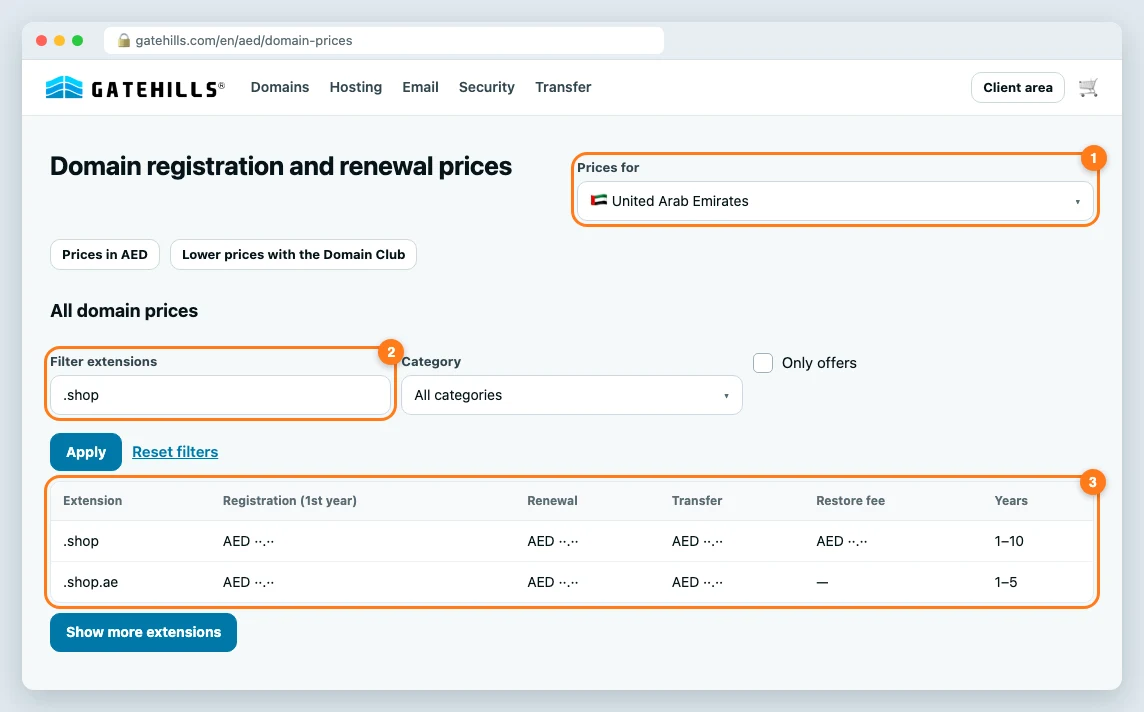
At the top of the site, in “Prices for” (1), choose the country you buy from. Prices, currency and VAT follow that choice. If a page shows prices in another currency, use the “See prices in…” link to switch.
- Open the price list
In the site menu choose “Domains” → “Domain price list”. At the top you find “Current offers” (first-year deals, each with “Renews at” and the renewal price) and “Popular extensions”.
- Find an extension
Under “All domain prices” type part of the extension in “Filter extensions…” (2), for example “shop”. You can also choose a “Category” or tick “Only offers”, then click “Apply”. “Reset filters” shows everything again.
- Read the table
The table (3) shows, for each extension, “Registration (1st year)”, “Renewal”, “Transfer” and “Restore fee”, plus the “Grace period”, the “Redemption period” and the “Years” you can register it for. Click a column heading to sort, and “Show more extensions” to load more rows.
- Open an extension page
Click an extension to open its page: it shows the price for each duration (“Duration”, “Registration”, “Renewal”), the rules of the extension and a search box to look for your name.
| Column | Meaning |
|---|---|
| Registration (1st year) | Price of a new registration for the first year (deals apply to new registrations only) |
| Renewal | Price of each following year |
| Transfer | Price to move the domain to Gatehills; for most generic extensions it adds one year |
| Restore fee | Price to recover a domain in redemption, including one year of renewal |
| Grace period | Days after expiry in which you can still renew at the normal price |
| Redemption period | After the grace period, the time in which the domain can only be recovered with the restore fee |
Which price page should I use?
| Page | What it shows | Use it to |
|---|---|---|
| Extension prices | Every extension we sell, with filters by category, country and price | Discover extensions, for example for one country |
| Domain price list | Registration, renewal, transfer and restore prices in one table, with the grace and redemption periods | Compare costs across extensions |
| Extension page | The price for each duration and the rules of the extension | Check one extension before you buy |
What is the ICANN fee?
The ICANN fee is a small yearly fee set by ICANN for generic domains such as .com, .net or .org. Gatehills adds it at checkout as a separate line, at cost. It is not subject to VAT, and coupons or the Domain Club never discount it. Country extensions such as .ae do not have it.
What happens if a domain is not renewed?
After the expiry date a domain goes through two periods, shown for each extension in the price list:
- Grace period: you can still renew at the normal renewal price.
- Redemption period: the domain can only be recovered with the Restore fee, which includes one year of renewal.
After the redemption period the registry deletes the domain and anyone can register it again. The length of both periods depends on the extension. For generic domains, ICANN sets the minimum rules in its Expired Registration Recovery Policy.
Do the prices include VAT?
It depends on the country you choose: the note under the table says whether prices include VAT or VAT is added in the cart as a separate line.
Can I pay in my currency?
Prices are shown in the currency of the country chosen in Prices for. The cart and checkout use the same prices.
Why can the renewal cost more than the first year?
Many extensions have a first-year deal for new registrations only. Renewals are at the regular price, which is always shown.
How can I pay less?
Members of the Domain Club get lower prices: look for Lower prices with the Domain Club. See the Domain Club.
How much does a transfer cost?
The Transfer column shows it. See transfer a domain to Gatehills.
Related guides