
How to buy and manage web hosting with cPanel
- Gatehills cPanel hosting gives you space for your website, email on your domain and databases, all managed in cPanel.
- You choose a plan from “Hosting” in the top menu of the website and manage it in the client area under “Hosting”.
- Prices are shown on each plan, monthly or yearly. SSL is free and automatic for domains registered with us.
- With hosting, the DNS of the domain is managed in cPanel, not in the DNS records tab.
Gatehills sells cPanel hosting with monthly or yearly payment. You pick a plan on the Hosting page, enter your domain and pay; the cPanel account is then created automatically. You open cPanel from the client area with a single-use link, and SSL is free for domains registered with Gatehills.
Hosting is the space where your website and your mailboxes live. Each plan includes the cPanel control panel, where you upload files, install applications, create email addresses and databases. The domain can be new, already in your Gatehills account or registered elsewhere: in the first two cases we set the name servers for you.
What is cPanel hosting?
cPanel is a widely used control panel for web hosting. With cPanel hosting you manage your website yourself in a browser: upload files, create mailboxes and databases, and install applications. Gatehills runs the servers, creates the account and keeps it active while the plan is paid. The official cPanel documentation is at docs.cpanel.net.
Free SSL comes from cPanel AutoSSL. It issues and renews the certificate by itself once the domain points to the hosting.
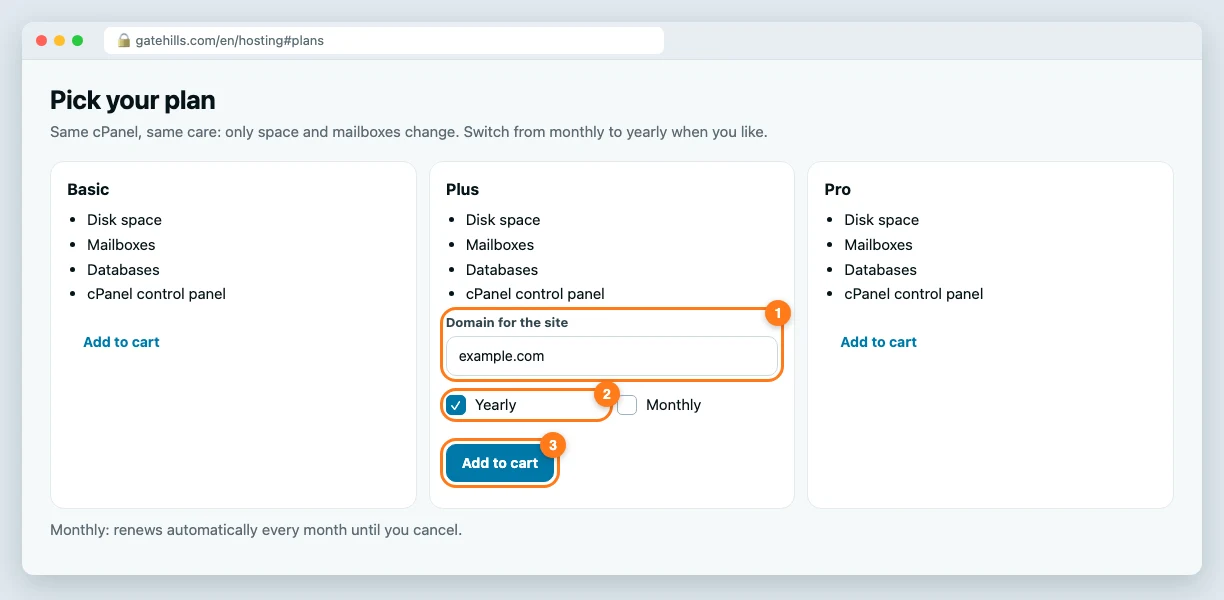
Buy a hosting plan
- Open the hosting page
On the website, open “Hosting” in the top menu and go to “Pick your plan”. Each card shows the disk space, mailboxes, databases and the monthly and yearly price.
- Write the domain
On the plan you want, write your domain in “Domain for the site” (1), for example “example.com”. It can be a domain you are buying now, one already in your account or one registered elsewhere.
- Choose how to pay
Choose “Yearly” or “Monthly” (2). Monthly renews automatically every month until you cancel. Some plans include a free domain for the first year with yearly payment.
- Add to cart and pay
Click “Add to cart” (3) and complete the order. For a monthly plan you are asked to authorise the monthly charge during checkout.
- Wait for activation
After payment the cPanel account is created automatically, with the status “Being activated” and then “Active”. We let you know when it is ready.
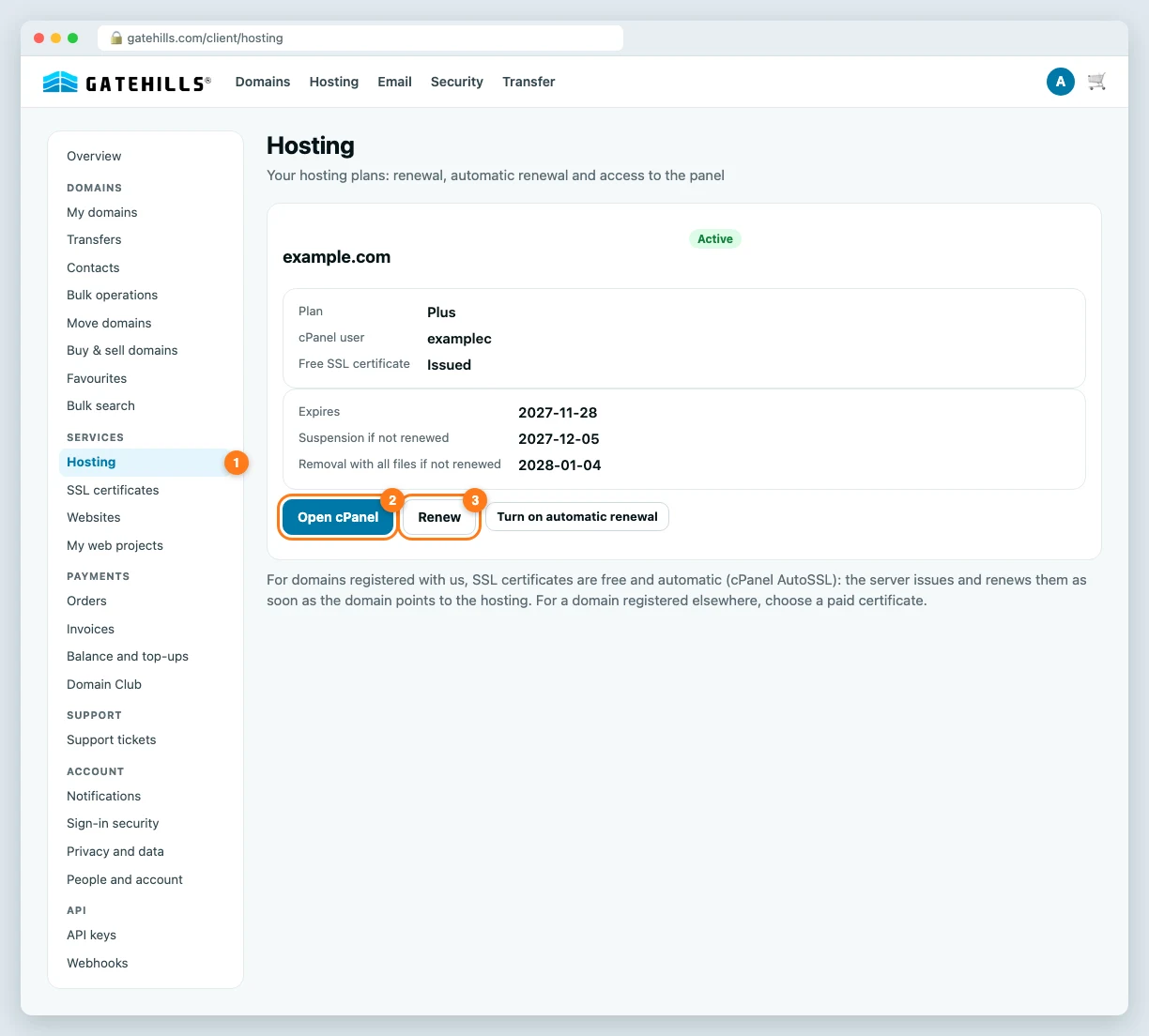
Manage your hosting
Open cPanel and renew
- Go to Hosting
In the client area choose “Hosting” in the menu (1). Each plan shows the domain, the status, the plan, the cPanel user, the free SSL certificate and a timeline with expiry, suspension and removal dates.
- Open cPanel
Click “Open cPanel” (2). cPanel opens in a new tab with a single-use link: there is no second password to remember.
- Renew
Choose the renewal period, then click “Renew” (3). For yearly plans you can also click “Turn on automatic renewal”.
- Monthly plans
A monthly plan is charged every month from your account balance or the saved card. You can “Remove card”, “Switch to yearly at expiry”, or “Cancel the monthly renewal”: the hosting stays active until the end of the paid month. To start again, use “Restart the monthly renewal”.
Your domain and DNS with hosting
| Your domain | What happens |
|---|---|
| Bought in the same order | It is registered directly with the hosting name servers. |
| Already in your Gatehills account on our DNS | We switch its name servers for you once the hosting is active. |
| Registered elsewhere | Set the hosting name servers shown on the page at your registrar, and add the TXT record shown on the Hosting page to prove you control the domain. |
When the domain uses the hosting name servers, its DNS records are managed in cPanel. The DNS records tab of the domain then shows a notice and the Open the hosting panel button. Records you had on the Gatehills DNS are no longer used, so recreate the ones you still need (for example for an external service) in cPanel.
What happens when cPanel hosting expires?
| When | What happens |
|---|---|
| 30, 14, 7, 3 and 1 days before expiry | Email reminders to renew |
| From 7 days before expiry | With automatic renewal on, a yearly plan is renewed from your account balance |
| Expiry date | The site stays online during a grace period |
| 7 days after expiry | The account is suspended: visitors see a suspension page, and a final backup is made |
| 3 days before removal | Final warning by email |
| 30 days after suspension | The account and its files are removed |
You can renew at any moment before the removal: a suspended account is reactivated after payment. These are the default timings. The exact dates for your plan are always in the timeline on the Hosting page.
How long does cPanel hosting activation take?
The cPanel account is created automatically right after payment, and the status changes from Being activated to Active. For a domain registered elsewhere, activation waits for the TXT record that proves you control the domain. Gatehills checks every 15 minutes and cancels the order after 14 days without the record.
Monthly or yearly: what changes?
Only how you pay: the plan is the same. Both prices are on each plan card.
How many email addresses can I create?
It depends on the plan: the number of mailboxes is on each card. You create them in cPanel.
Is the SSL certificate free?
Yes, for domains registered with us cPanel AutoSSL issues and renews it automatically as soon as the domain points to the hosting. See free SSL certificates.
Can a team member manage the hosting?
Yes, if the primary user gives them the hosting function. See people and account.
Why can I not use redirects or Dynamic DNS on this domain?
Those tools need the Gatehills DNS. With hosting, set up redirects and DNS records in cPanel.
Related guides