
How to buy, validate and install a paid SSL certificate
- A paid SSL certificate adds the padlock and HTTPS to your site, with your company name (OV, EV), a wildcard or several names.
- You buy it on the “SSL certificates” page and manage it in the client area, “Services” → “SSL certificates”.
- The yearly price is shown on each certificate. Reissues during the year are free.
- On Gatehills hosting the key, the validation and the installation happen by themselves.
An SSL certificate is a file signed by a certificate authority. It proves that the site belongs to your domain and encrypts the connection with HTTPS. At Gatehills you buy a paid SSL certificate on the SSL certificates page and set it up with a CSR and a domain validation. On Gatehills hosting it installs itself; on another server you install it yourself.
All certificates encrypt the same way. What changes is how much is verified about you (domain only, company, or extended check) and how many names the certificate covers: one domain with and without www, a wildcard (*.example.com) or several names. If you only need the padlock and the domain uses the Gatehills name servers, a free certificate may be enough.
Buy and set up a paid certificate
- Choose the certificate
Open the public “SSL certificates” page and click “Choose your certificate”. Each card shows the validation level (“Domain validation (DV)”, “Organization validation (OV)” or “Extended validation (EV)”), the names covered and the yearly price.
- Write the domain and pay
In “Domain of the certificate” write your domain, for example “example.com”, click “Add to cart” and complete the checkout. For a wildcard choose a wildcard product and write only the domain.
- Open the certificate
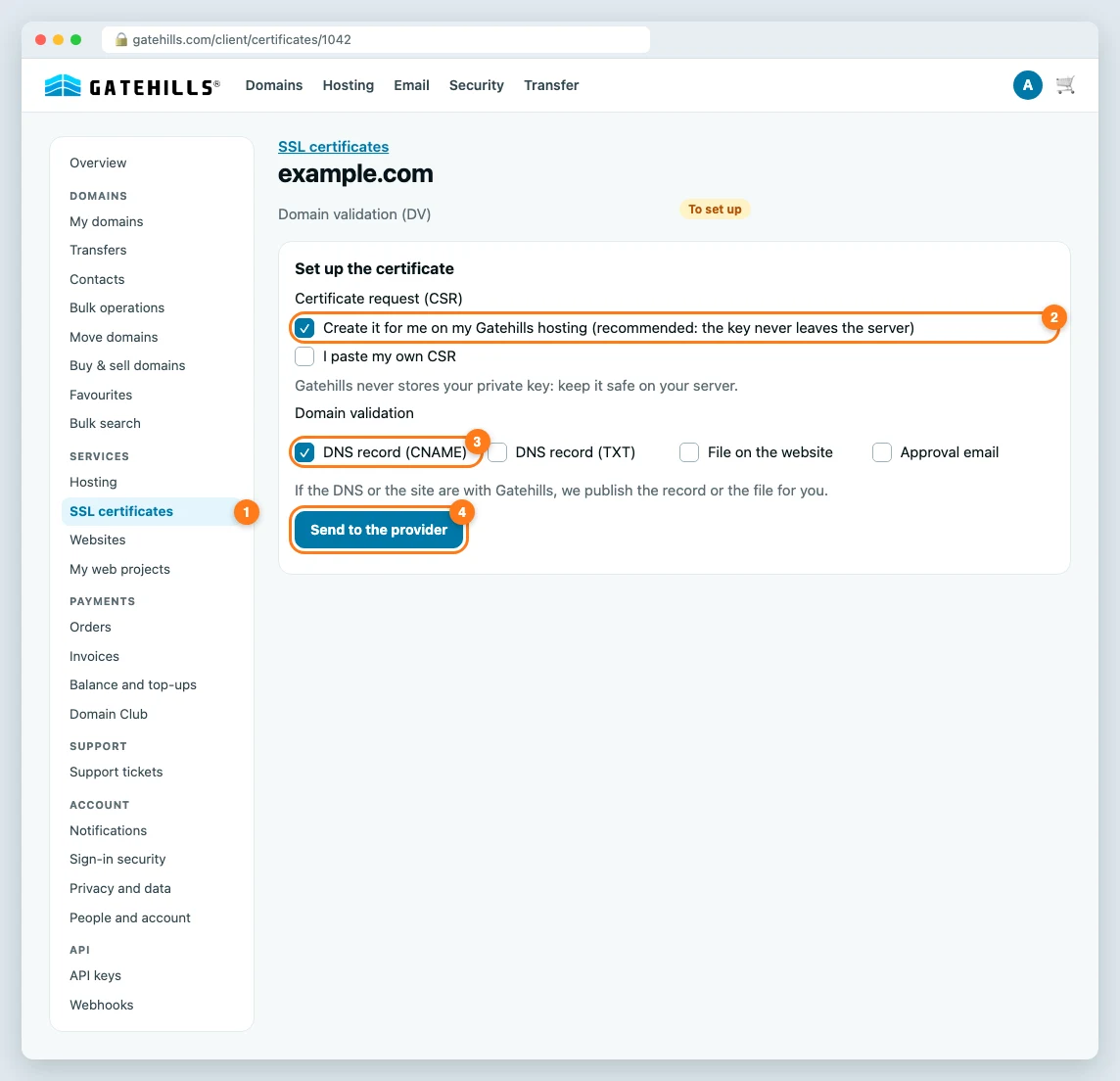
In the client area choose “SSL certificates” in the menu (1) and click the certificate. Its status is “To set up”.
- Choose how to create the CSR
Under “Certificate request (CSR)” (2): if the site is on Gatehills hosting choose “Create it for me on my Gatehills hosting”: the private key never leaves the server. Otherwise choose “I paste my own CSR” and paste the CSR generated on your server. For multi-domain certificates add the extra names, one per line.
- Choose the domain validation
Under “Domain validation” (3) choose “DNS record (CNAME)”, “DNS record (TXT)”, “File on the website” (not for wildcards) or “Approval email”. If the DNS or the site are with Gatehills, we publish the record or the file for you. For OV and EV also fill in the company details.
- Send the request
Click “Send to the provider” (4). The status becomes “Validating”. If the validation is not automatic, the “Validation” box shows the record, the file or the email address to use.
How do I install, reissue and renew an SSL certificate?
When the status is Issued:
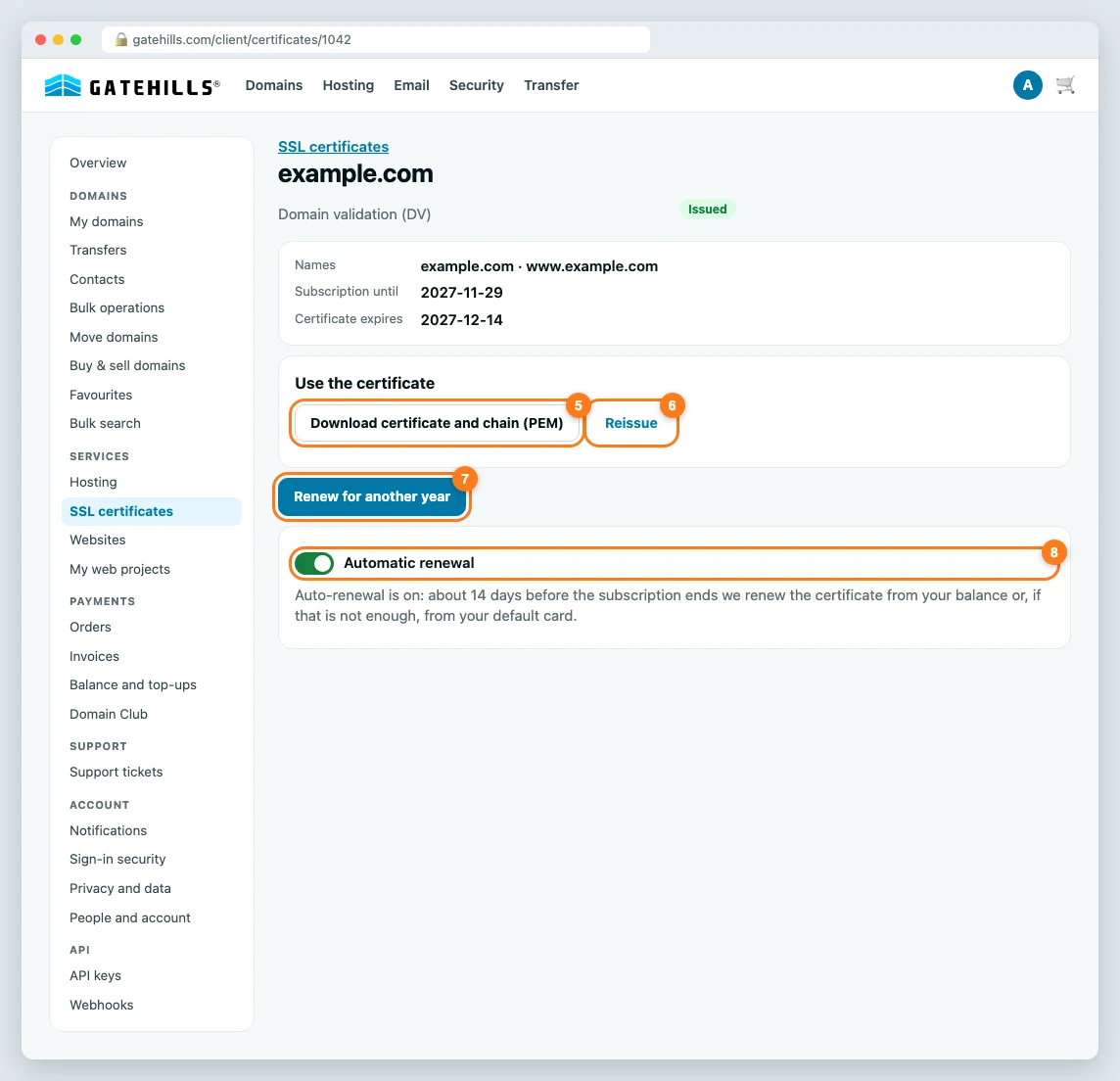
- On Gatehills hosting the certificate is installed automatically: the page says it is installed on your hosting and there is nothing else to do.
- On another server click Download certificate and chain (PEM) (5) and install the file on your server together with the private key you created with the CSR.
- Reissue (6) gives you a new certificate at no cost, for example if you lost the key or changed server. If you used your own CSR, paste the new one first.
- Renew for another year (7) adds the renewal to the cart. With Automatic renewal on (8), we renew it about 14 days before the subscription ends, from your balance or your default card.
The Timeline at the bottom lists every step: order paid, validation, issue, installation.
Which SSL certificate do I need: DV, OV or EV?
All three types use the same encryption. The difference is how much the certificate authority checks before it issues the certificate, and what the certificate shows about you. The rules for each level are set by the CA/Browser Forum, the body of certificate authorities and browser makers.
A wildcard certificate covers all first-level subdomains of one domain, such as www.example.com and shop.example.com. A multi-domain certificate covers a list of different names that you add during the setup.
| Type | What is checked | Good for |
|---|---|---|
| DV | Only that you control the domain | Blogs, landing pages, personal sites |
| OV | The domain and your company | Companies and online shops |
| EV | Highest level of company checks | Banks, large stores, institutions |
| Wildcard / multi-domain | Depends on the product | Many subdomains or several sites |
How long does the domain validation take?
The validation proves to the certificate authority that you control the domain. You choose the method when you set up the certificate. A DV certificate usually arrives within minutes of a successful validation. OV and EV certificates also need the company check by the provider, which usually takes a few working days.
| Method | Works with a wildcard | Done for you when |
|---|---|---|
| DNS record (CNAME) | Yes | The domain uses the Gatehills DNS |
| DNS record (TXT) | Yes | The domain uses the Gatehills DNS |
| File on the website | No | The site is on Gatehills hosting |
| Approval email | Yes | Never: you approve the email yourself |
How long does it take to get the certificate?
DV certificates usually arrive within minutes of the domain validation. OV and EV also need the company check by the provider, usually a few working days.
Do I need a paid certificate if I have Gatehills hosting?
Not for the padlock: hosting with a domain registered with us already gets a free certificate. Choose a paid one for your company name in the certificate, for a warranty or for names that are not on the hosting.
Can I use the certificate on a server outside Gatehills?
Yes. Choose I paste my own CSR, complete the validation and download the PEM file to install it on your server.
Is a reissue paid?
No, reissues during the subscription year are free.
Why can't I see the SSL certificates page?
In an account with several people you need the hosting function. Ask the primary user to give it to you. See people and account.
What happens if my SSL certificate expires?
Visitors see a browser security warning instead of your site. To avoid it, turn on Automatic renewal: we renew about 14 days before the subscription ends, from your balance or your default card. Otherwise click Renew for another year in time.
Related guides