
How to search for a domain name
- Domain search: type a name in the search box on the home page, or open “Domains” → “Register a domain”.
- Availability is checked live with each registry, with the first-year and the renewal price.
- Add a free name to the cart or save it with the heart. WHOIS privacy, SSL, DNS and forwarding are included free.
- If the name is taken, you can hire a broker, transfer it to us or look at similar names.
Domain search on Gatehills tells you in seconds if a name is free to register. Gatehills asks the registry of each extension live, then shows the status, the first-year price and the renewal price. You can search without an account; you sign in only to save favourites and to pay.
A domain search is a live check of domain availability: only the registry knows if a name is taken. Gatehills is the registrar, so the answer does not come from an old list. The page also compares the same name on other domain extensions, such as .net or .ae.
How does a domain search work on Gatehills?
Search for a domain and add it to the cart
- Type the name
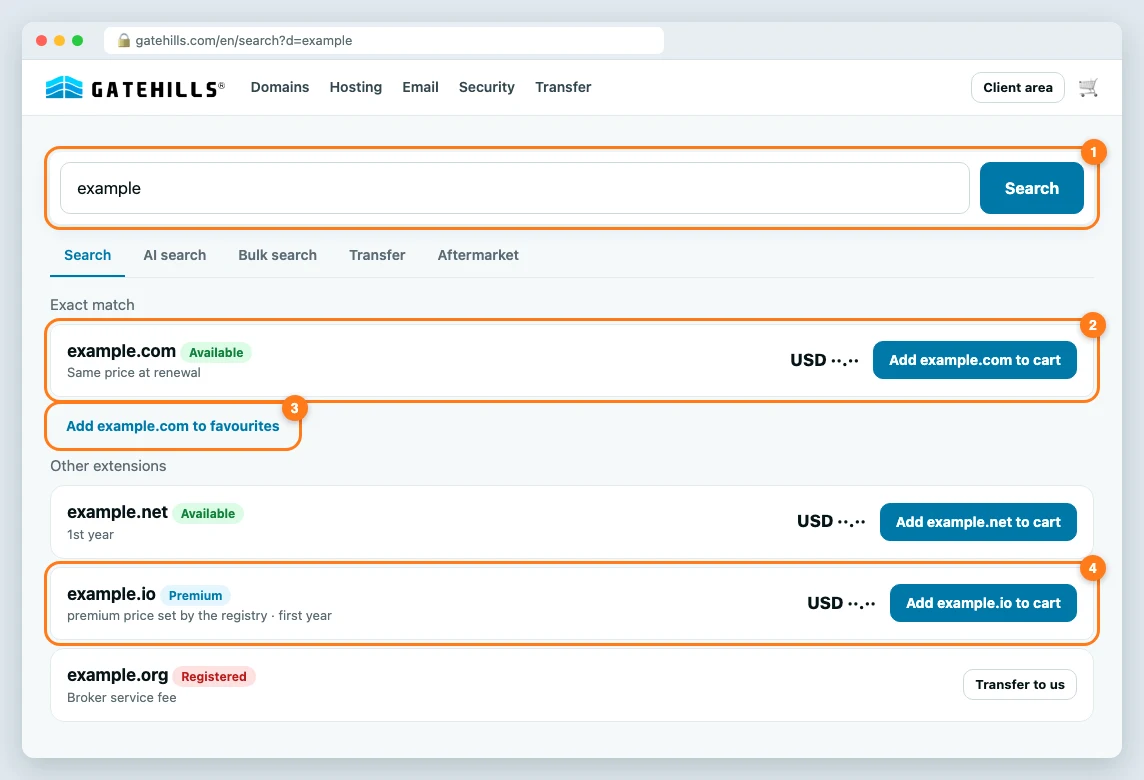
Write the name in the search box (1), with or without the extension (for example “example” or “example.com”), and click “Search”. If you click in the empty box you see your “Recent searches” and, when you are signed in, your “Favourites”.
- Look at the exact match
At the top, under “Exact match”, you see the name you typed. “Available” means you can register it now. Next to it you see the price of the first year and the renewal price, or “Same price at renewal”. While the registries answer, some names show “Checking…” for a moment.
- Compare the other extensions
Under “Other extensions” the same name is shown with other endings, such as .net or .ae. A “1st-year deal” badge means the first year is discounted: the renewal price is always shown. Some extensions must be registered for more than one year, for example “Minimum 2 years”.
- Add the name to the cart
Click the cart button (2) next to the name. The button turns into a tick (“In cart”) and your cart opens on the side. You can keep searching and add more names before you pay.
- Save it for later
Click the heart (3) to add the name to your “Favourites”. Favourites are saved in your account, so you are asked to sign in the first time.
- Premium names
A “Premium” badge (4) means the registry asks a higher price for that name. The price shown is the registry's premium price for the first year; it is checked again before you pay.
When the name is already registered
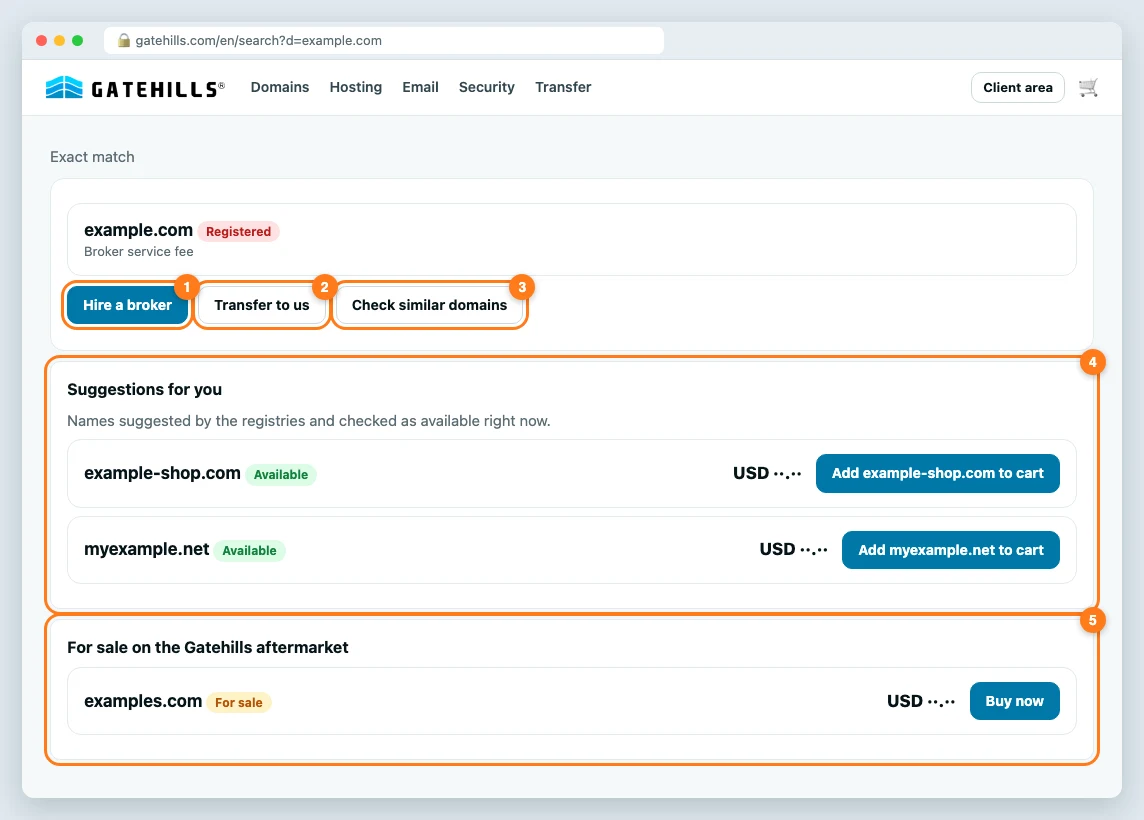
A name marked Registered belongs to someone else, but you still have options:
- Hire a broker (1): our broker contacts the current owner anonymously and negotiates the purchase for you. The Broker service fee shown covers the service; the price of the domain is agreed separately.
- Transfer to us (2): if the domain is yours at another registrar, add the transfer to the cart. With Transfer: check and enter the code you can first check that it can be moved.
- Check similar domains (3): variants of the name on the same extension.
- Suggestions for you (4): names suggested by the registries and checked as available right now.
- For sale on the Gatehills aftermarket (5): matching names that their owners sell on our marketplace, with Buy now or other options.
What does each result mean?
| Status | What it means | What to do |
|---|---|---|
| Available | Nobody owns the name: you can register it now | Add it to the cart |
| Registered | Someone else owns the name | Hire a broker, transfer it if it is yours, or look at similar names |
| Premium | The registry asks a higher price for this name | Check the premium price before you add it |
| 1st-year deal | The first year is discounted; the renewal is at the normal price | Compare the renewal price |
| Checking… | The registry has not answered yet | Wait a moment |
| Check unavailable, try again | The registry did not answer in time | Click the badge to check again |
Which characters can a domain name contain?
A domain name is made of parts separated by dots, such as example and com. Each part can have up to 63 characters: letters, digits and hyphens. It cannot start or end with a hyphen (RFC 1035). Names in Arabic, Chinese or Cyrillic are internationalised domain names (IDN): the search accepts them as you type them. Upper and lower case make no difference: Example.com and example.com are the same domain.
How long does a domain availability check take?
Usually a few seconds. While the registries answer, some names show Checking… for a moment. If a registry does not answer in time, the name shows Check unavailable, try again: click the badge to check again.
Availability is checked again when you pay. A name that is free today can be registered by someone else before your payment: favourites and the cart do not reserve it.
Is the availability real?
Yes. Each name is checked live with its registry. It is checked again when you pay, because someone else may register it in the meantime.
Do I need an account to search?
No. You can search freely. You sign in only to save favourites and to complete the purchase.
Do the prices include VAT?
It depends on your country: the note under the results says whether VAT is included or added in the cart. For generic domains such as .com, the ICANN fee is added at checkout as a separate line.
What is included with the domain?
WHOIS privacy, SSL, DNS and email forwarding come at no cost: see the Included free box next to the results.
Can I check many names at once?
Yes. Use bulk search for a list of names, or AI search to get name ideas from a description of your business.
Related guides