
How to get a free SSL certificate for your domain
- A free SSL certificate covers your domain and all its subdomains (“example.com” and “*.example.com”).
- You request it from “My domains” → your domain → “SSL”, or from “SSL certificates” → “Free certificate”.
- It is free, with no order. It renews automatically 30 days before it expires.
- It needs the Gatehills name servers (or those of your Gatehills cPanel hosting). On our hosting it is installed by itself.
A free SSL certificate from Gatehills encrypts your site with HTTPS at no cost. It covers the domain and all its subdomains, renews by itself 30 days before expiry and installs itself on Gatehills hosting. You request it in the client area, in the SSL tab of your domain. The domain must use the Gatehills name servers.
The free certificate is issued by Let’s Encrypt or Google Trust Services. To prove the domain is yours, Gatehills publishes a DNS record for you: that is why the domain must use our name servers. You do not have to copy codes or upload files, and you never have to remember the renewal.
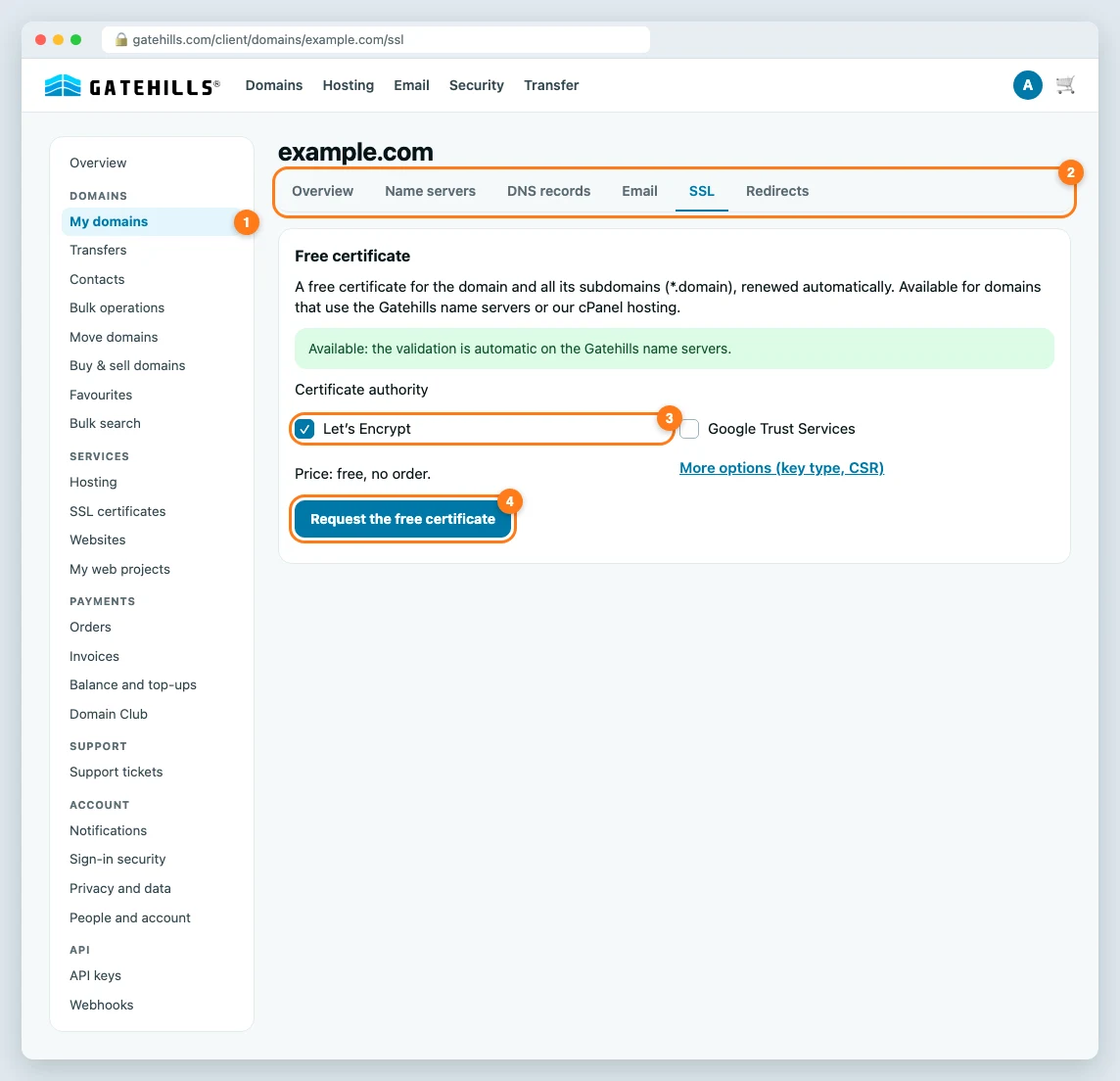
Request a free certificate
- Open your domain
Sign in to the client area, choose “My domains” in the menu (1) and click the domain name.
- Go to the SSL tab
Click the “SSL” tab (2). If the box says the validation is automatic, the domain is ready. If it says the domain uses external DNS, click “Switch to the Gatehills name servers” first.
- Choose the certificate authority
Under “Certificate authority” (3) leave “Let’s Encrypt” or choose “Google Trust Services”. Both are trusted by all browsers.
- Request it
Click “Request the free certificate” (4). The status goes from “Queued” to “Being validated” and then “Issued”, usually within a few minutes.
- Use it
On Gatehills cPanel hosting the certificate is installed automatically. For another server open the certificate and download it (see below).
More options: key type and your own CSR
Click More options (key type, CSR) in the SSL tab, or Free certificate on the SSL certificates page. Under Private key you can choose:
- Created by Gatehills: ECDSA P-256 (recommended);
- Created by Gatehills: RSA 2048 (for older servers);
- I paste my CSR (the key stays with me): the CSR must contain exactly the domain and
*.domain. With your own CSR we cannot install the certificate on the hosting.
The page also shows how many active free certificates an account can have.
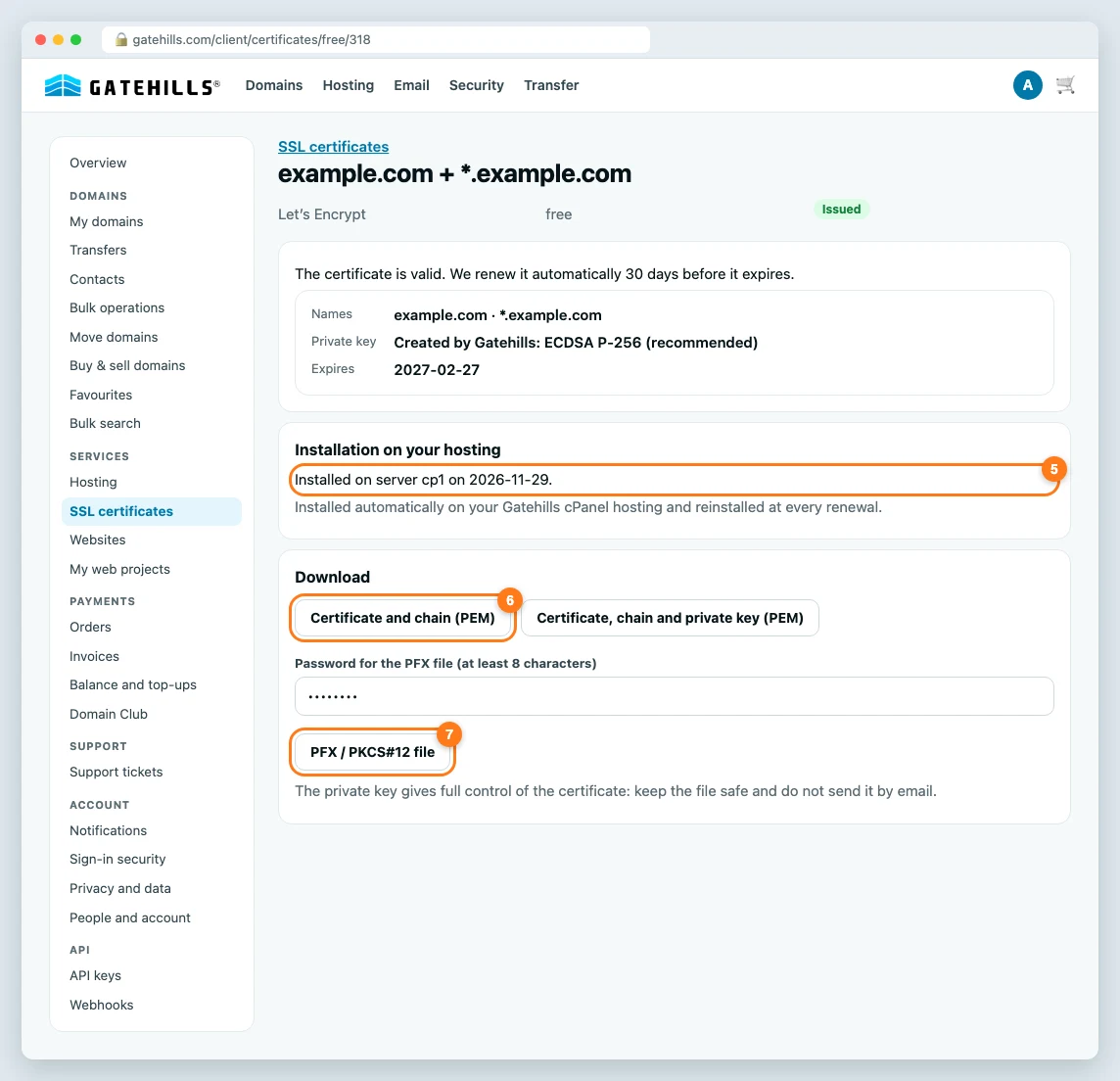
How is the free SSL certificate installed and renewed?
Open the certificate from SSL certificates (or Open the certificate in the SSL tab).
- Installation on your hosting (5) shows on which server it is installed. It is reinstalled at every renewal. If something went wrong, click Retry the installation.
- In Download you get the Certificate and chain (PEM) (6), the version with the private key, or a PFX / PKCS#12 file (7) protected by a password of at least 8 characters. Keep the private key safe and do not send it by email.
- Renewal is automatic 30 days before expiry. While it renews, the current certificate stays valid.
- History lists every step: request, validation, issue, installation, renewal.
What do the certificate statuses mean?
| Status | What it means |
|---|---|
| Queued | We are preparing the request with the certificate authority. |
| Being validated | We published a DNS record that proves the domain is yours: it usually takes a few minutes. |
| Issued | The certificate is valid. We renew it automatically 30 days before it expires. |
| Renewing | Renewal in progress: the current certificate stays valid in the meantime. |
| Renewal failing | The renewal has not succeeded yet and we keep trying. The current certificate stays valid until it expires. |
| Error | The certificate could not be issued. Check the reason shown and try again. |
| Revoked | The certificate has been revoked and is no longer trusted. |
| Expired | The certificate has expired. You can request a new one. |
Free or paid SSL certificate: which one do I need?
Both encrypt the connection in the same way. Let’s Encrypt and Google Trust Services are public certificate authorities trusted by all browsers. They issue certificates automatically with the ACME protocol: see how Let’s Encrypt works.
The free certificate is always a wildcard for one domain, validated through DNS. Choose a paid certificate when you need your company name in it, a warranty, or a domain that does not use our name servers.
| Feature | Free certificate | Paid certificate |
|---|---|---|
| Price | Free, renewals included | Yearly price shown on the page |
| Names covered | The domain and *.domain | One domain, a wildcard or several names, depending on the product |
| Validation | DNS record published by Gatehills | DV, OV or EV, with the method you choose |
| Company name in the certificate | No | Yes, with OV and EV |
| Name servers | Gatehills, or those of your Gatehills hosting | Any |
| Renewal | Automatic, 30 days before expiry | Yearly, with optional automatic renewal |
Is it really free?
Yes. There is no order and no payment, and the renewals are free too.
Does it cover www and the other subdomains?
Yes. Every free certificate covers the domain and all its first-level subdomains, such as www.example.com or shop.example.com.
What happens if the renewal fails?
The status becomes Renewal failing and we keep trying automatically. The current certificate stays valid until it expires. You can also click Try again.
I revoked the automatic certificate of my hosting. How do I get it back?
In the domain’s SSL tab click Turn the automatic certificate back on: a new free certificate is requested and installed.
When should I choose a paid certificate instead?
When you want your company name in the certificate (OV, EV), a warranty, or the domain does not use our name servers. See paid SSL certificates.
Related guides