
How to manage the DNS records of your domain
- DNS records tell the internet where your website, email and other services live.
- You manage them in “My domains” → your domain → “DNS records”.
- Changes are published automatically, usually within a few minutes. The DNS service is free.
- It works when the domain uses the Gatehills name servers; with hosting, the zone is managed in the hosting panel.
On Gatehills you add, edit and delete the records of your domain in the client area, on the DNS records tab of the domain. The service is free with every domain that uses the Gatehills name servers. A saved change reaches our name servers within a few minutes. The rest of the internet sees it once the old TTL expires.
What are DNS records?
Every domain has a DNS zone: a list of records that point the name to a server. Each record has a name, a type, a value and a TTL. For example, an A record sends example.com to the IP address of your website. An MX record tells other servers where to deliver your email.
If your web designer, email provider or another service asks you to "add a DNS record", this is the page to use. You do not need technical knowledge: you copy the values they give you into the form. The record types are defined in RFC 1035, the DNS standard.
Add a DNS record
- Open your domain
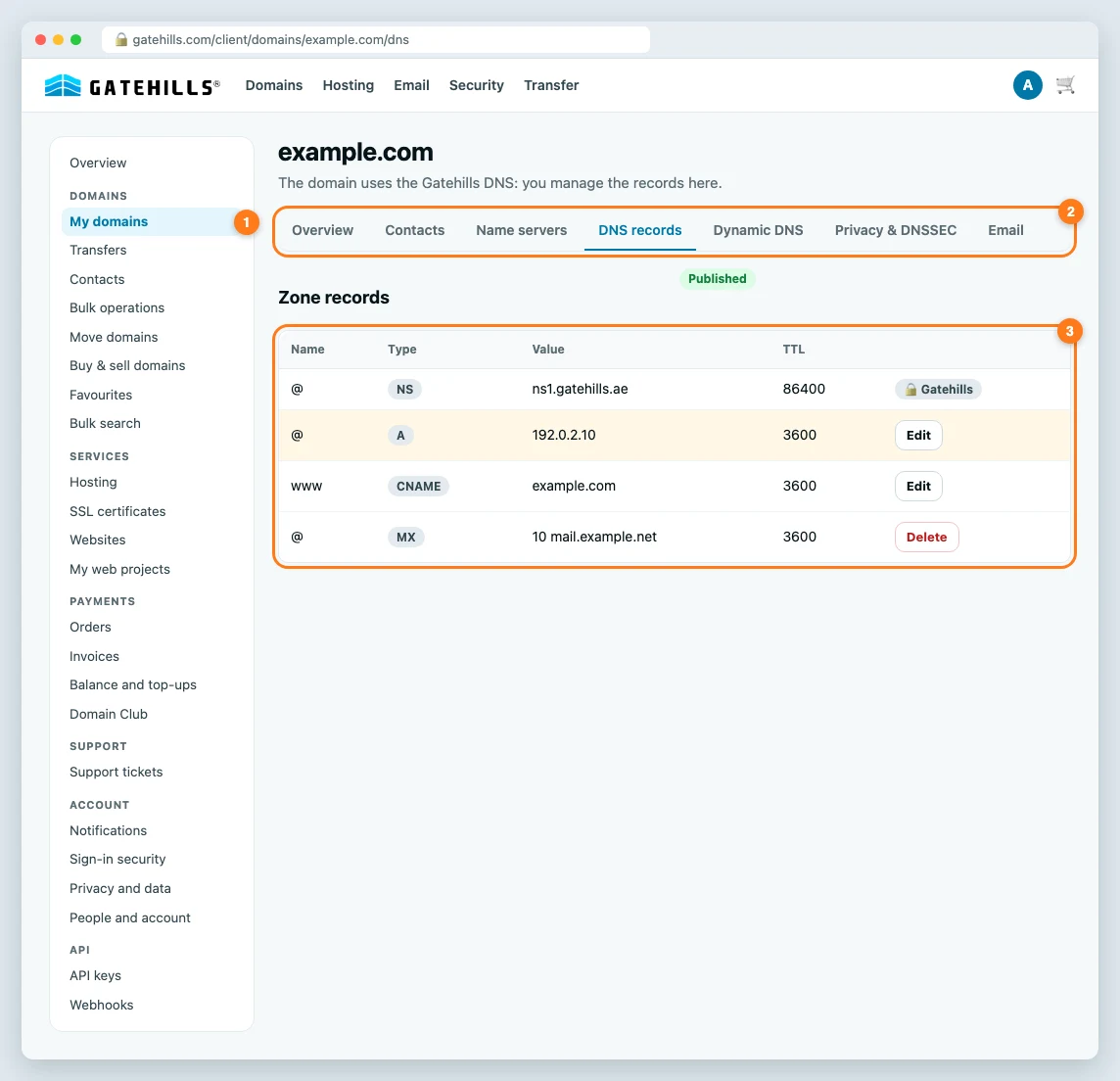
Sign in to the client area, choose “My domains” in the menu (1) and click the domain name.
- Go to the DNS records tab
Click the “DNS records” tab (2). You see the “Zone records” (3) and, at the top, whether the latest changes are “Published”.
- Choose the type
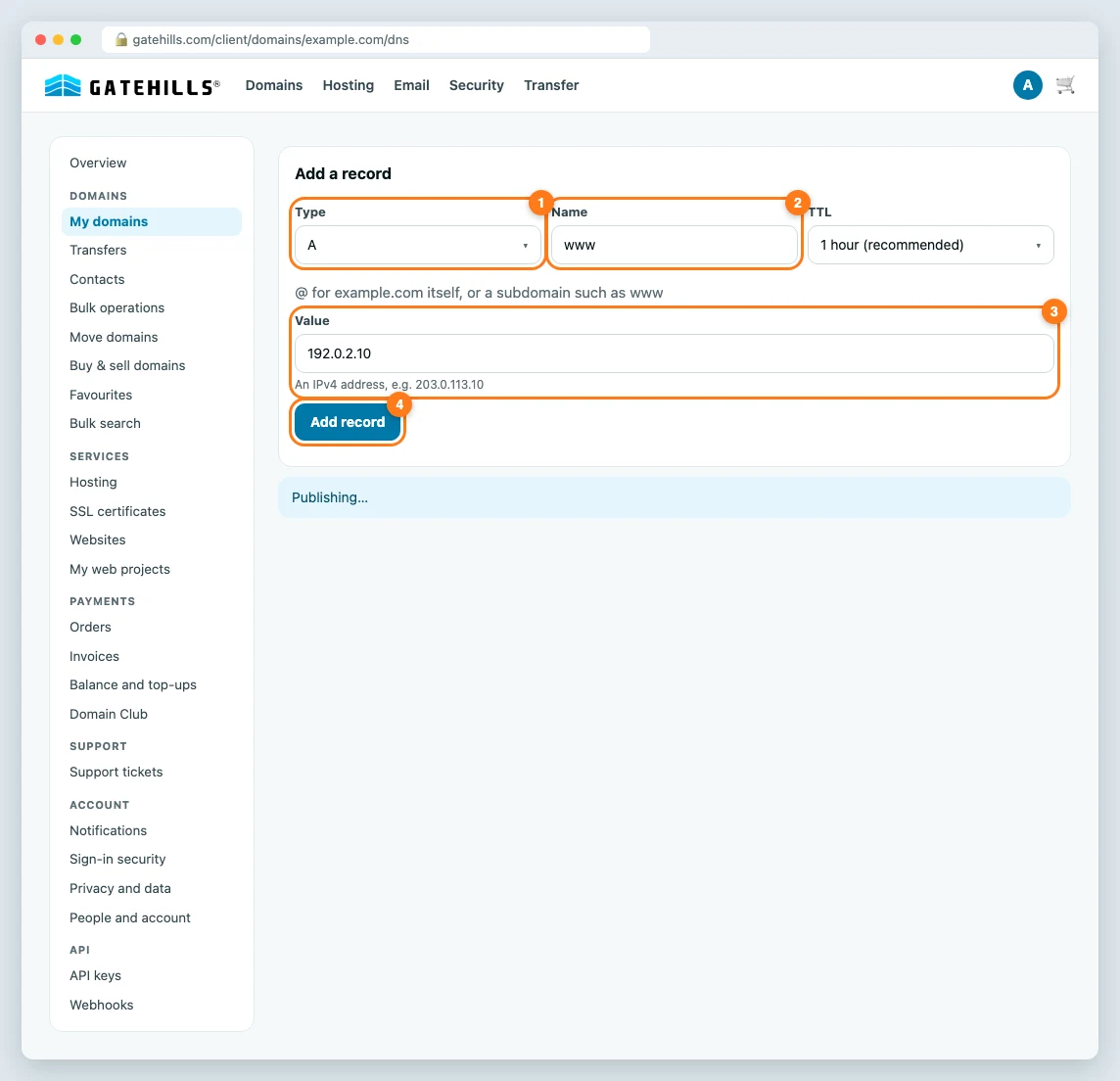
In the “Add a record” box, choose the “Type”: A (IPv4 address), AAAA (IPv6 address), CNAME (alias to another name), MX (mail server), TXT (text, for example SPF or a verification code), SRV, CAA or NS.
- Write the name
In “Name” write “@” for the domain itself (example.com) or only the subdomain part, for example “www” or “shop”. Do not write the full domain: Gatehills adds it for you.
- Write the value and the TTL
In “Value” paste what your provider gave you (an IP address, a server name, a text). For MX records fill in “Priority”; for SRV records also “Weight” and “Port”. Leave the TTL on “1 hour (recommended)” unless you were told otherwise.
- Save
Click “Add record”. The status shows “Publishing…” and then “Published”: the record is live on our name servers. Other networks may take up to the TTL to see the change.
Edit or delete a record
In the list of zone records click Edit next to the record. The form fills in with its data: change what you need and click Save. To remove a record click Delete and confirm.
Records marked 🔒 Gatehills are managed by us. They keep the domain on our name servers and cannot be changed.
Which DNS record type do I need?
| Type | Used for | Example value |
|---|---|---|
| A | Point the domain to a server (IPv4) | 192.0.2.10 |
| AAAA | Point the domain to a server (IPv6) | 2001:db8::10 |
| CNAME | Make a subdomain an alias of another name | example.net |
| MX | Receive email | 10 mail.example.net |
| TXT | SPF, DKIM, site verification | v=spf1 include:example.net ~all |
| SRV | Services such as SIP, with priority, weight and port | _sip._tcp → sip.example.net |
| CAA | Allow only some authorities to issue SSL certificates | 0 issue "letsencrypt.org" |
| NS | Delegate a subdomain to other name servers | ns1.example.net |
What is an MX record?
An MX record names the server that receives email for your domain. The Priority decides the order: the lowest number is tried first. If you have two mail servers, give the main one 10 and the backup 20. A domain without MX records cannot receive email, unless you use email forwarding.
How long does a DNS change take?
Our name servers are updated within a few minutes of saving. Other networks keep a copy of the old answer for the TTL (time to live) of the record. So the worst case is the TTL you had before the change.
You can choose a TTL of 5 minutes, 15 minutes, 30 minutes, 1 hour, 4 hours, 12 hours or 1 day. Any TTL must be between 60 and 86,400 seconds. Before a planned move, lower the TTL to 5 minutes a day in advance. After the move, set it back to 1 hour.
| Status | What it means |
|---|---|
| Published | All your changes are live on the Gatehills name servers. |
| Publishing… | The change is saved and is being sent to the name servers. |
| Publication delayed | The first attempt failed. Your changes are saved and we retry automatically. |
Limits and special cases
- A zone can hold up to 500 records.
- If the domain expires, its DNS zone is suspended until renewal. Your records come back automatically when you renew.
- Team members without the DNS function see the records but cannot change them.
- Tools such as Set up email, email forwarding and redirects add the records they need for you. They do not change records you added yourself.
How long does a DNS change take?
Our name servers are updated within a few minutes (the status changes from Publishing… to Published). Other networks may keep the old value until the TTL expires, at most the TTL you chose.
What does "Publication delayed" mean?
Publication did not succeed at the first attempt and is retried automatically. If it stays for more than an hour, open a support ticket.
I want to set up email with Google Workspace or Microsoft 365. Which records do I add?
You do not need to type them: use Set up email on the same page, which adds the right records for you. See how to set up email with Google or Microsoft.
Can someone in my team edit the DNS?
Yes, if the primary user gives them the DNS function. Without it they see the records but cannot change them. See people and account.
Is the DNS service paid?
No, the Gatehills DNS is included with every domain registered with us.
Can I keep my DNS records if I change name servers?
Records are not copied between providers. Before you switch, recreate them at the new provider, or in the DNS records tab if you move to the Gatehills DNS. See change the name servers.