
How to monitor the dark web for your company’s email addresses
- Dark web monitoring on Gatehills checks your company domain and chosen email addresses against known data breaches every day.
- When an address turns up you see the breach, its date, the exposed data, a risk score from 0 to 100 and the steps to take.
- Only domains and addresses you prove are yours are searched: a TXT record or a domain in your account, a confirmation link for other addresses.
- You get an email and a bell notification, a monthly report and a read-only link to share it; plans are on the dark web monitoring page, with a free trial.
Dark web monitoring tells you when the email addresses of your business show up in a data breach, so you can change passwords before criminals use them. On Gatehills you add your company domain and the addresses that matter, and we search for them every day.
This guide is for business owners and the people who look after IT. You need a Gatehills customer account and the permission to manage domains; starting the trial or changing the plan needs the permission to pay.
What is dark web monitoring?
The dark web is the part of the internet where stolen data is sold and swapped. When a website you used is breached, the email addresses, passwords and personal data taken often end up there. Dark web monitoring compares your addresses with collections of breaches that have become public and alerts you when there is a match.
Gatehills shows which kind of data leaked, never the leaked passwords themselves. A monitoring service cannot see every closed criminal forum: an empty list means nothing was found in the sources we search, not that your data is safe.
Set up dark web monitoring
- Open Dark web
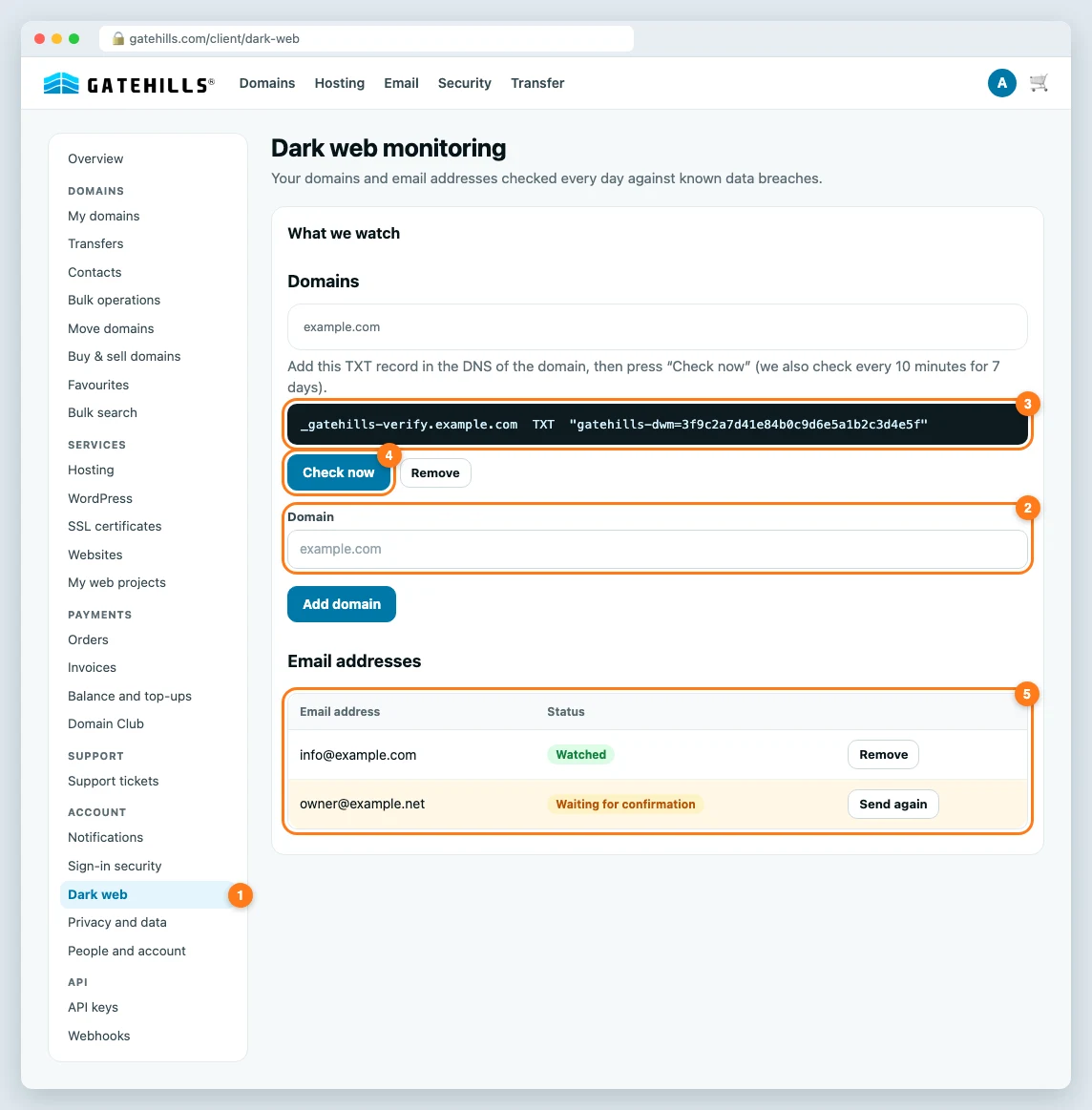
In your account choose “Dark web” in the menu (1). Without a subscription the page offers the free trial and the plans.
- Start the trial or buy a plan
Choose the plan and whether you will pay monthly or yearly afterwards, then press “Start the free trial”. You can also buy a plan from the public page, with the usual cart and checkout.
- Add your domain
Type the domain in “Domain” (2) and press “Add domain”. A domain registered in your Gatehills account is verified at once.
- Publish the TXT record
For a domain registered elsewhere, add the TXT record shown on the page (3) at your DNS provider, then press “Check now” (4).
- Add email addresses
Add the addresses to watch (5). Addresses on a verified domain are watched immediately; others receive an email and must click “Yes, watch this address”.
- Wait for the first search
The first search runs within 15 minutes. Results appear in “Breaches found”, and you get an email and a bell notification for new ones.
How do I verify my domain for dark web monitoring?
Breach results are personal data, so we only show them to whoever controls the domain or the address. A domain in your account counts as verified straight away. For any other domain the page gives you a TXT record named _gatehills-verify.<your domain> with a value that starts with gatehills-dwm=.
We read the record from two public DNS resolvers: when both see it, the domain is verified. We check by ourselves every 10 minutes for 7 days; after that the verification expires and you can try again. A verified domain can be watched by one Gatehills account only.
| What | How it is verified | When |
|---|---|---|
| Domain in your Gatehills account | Automatically | At once |
| Domain registered elsewhere | TXT record seen by two DNS resolvers | Minutes after you publish it, up to 7 days |
| Address on a verified domain | Through the domain | At once |
| Any other address | Link emailed to the address, valid 7 days | When its owner clicks it |
What does a dark web monitoring result show?
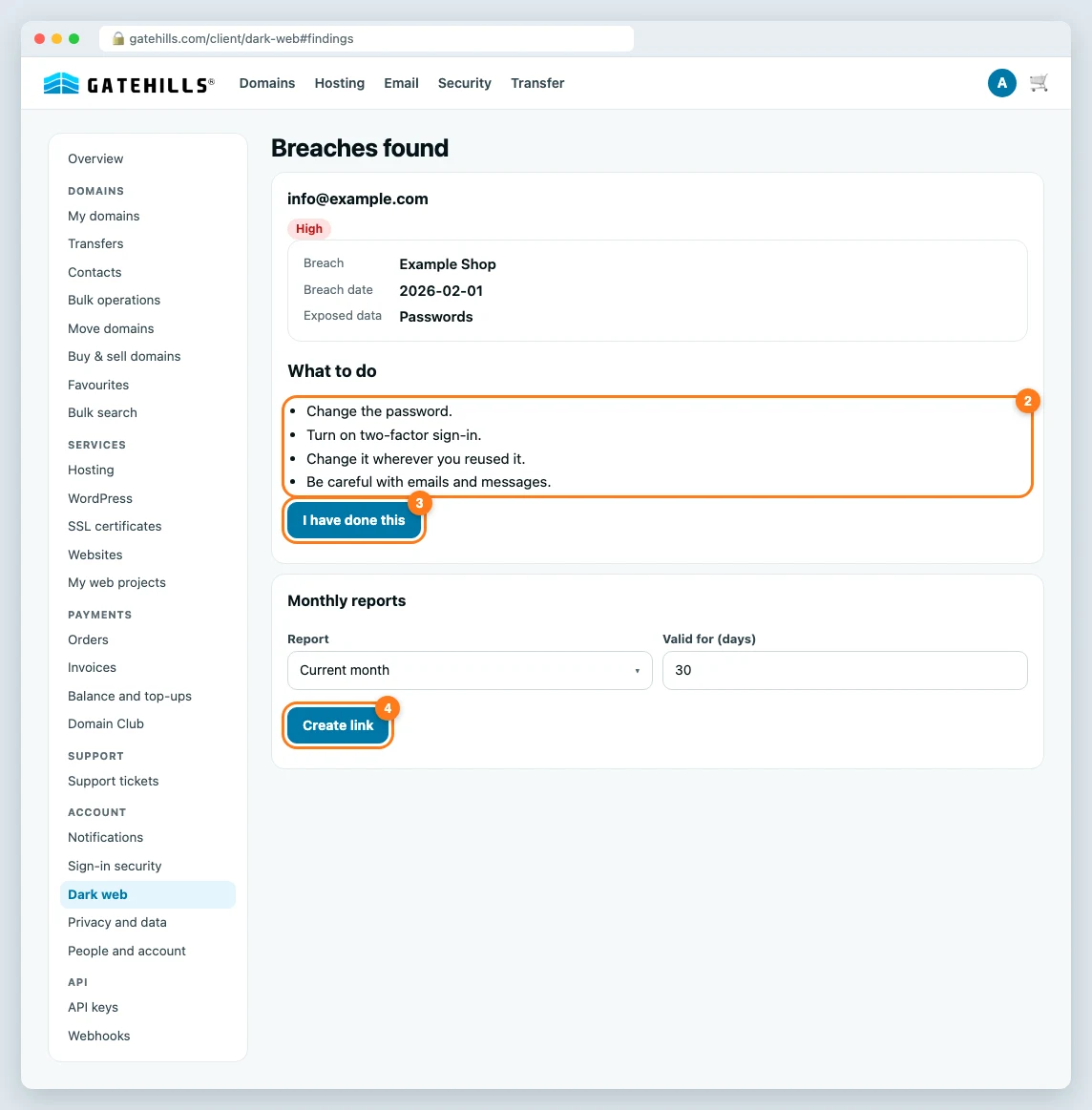
Each result in Breaches found shows the address, the breach it comes from, the breach date, the day we found it and the exposed data, for example passwords, phone numbers or card data. The risk score goes from 0 to 100 and depends on what leaked, how recent the breach is and whether the data was stolen by malware on a device.
Results are sorted with the most serious first. Addresses are partly hidden in emails and shared reports.
| Level | Score | What it usually means |
|---|---|---|
| High | 70 to 100 | Passwords, cards or sign-in tokens, or a recent breach: act today |
| Medium | 40 to 69 | Personal data such as phone numbers or older passwords |
| Low | 0 to 39 | Only the address or little else, or an old or unverified source |
What should I do when an address is found?
Open What to do (2) under the result: the steps depend on the exposed data. The most common are:
- change the password on the breached service and anywhere you reused it;
- turn on two-factor sign-in, which stops a stolen password on its own (see the CISA advice on MFA);
- if the data came from malware, scan the device before changing passwords and sign out of every session;
- check cards and bank accounts when payment data leaked, and expect phishing that mentions the breach.
When you have finished, press I have done this (3). The result moves to the handled ones and you can reopen it.
Monthly reports and shareable links
On the first day of each month Gatehills saves a report of the month before: new results, open ones, high risks and the full list with partly hidden addresses. You find the history in Monthly reports.
To send a report to your IT company or accountant, choose the month or the current month, the number of days and press Create link (4). Copy the link at once: we show it only one time. Anyone with the link can read that report without access to your account; you can revoke it at any moment and see how many times it was opened.
Free trial, plans and renewal
Plans differ only in the number of domains and email addresses; prices are on the dark web monitoring page. The free trial is available once per account. At the end of the trial, if automatic renewal is on, the first period is paid from your balance or saved card; three days before, we remind you of the price.
Renewal works like the other Gatehills services: from your account balance, then your saved card. Turn off automatic renewal at any time; monitoring continues until the end date. If you change to a smaller plan, the domains and addresses added first stay watched and the others are paused.
Do you show or store the leaked passwords?
No. We show that a password was part of the breach and what to do, but we never receive, store or display the password itself.
Which data source do you use?
Collections of breaches that have been made public and checked by security researchers. When the source asks for credit, its name appears under the results and in the reports.
Can I watch an address that is not on my domain?
Yes, if its owner confirms it with the link we email to them. Without the confirmation the address is not searched.
How often do you search?
Every domain and address is searched at least once a day. With Search again now you can ask for a new search, at most once an hour.
What happens if I cancel?
Searches continue until the end of the paid period, then stop. Your domains, results and reports stay in your account if you come back.
Related guides