
How to follow and manage your orders
- Your order status is in “Orders”: every purchase with number, date, status and total.
- An order “Awaiting payment” can be paid by card or from your balance, or cancelled.
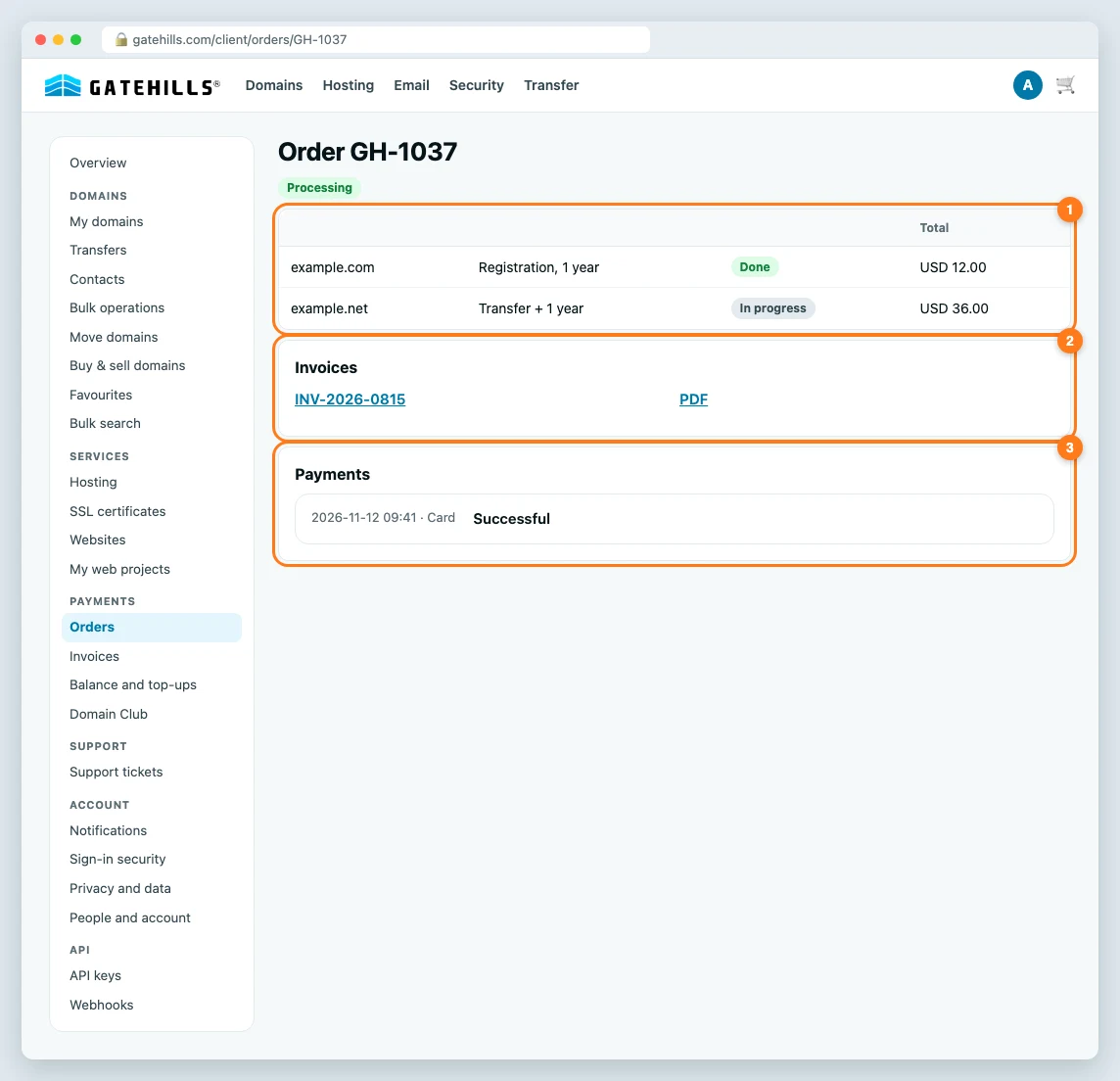
- The order page shows the activation of each item, the invoices and the payment attempts.
- Transfers waiting for an authorization code can be completed from the order page.
Gatehills shows the order status of every purchase on the Orders page of the client area, under Payments. There you pay or cancel an unpaid order, follow the activation of each item and download the invoices. An order groups what you buy at once: domains, renewals, transfers, hosting, SSL certificates, Domain Club and balance top-ups.
What is an order status? It is the label that tells you where the order stands: waiting for payment, being activated, completed, cancelled or refunded. Each item of the order also has its own status, so you see exactly which domain or service is ready.
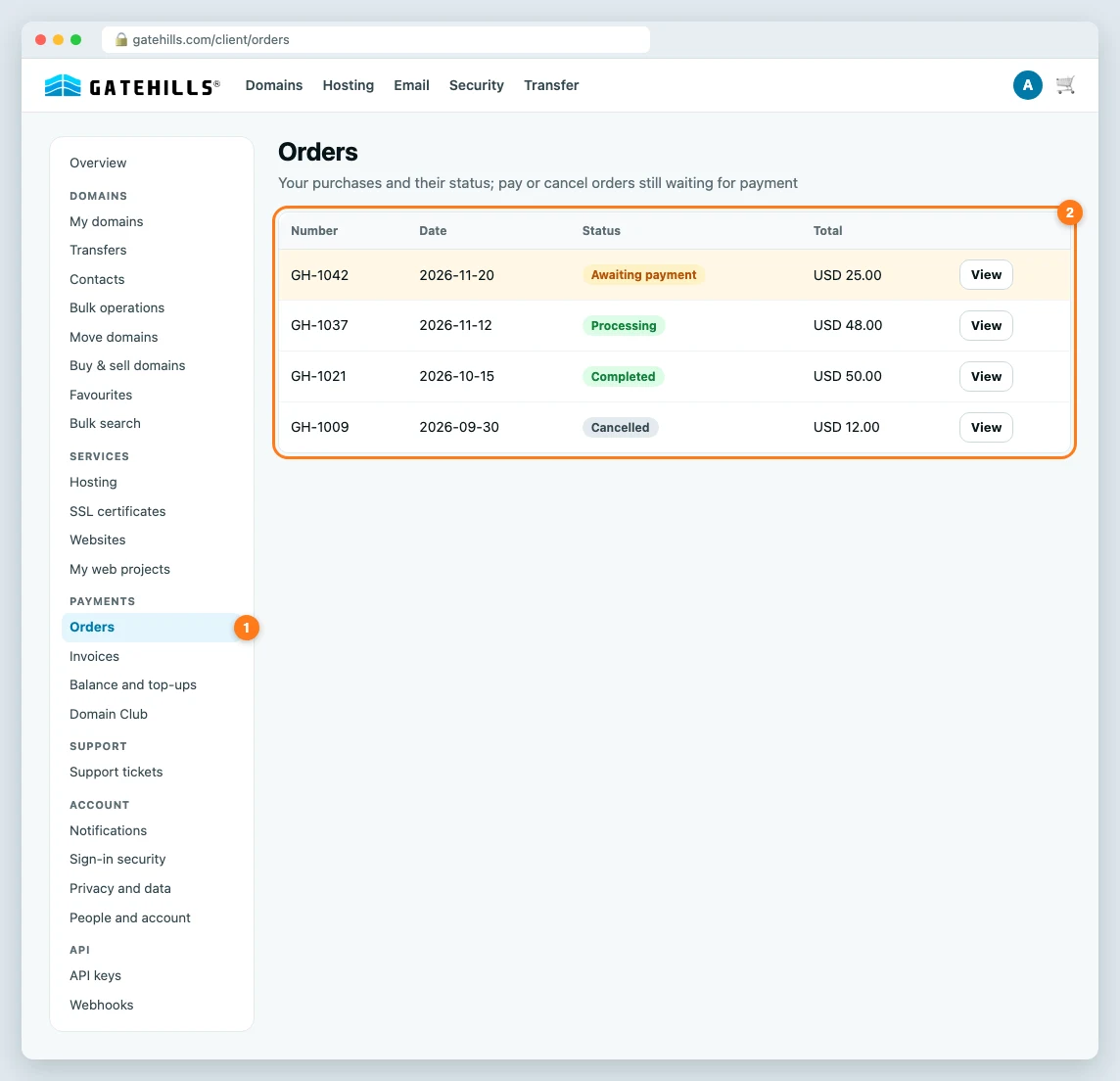
Open, pay or cancel an order
- Open the list
In the client area menu, under “Payments”, click “Orders” (1). Each row shows “Number”, “Date”, “Status” and “Total” (2). Balance top-ups are marked “Balance top-up”.
- Open an order
Click “View” next to the order. You see each item with its own status, the total with VAT and the date and method of payment.
- Pay an unpaid order
If the status is “Awaiting payment”, the “Payment” box appears at the bottom. Click “Pay … by card” or “Pay … from balance”. Before charging, we check again that new domains are still available.
- Or cancel it
If you no longer want it, click “Cancel this order” under the payment box. The status changes to “Cancelled” and nothing is charged.
- Follow the activation
After payment, each item goes from “Queued” to “In progress” and “Done”. The thank-you page “Payment received” updates by itself while activation is running.
What does each order status mean?
| Status | What it means |
|---|---|
| Awaiting payment | The order is created but not paid. You can pay or cancel it. |
| Paid | We received the payment; activation is about to start. |
| Processing | We are activating the items (registration, transfer, renewal…). |
| Completed | All items are active. |
| Partly completed | Some items are active, others did not go through: see the item status. |
| Not completed | Activation failed. Check the items; if needed, contact support. |
| Cancelled | The order was cancelled before payment. |
| Refunded | The amount was refunded. |
What does the status of each item mean?
Inside an order, every item has its own status. It changes during activation, so you can follow it on the order page.
- Queued: the item is waiting its turn.
- In progress: we are working on it, for example the registry is processing a transfer.
- Done: the item is active.
- Not completed: the item did not go through. The order then shows Partly completed or Not completed.
- Refunded: the amount of that item was refunded.
Transfers that need the authorization code
If a transfer is waiting for the code, the order page shows the box Authorization code for followed by the domain. Paste the code you got from your current registrar in Authorization code and click Start the transfer. If the registry refuses the code, unlock the domain at your current registrar and enter a new code. See transfer a domain to Gatehills.
How long does it take to activate an order?
Activation starts as soon as the payment is confirmed. The order status moves from Paid to Processing, and the thank-you page updates by itself. Gatehills also sends you a confirmation email.
Registrations and renewals are sent to the registry right away. A transfer takes longer: it stays In progress until your current registrar and the registry complete it. If an item ends as Not completed, check the order page first, then contact support if needed.
What happens if the payment of an unpaid order fails?
The Payments box of the order lists every payment attempt with its method (card or balance) and result: Started, Waiting for confirmation, Successful, Declined, Cancelled or Under review.
A declined or cancelled attempt charges nothing. The unpaid order stays Awaiting payment, so you can try again with another card or from your balance. Before charging, Gatehills checks again that new domains in the order are still available. Aftermarket domains are checked too. If a name is no longer free, the page tells you and nothing is charged.
Which items can an order contain?
An order can contain one or more of these items, each with its own line and price:
- Registration of a new domain, for one or more years.
- Transfer + 1 year and Restore + 1 year.
- Renewal of domains, hosting, SSL certificates and Domain Club.
- Hosting, websites and SSL certificates.
- Aftermarket domain purchase, Domain lease-to-own payment and Broker service.
- Balance top-up, shown as a separate kind of order in the list.
Why is there an order I did not create?
Automatic renewals create a renewal order. If your balance and card could not pay it, it stays Awaiting payment and you receive an email with a link to pay it.
What does Refund awaiting approval mean?
A refund has been proposed for the order (for example an item that could not be activated) and is waiting for approval. When it is done, the order shows the refunded amount.
Where is the invoice of my order?
On the order page, in the Invoices box, with a link to the PDF. All invoices are also in Invoices. See invoices.
I bought hosting or a website. What now?
The paid order shows Next steps with Open the setup for hosting or Open the editor for the website.
Why can I not pay an order created in a shop?
If a shop created the order and you agreed to pay by bank transfer, the order page shows Payment awaiting bank transfer: please contact the shop. In that case you cannot pay or cancel it online: the shop follows the payment.
I paid from a balance in another currency. Where do I see the rate?
On the order page. It shows the amount taken from your balance, the exchange rate used and its date.