
How the Domain Club works: join, change level or cancel
- The Gatehills Domain Club is a yearly membership that lowers your prices on domain registrations, renewals and transfers.
- You choose a level (Basic, Premium or Pro) on the public page and click “Join the club”: the membership goes to the cart.
- You manage it in the client area under “My club”: level, renewal date, savings, change of level and cancellation.
- It renews every year from your balance or your saved card; you can cancel automatic renewal at any time.
What is the Domain Club?
The Domain Club is a paid yearly membership of Gatehills. While it is active, your account pays club prices on registrations, renewals and transfers of every extension. Premium names are excluded. You join from the public club page and manage the membership in the client area.
The club is for private and business customers who manage several domains, such as companies protecting their brands, agencies and domain investors. Club prices apply everywhere on your account: search, cart, checkout, automatic renewals, the API and the Gatehills app. The yearly price of each level is shown on the page, before VAT.
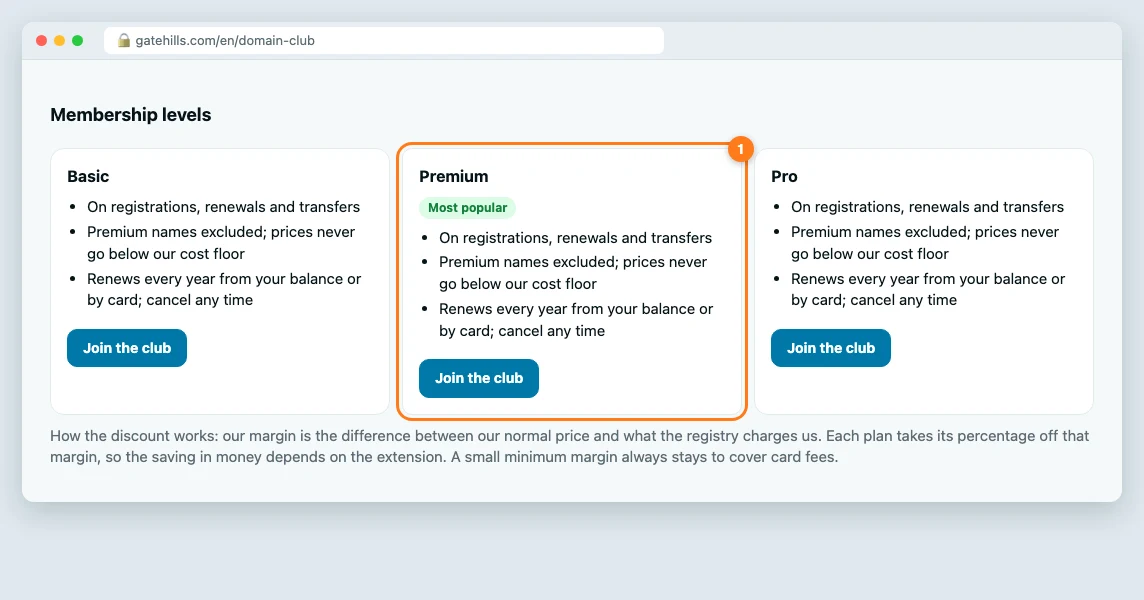
Join the club
- Open the club page
In the website menu choose “Domain Club”. The page explains “How it works” and, with “How much would you save?”, estimates your yearly saving based on how many domains you renew.
- Compare the levels
In “Membership levels” each level shows its yearly price and its discount. The table “Normal price and club price” shows the prices of the most popular extensions with and without the club.
- Join
Click “Join the club” (1) on the level you want. The membership is added to your cart.
- Pay
Complete the checkout and pay by card or from your balance. Club prices apply to your account as soon as the payment is confirmed.
How much does a domain membership save?
The saving depends on the level and on the extension. Each level takes a fixed percentage off our margin. Our margin is the difference between our normal price and what the registry charges us. So the domain discount in money is larger on extensions with a larger margin.
Three rules always apply:
- A club price never goes below the registry cost plus a small margin that covers card fees.
- The club never raises a price: if the normal price is already lower, you keep it.
- Premium names are excluded from club prices.
The calculator How much would you save? shows the yearly saving on renewals, already net of the membership fee. Move the slider to the number of domains you renew each year and choose your main extension. The calculator also tells you from how many domains a level is worth it. The comparison table covers popular extensions such as .com, .net, .org, .ae, .io and .ai.
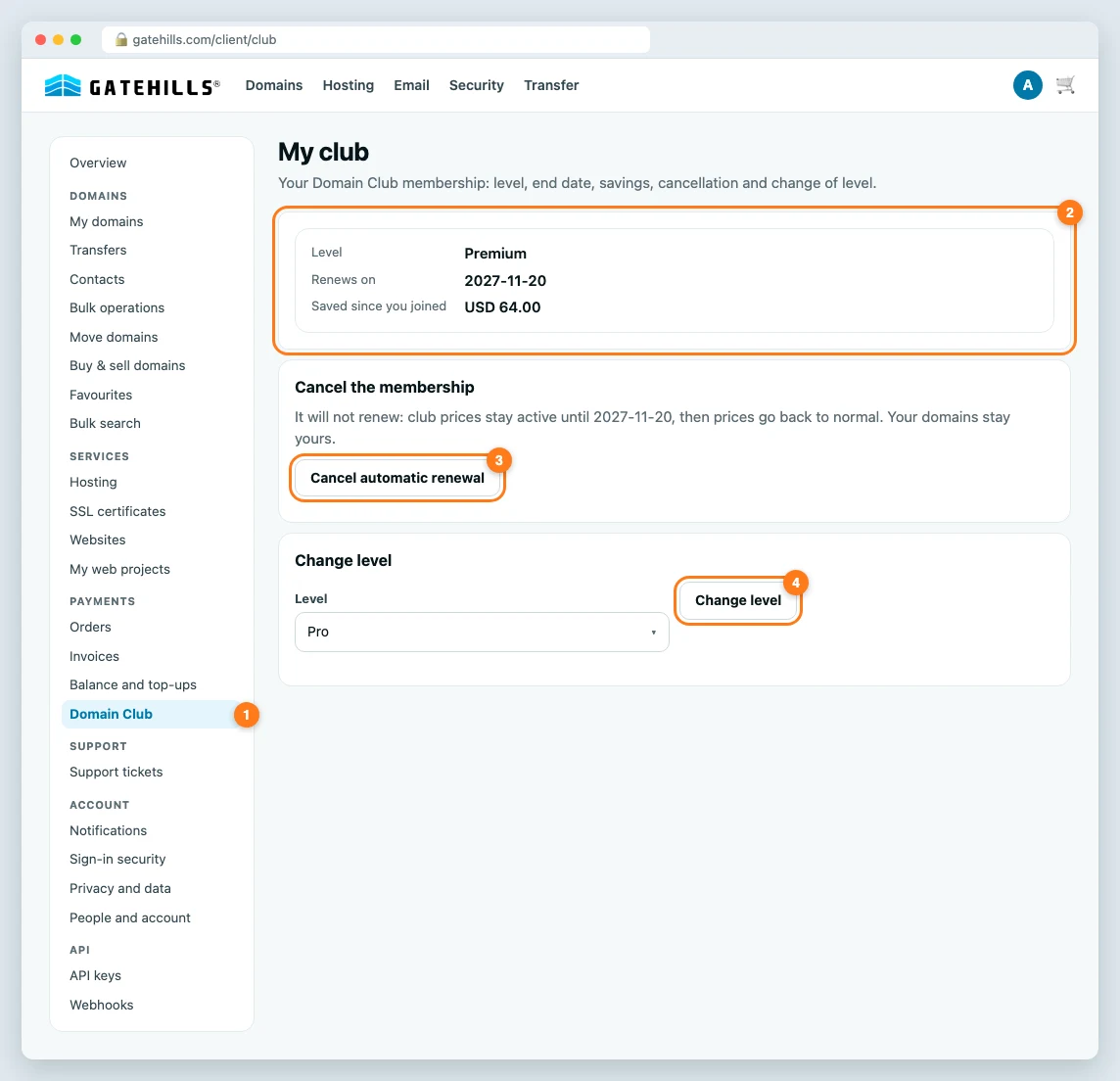
How do I cancel or change my level?
In the client area menu, under Payments, click Domain Club (1). The My club page shows your Level, the date in Renews on (or Ends on if renewal is off) and how much you Saved since you joined (2).
- Cancel: click Cancel automatic renewal (3). The membership does not renew; club prices stay active until the end date, then prices go back to normal. Your domains stay yours.
- Change your mind: click Turn automatic renewal back on before the end date.
- Change level: choose the new level and click Change level (4). The new level starts at the next renewal, which charges the price of the new level. Until then, Next level shows the level you picked.
To use these buttons you need the Pay and manage payment methods function on the account.
When does the membership renew?
Automatic renewal starts up to 7 days before the end date. Gatehills first pays the renewal order from your balance. If the balance is not enough, it charges your default saved card. If that also fails, you get a notice with a link to pay the order yourself.
| When | What happens |
|---|---|
| 30, 7 and 1 day before the end date | Reminder in the notification center, in the app and by email to the primary user |
| Up to 7 days before the end date | Renewal order at the price of your renewal level, paid from the balance |
| Balance not enough | Charge on the default saved card, at most one attempt a day |
| Card not available or declined | Notice with a link to pay the order by card |
| After the end date without renewal | Normal prices again; your domains are not affected |
How is the discount calculated?
Each level takes a percentage off our margin, that is the difference between our normal price and what the registry charges us. The saving in money therefore depends on the extension, and a club price never goes below the registry cost plus a small margin.
When does the membership renew, and how is it paid?
Once a year, on the date shown in Renews on, from your balance or by card. Keep a balance or a valid saved card. See saved cards.
What happens if I cancel?
The membership stays active until its end date. After that, prices go back to normal. Nothing happens to your domains.
Do I get API access with the club?
Yes. For client accounts, API keys require an active membership; registrations, renewals and transfers via API use your club prices and are charged to the balance. See API keys.
Do club prices apply to automatic renewals?
Yes, as long as the membership is active on the day of the renewal. See renewals.