
How to renew a domain and use automatic renewal
- Domain renewal at Gatehills: open the domain, go to its “Renewal” section, choose the years and click “Renew”, or turn on “Automatic renewal”.
- With automatic renewal on, we renew about 30 days before expiry from your balance or, if that is not enough, from your default card.
- A domain can be renewed up to 10 years in total; the years are added to the current expiry date.
- After expiry there is a grace period at the normal price, then a redemption period where the domain can only be restored.
Domain renewal at Gatehills extends the registration of a domain you already own, so its website and email keep working. You can renew by hand from the domain page, for one or more years, or let automatic renewal pay one year about 30 days before expiry.
If a domain is not renewed, the website and email that use it stop working. After a while, anyone can register it. Automatic renewal is the safest choice for the domains you want to keep. Manual renewal is useful if you prefer to decide each time.
What is domain renewal?
A domain is never bought forever. It is registered for a fixed period, and domain renewal adds more time before that period ends.
- The years you buy are added to the current expiry date, so renewing early loses nothing.
- A domain can be registered for at most 10 years in total.
- The registry of each extension keeps the official expiry date. After payment, the new date appears on the domain page within moments.
- A renewal costs the price shown in the Renew for menu. A restore after expiry costs much more.
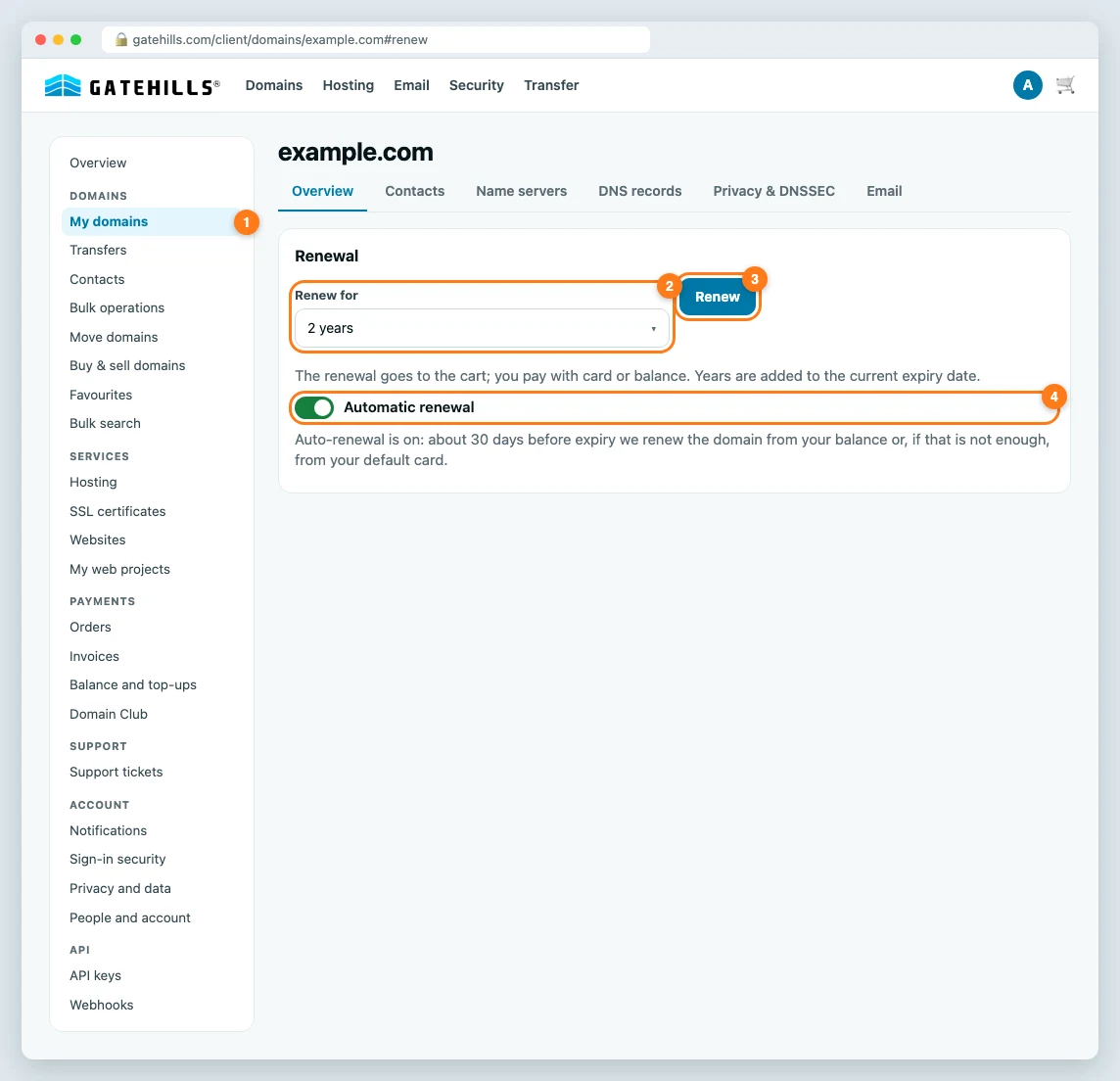
Renew a domain now
- Open the domain
Choose “My domains” in the menu (1) and click the domain. In the “Overview” tab, “Automatic renewal” shows “Automatic” or “Manual”; click “Change” to jump to the “Renewal” section.
- Choose the years
In “Renew for” (2) choose how many years. The menu shows the price of each option.
- Add the renewal to the cart
Click “Renew” (3). The renewal goes to the cart: nothing is charged yet.
- Pay
Complete the checkout and pay by card or from your balance. The new expiry date appears on the domain page in a few moments.
Turn automatic renewal on or off
In the same Renewal section click the Automatic renewal switch (4). The text under it confirms the state:
- On: about 30 days before expiry we create a one-year renewal and pay it from your balance or, if that is not enough, from your default card. If neither works, the owner of the account receives an email with a link to pay, and we try again every day until 3 days before expiry.
- Off: the domain expires unless you renew it yourself.
You can switch many domains at once in Bulk operations with Turn on auto-renewal or Turn off auto-renewal.
When do the renewal reminders arrive?
Gatehills emails the account owner before the expiry date. By default the reminders arrive 30, 15, 7, 3 and 1 day before expiry and on the expiry day. Some extensions add more dates.
Each reminder lists the domains and has a Renew all button. If automatic renewal is on and your balance covers the renewal, the early reminders are skipped: the renewal will happen anyway. For generic extensions such as .com, ICANN rules require a reminder about one month before, one about a week before and one within 5 days after expiry.
What happens if automatic renewal cannot be paid?
Automatic renewal first tries your balance. If the balance is not enough, it charges the default saved card of the account: at most one attempt a day and three per order.
If neither works, the account owner receives an email with a link to pay the renewal order. Gatehills stops trying 3 days before expiry. From then on only the reminders remain, and you must renew by hand.
Automatic renewal does not run for domains that are being transferred, that have left Gatehills or that are still waiting for registration.
| Manual renewal | Automatic renewal | |
|---|---|---|
| When | When you click “Renew” | About 30 days before expiry |
| Length | One or more years, up to 10 in total | One year each time |
| Payment | Card or balance at checkout | Balance, then the default card |
| If payment fails | The order stays “Awaiting payment” in “Orders” | Email with a payment link, new attempts until 3 days before expiry |
Renew many domains at once
- In the reminder email about expiring domains, the Renew all button adds a one-year renewal of all listed domains to your cart (and a restore for domains already in redemption). You then check the cart and pay.
- In Bulk operations choose Renew for 1 year (add to cart) for the domains you select.
- On the dashboard, Upcoming expiry dates has a Renew button next to each domain.
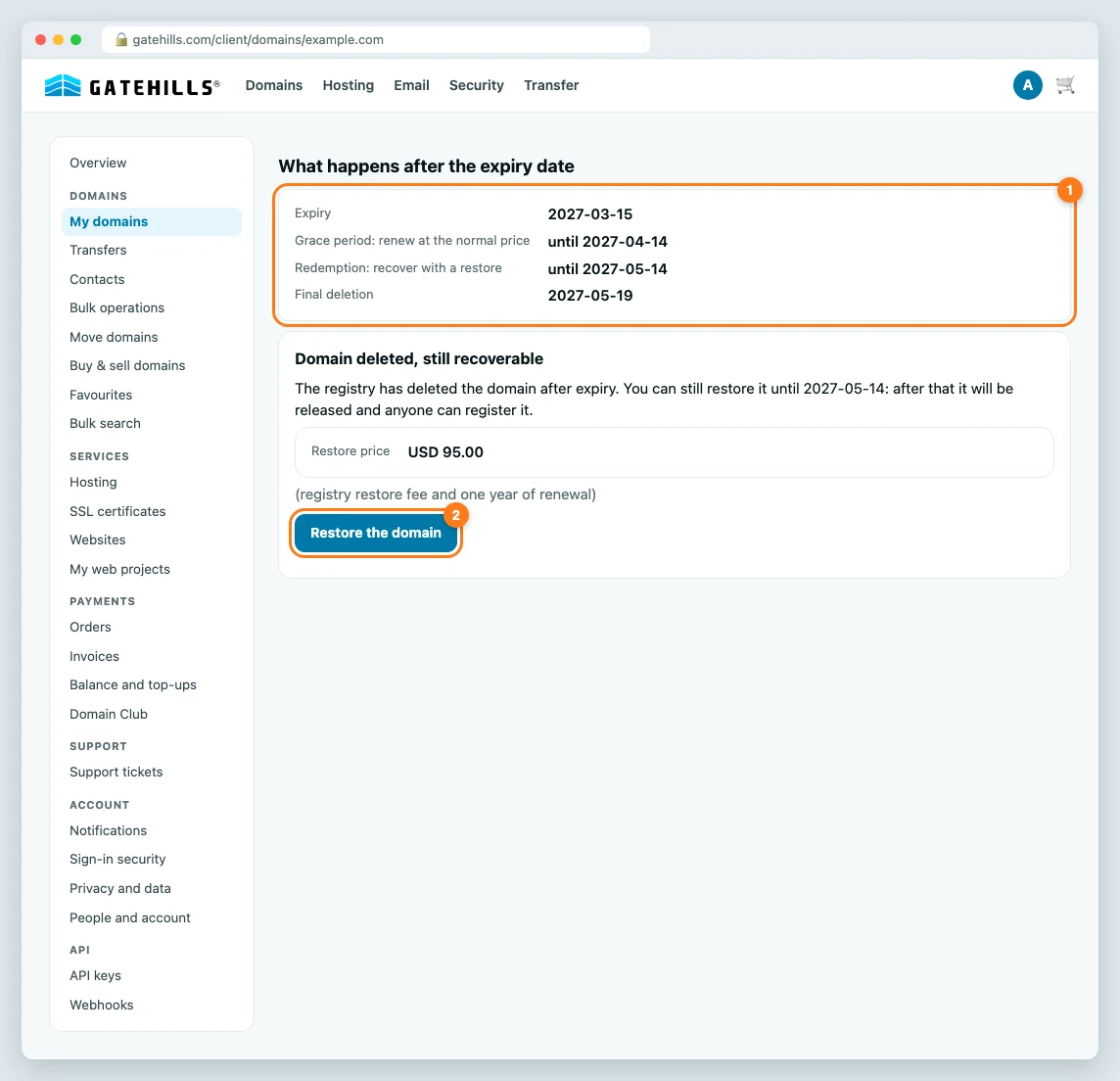
After the expiry date
The domain page shows What happens after the expiry date with the dates for your domain (1):
- Expiry: the website shows a Gatehills renewal page; email keeps working for a short time, then stops too.
- Grace period: renew at the normal price: click Renew as usual and everything comes back.
- Redemption: recover with a restore: the registry has deleted the domain. The page shows Domain deleted, still recoverable and the Restore price (registry restore fee and one year of renewal). Click Restore the domain (2) and pay the cart.
- Final deletion: the domain is released and anyone can register it.
The dates after expiry are estimates based on the rules of the extension; the registry decides the exact ones.
If I renew early, do I lose the remaining time?
No. The years you buy are added to the current expiry date, up to 10 years in total.
How much does a renewal cost?
The price is shown in the Renew for menu and in the cart. Domain Club members pay club prices on renewals too. See Domain Club.
Will I be reminded before the expiry?
Yes, we send reminder emails before the expiry date with the list of domains and a Renew all button. The dashboard also shows the domains expiring soon.
Can someone in my team renew domains?
Yes, if they have the Register, renew and transfer domains function. To pay they also need the payment function. See people and account.
Is a restore always possible?
Only during redemption and only if the extension allows it. If restore is not sold online for an extension, the page says so: contact support.
Does automatic renewal still work after the expiry date?
No. Automatic renewal only runs between 30 and 3 days before expiry. After that, renew the expired domain by hand in the Renewal section, during the grace period at the normal price.