
How to manage your saved cards
- Saved cards are the cards you paid with on Gatehills: each one is saved automatically, with nothing to set up.
- You find them in “Balance and top-ups” → “Saved cards”.
- The “Default” card pays automatic renewals only when your balance is not enough.
- We keep only a reference from the payment provider, never the full card number.
On Gatehills, saved cards are payment cards kept by our payment provider after you pay with them. The default card pays the automatic renewal of domains, SSL certificates and annual hosting when your balance is short. You manage the list in Balance and top-ups: choose the default card or remove old and expired cards.
What are saved cards?
A saved card is a reference to a payment card stored by the payment provider, not by Gatehills. Every card payment saves the card on your account. The page shows only what the provider returns: the card brand, the last four digits and the expiry date.
If you pay again with a card that is already in the list, the card is updated, not added twice. The card you paid with last becomes the Default card. Only one card at a time carries the Default badge.
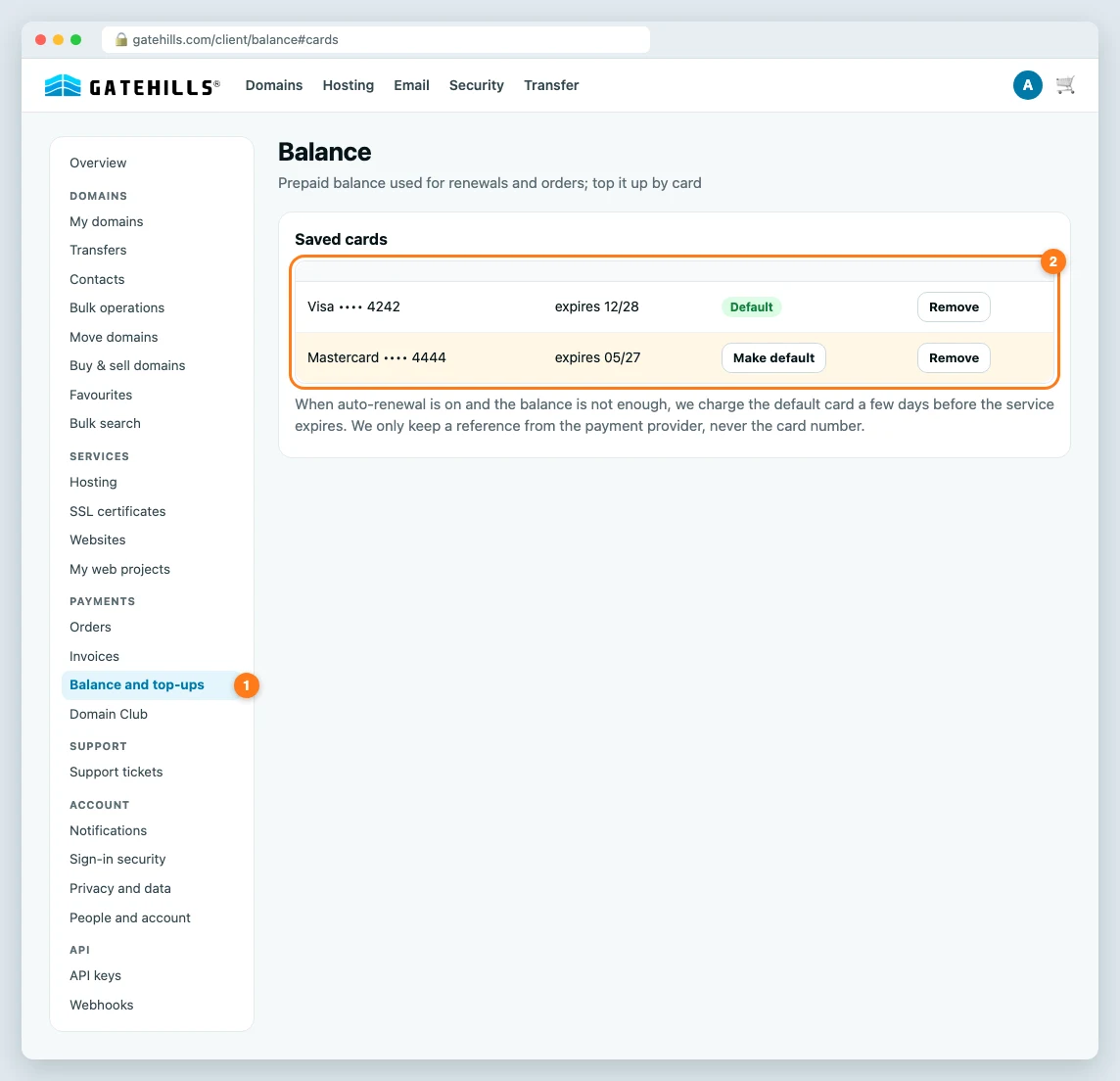
Choose the default card or remove a card
- Open your cards
In the client area menu, under “Payments”, click “Balance and top-ups” (1). The “Saved cards” section lists each card with its last digits and expiry date (2).
- Check the default card
The card with the “Default” badge is the one used for automatic renewals when the balance is short. It is always shown first.
- Change the default card
Next to another card click “Make default”. The message “Default card updated.” confirms the change.
- Remove a card
Click “Remove” next to the card. The message “The card has been removed.” confirms it. The card is detached from the payment provider and no longer used. If it was the default card, the most recent remaining card becomes the default.
How do I add a new card?
There is no separate form: a card is saved when you pay with it. To add a new card, pay an order or a small balance top-up with it (see account balance). The new card becomes the default automatically. To keep an older card as the default, come back here and click Make default next to it.
When is the default card charged?
The default card is charged only by automatic renewals. A new order is never charged unless you click pay yourself. Automatic renewal always follows the same order:
- Balance first: the renewal is paid from your balance in the order currency, or from a balance in another currency that covers the converted amount.
- Then the default card: if no balance is enough, we charge the default card without asking you.
- Then an email: if the card fails too, the account owner receives an email with a link to pay.
Domains with automatic renewal are renewed from about 30 days before expiry. SSL certificates are renewed about 14 days before the subscription ends.
How many times is the card tried?
A renewal order is charged to the card at most three times, with about one attempt per day. The same renewal is never charged twice. If your bank asks for confirmation (3-D Secure), the attempts stop. Open the order in Orders and pay it yourself, confirming in your banking app.
| Situation | What Gatehills does |
|---|---|
| The balance covers the renewal | Pays from the balance; the card is not charged |
| The balance is short and there is a default card | Charges the default card |
| The bank declines the card | Tries again about a day later, up to three attempts in total |
| The bank asks for 3-D Secure | Stops the card attempts and emails the link to pay |
| No saved card and not enough balance | Emails the account owner the link to pay |
What happens when I remove a card?
Removing a card detaches it from the payment provider and deletes it from your account. It cannot be charged again. Monthly hosting plans and domain lease instalments that used the card stop using it as well. They are then paid from your balance or with the link we email you.
In some currencies our payment provider does not keep cards. Renewals in those currencies are paid from the balance or with the link to pay.
When is my saved card charged?
Only for automatic renewals, and only if your balance does not cover them. Domains are renewed from about 30 days before expiry; the card is tried if the balance is short. New orders are never charged without you clicking pay.
Does Gatehills store my card number?
No. We keep only a reference from the payment provider, the last digits and the expiry date shown on the page.
What happens if the charge fails?
The renewal order stays Awaiting payment and the account owner receives an email with a link to pay. The card is tried at most three times, about once a day. You can also pay the order yourself from Orders.
Can I pay by card without saving it?
Every card payment saves the card. If you do not want to keep it, click Remove next to it in Balance and top-ups after paying.
Can I stop using cards for renewals?
Yes. Remove your saved cards and keep your balance topped up, or turn off automatic renewal on the domains you do not want renewed. See renewals.