
How to find and download your invoices
- To download invoices, open “Invoices” in the client area and click “PDF”: Gatehills issues an invoice for every paid order and a credit note for every refund.
- You find them all in “Invoices”, ready to download as PDF.
- The invoice uses the “Billing details” you entered at checkout, including the VAT number if you have one.
- Each invoice links to its order, and each order lists its invoices.
You can download invoices from the Gatehills client area at any time: open Invoices and click PDF. Gatehills creates every invoice automatically when an order is paid, so there is nothing to request. Companies use them for their accounts and to recover VAT. Check your billing details before you pay, because issued invoices do not change.
How do I download invoices from Gatehills?
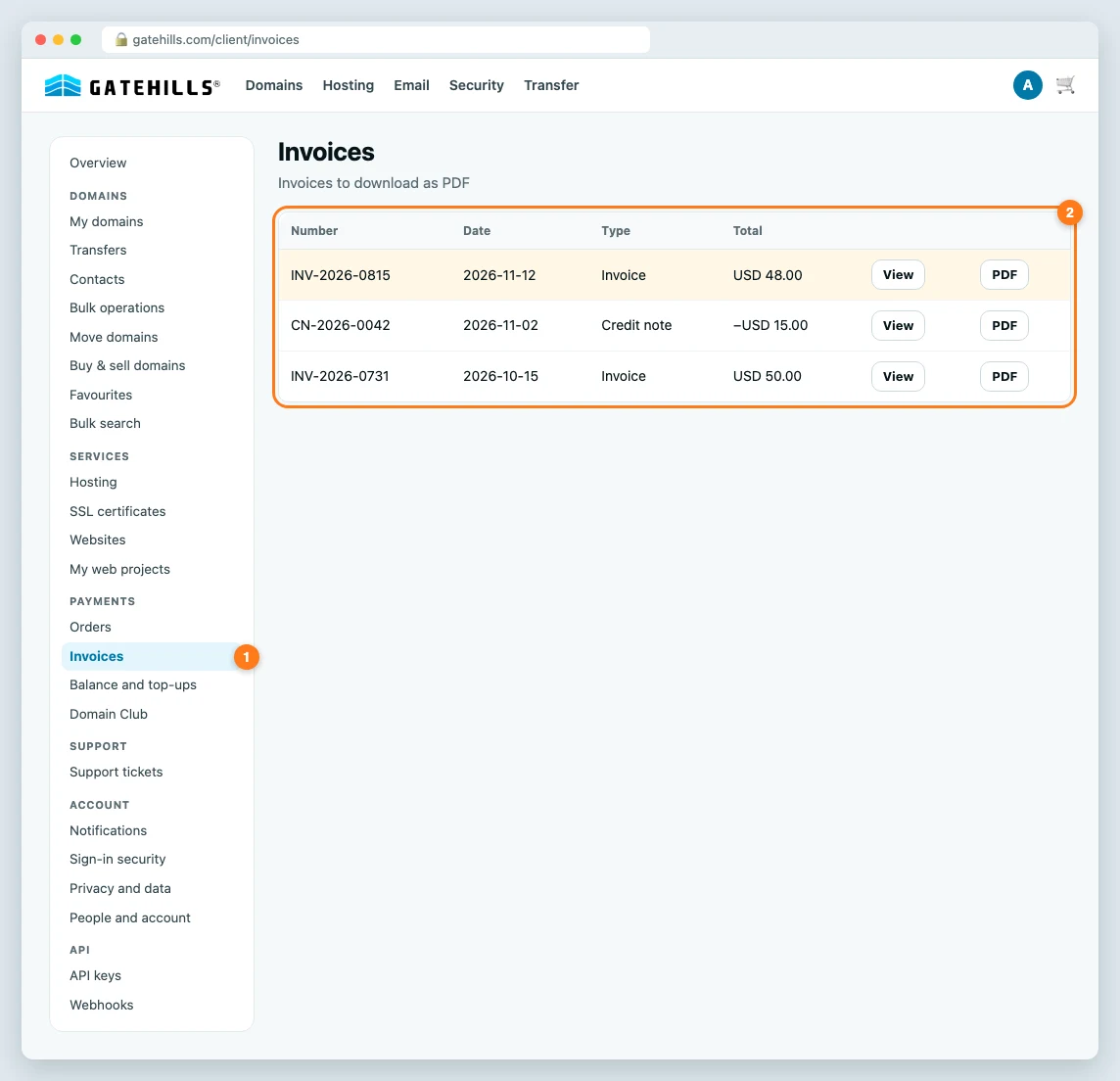
Download an invoice
- Open the list
In the client area menu, under “Payments”, click “Invoices” (1). Each row shows “Number”, “Date”, “Type” (“Invoice”, “Credit note” or “Commission invoice”) and “Total” (2).
- Download the PDF directly
Click “PDF” on the row of the invoice: the file downloads straight away.
- Or open the details
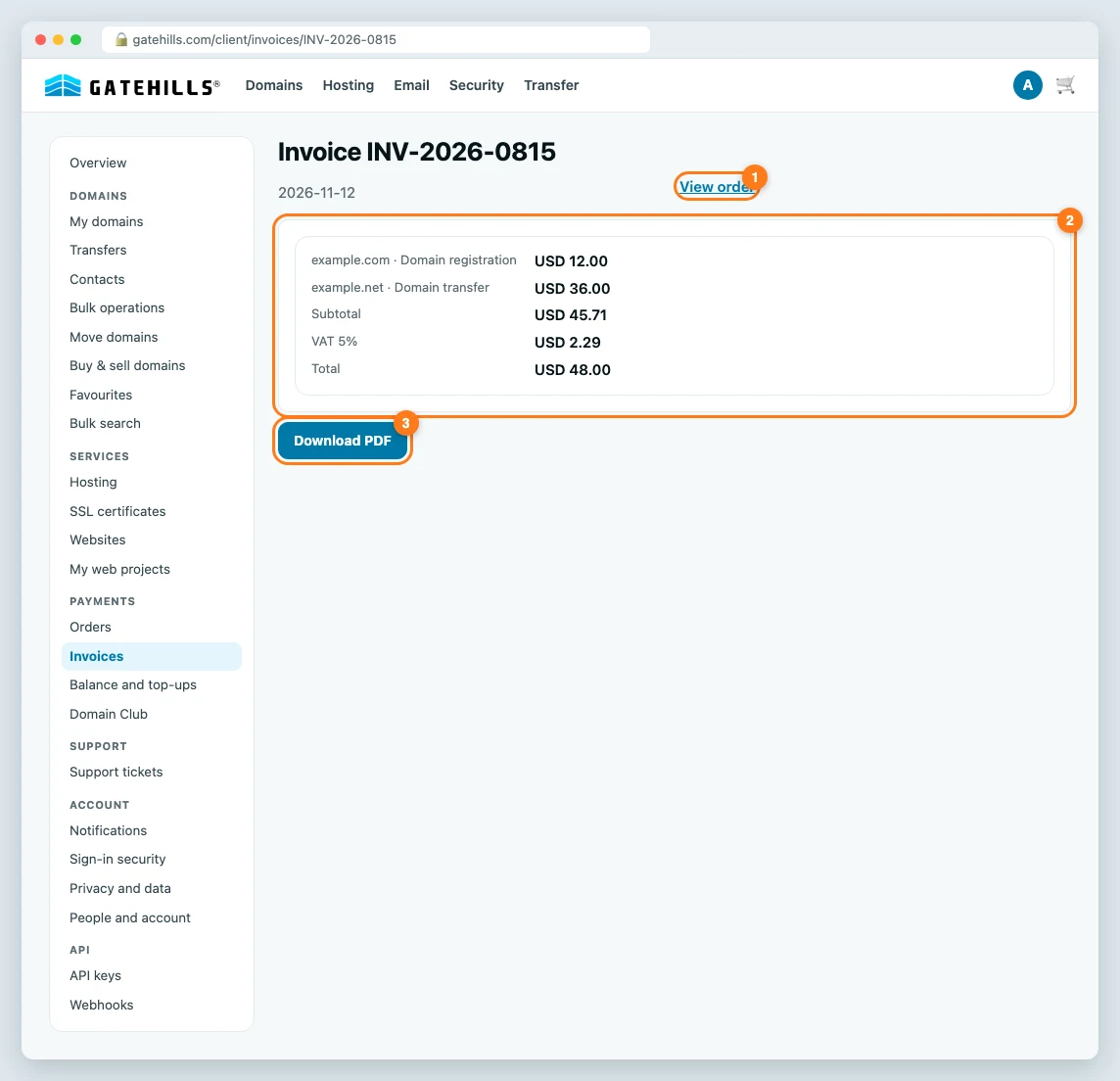
Click “View” to see the lines of the invoice, the subtotal, the VAT and the total. From here “View order” opens the related order.
- Download from the details
Click “Download PDF” (3) at the bottom of the invoice.
Billing details and VAT number
The name, address and tax data on the invoice come from the Billing details step of the checkout. There you choose Who is buying (Individual or Company) and, for a company, enter the VAT number (for companies in the United Arab Emirates, the TIN and, if registered for VAT, the TRN).
To change them before your next purchase, go to the checkout and on the Review and pay page click Edit next to Invoice to. If your billing details are incomplete, the Overview of the client area shows the button Complete now. Changes apply to the next invoices: invoices already issued are not changed.
How are Gatehills invoices numbered?
Every document has a number made of a series, the year and a progressive number, for example GH-2026-000001. Numbers run without gaps within each series and year. The year follows the Dubai time zone.
The PDF file has the same name as the document, for example GH-2026-000001.pdf. This makes it easy to find a file again in your downloads or in your accounting software.
| Type | Series | Example | When it is issued |
|---|---|---|---|
| Invoice | GH | GH-2026-000001 | When an order is paid |
| Credit note | NC | NC-2026-000001 | When a refund is recorded |
| Commission invoice | CM | CM-2026-000001 | When the proceeds of a domain you sell on the aftermarket are collected |
What is on a Gatehills invoice?
An invoice lists one line for each item of the order, such as Domain registration, Domain transfer, Domain renewal, Web hosting, SSL certificate or Domain Club membership. Below the lines you find the Subtotal, the VAT with its rate, the ICANN fee when the order includes one, and the Total.
If you used a coupon, the invoice says Coupon discount included in the amounts. For reseller accounts, the card surcharge is a separate line, subject to VAT and included in the total.
Invoices are final documents. Each one keeps a copy of the seller and buyer details as they were when it was issued. The PDF is generated from that copy, so you get the same content every time you download it.
What is a credit note?
A credit note is the document Gatehills issues when a refund is recorded. It has a negative total and cancels all or part of an invoice. The detail shows the Reason and the invoice it refers to, with a link to it. If you paid from a balance in another currency, the credit note also shows the amount refunded to your balance and the exchange rate used.
When is the invoice issued?
As soon as the order is paid. You find it in Invoices and on the order page.
What is a credit note?
It is the document we issue for a refund. It shows the reason and the invoice it refers to, and its total is negative.
I paid from a balance in another currency. Which amount is on the invoice?
The invoice and its VAT stay in the currency of the order. The detail shows, for information, the amount charged to your balance with the exchange rate and its date.
What is a Commission invoice?
If you sell a domain on the Gatehills aftermarket, our commission is invoiced to you; it is deducted from the sale proceeds. See sell a domain.
Will I receive my invoice by email?
Yes. When an invoice or a credit note is issued, Gatehills sends an email with its number, the order reference, the total and a link to the document in the client area. Commission invoices are not sent by email: you find them in Invoices.
Do I get an invoice when I top up my balance?
No. A balance top-up is a deposit without VAT. The invoice is issued when you buy something and pay with the balance. Reseller accounts that top up by card receive an invoice for the card surcharge only.
Can I change an invoice after it is issued?
No. Issued invoices cannot be edited in the client area. New billing details apply only to the next invoices, so check them on the Review and pay page before paying.