
How to top up and use your account balance
- Your Gatehills account balance is prepaid credit for orders and renewals, in “Balance and top-ups”.
- You top it up by card; the amount is added as soon as the payment provider confirms.
- Automatic renewals use the balance first, then your default card.
- Each currency has its own balance; the “Movements” list shows every entry.
Your account balance at Gatehills is prepaid credit that you top up by card in Balance and top-ups. You then pay new domains, renewals and other orders from it in one click. Automatic renewals use the balance first. Each currency has its own balance, and every movement is listed with the balance after it.
What is an account balance?
An account balance is money you pay in advance and keep in your Gatehills account. Each top-up is recorded as a movement. Each order you pay from it is subtracted. The balance belongs to the account, not to a single user: everyone with the right permissions sees the same amount.
A top-up is a deposit, so no VAT is charged on it. Tax applies to the orders you pay with the balance, as their invoices show.
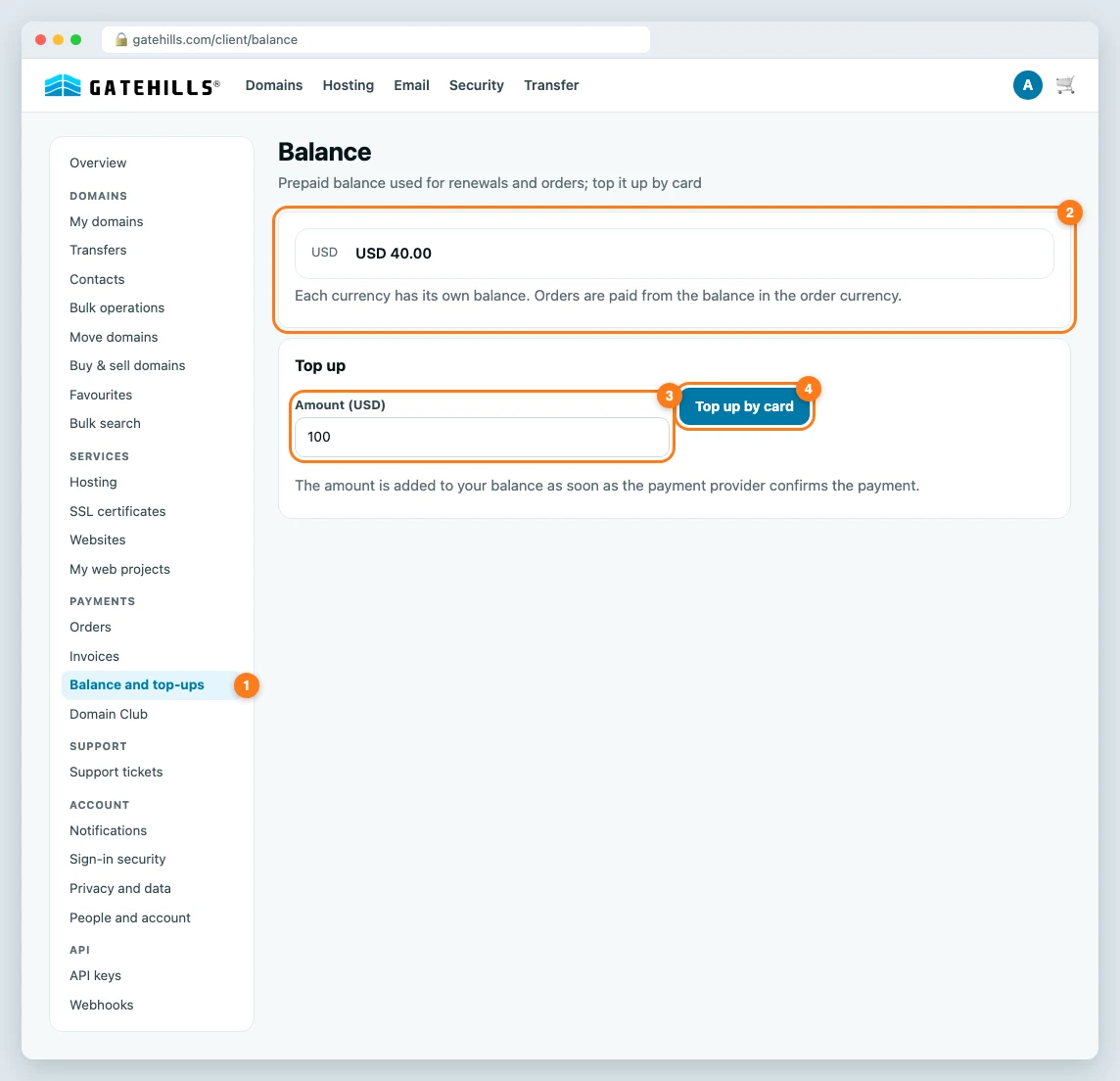
Top up your balance
- Open the balance page
In the client area menu, under “Payments”, click “Balance and top-ups” (1). At the top you see your balance in each currency (2).
- Enter the amount
In the “Top up” box, type the amount in “Amount” (3). The currency is the one your account pays orders in, based on your billing country.
- Pay by card
Click “Top up by card” (4). The “Card payment” page opens: enter your card and confirm (your bank may ask for 3-D Secure).
- Check the new balance
When the provider confirms, you come back to the page with the message “Top-up received: your balance has been updated.” The top-up also appears in “Orders” as “Balance top-up”.
Pay with your balance
At checkout and on an unpaid order, the Payment box shows Your balance and the button Pay … from balance when the balance covers the total. If it does not, you see Your balance does not cover this order. with a link to top up. If you have a balance in another currency, the box may also offer to pay from it at the exchange rate of the day: the order and the invoice stay in the order currency.
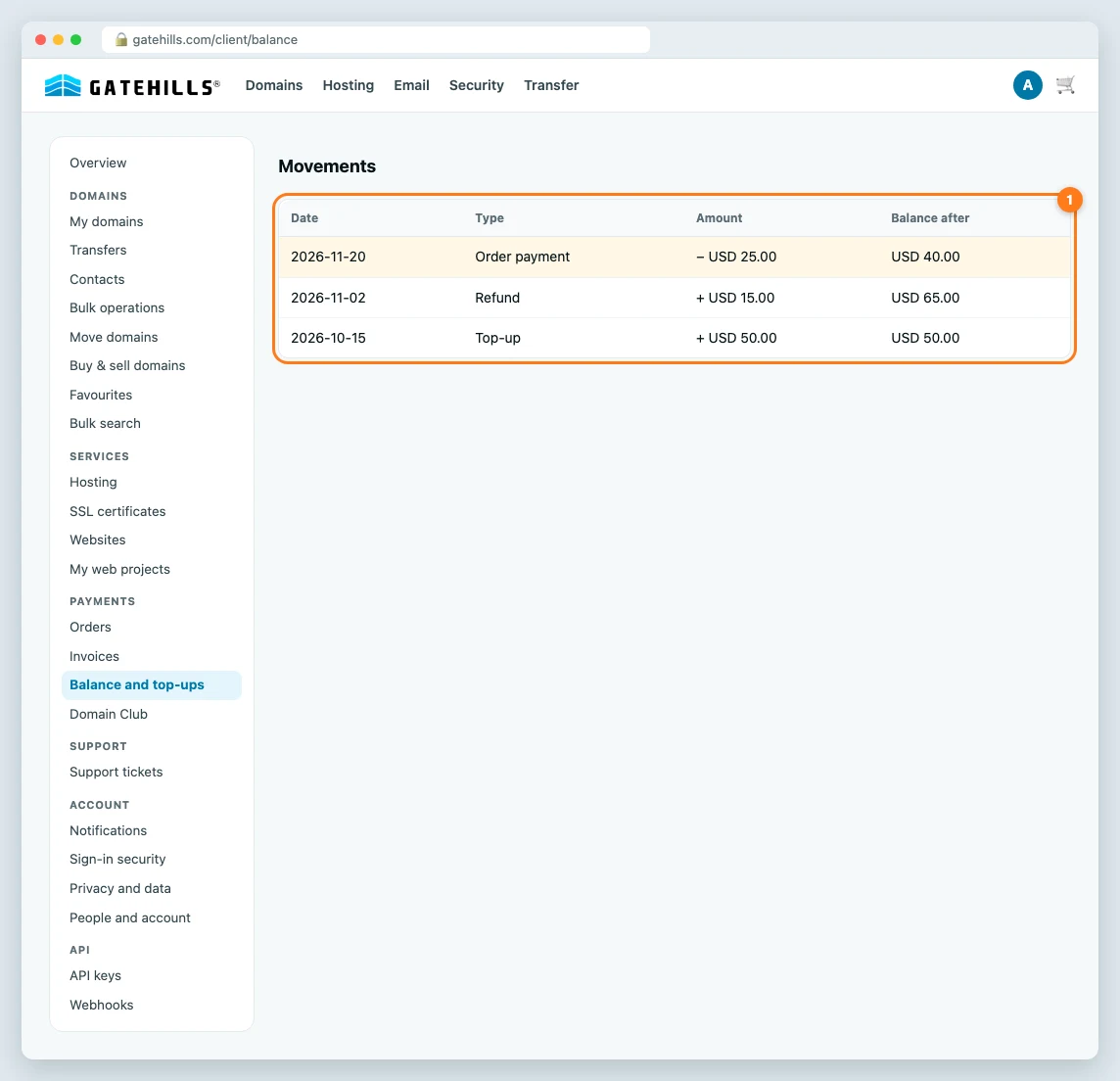
Read the movements
The Movements table lists the latest entries with Date, Type, Amount and Balance after. Types include Top-up, Order payment, Refund, Adjustment, Reversal and Aftermarket sale payout. Amounts added show a plus sign, amounts taken a minus sign.
How long does a top-up take?
The amount is added as soon as the payment provider confirms the card payment. This usually takes a few seconds. Until then, the top-up is an order with the status Awaiting payment in Orders. If you close the card page or the bank declines the payment, nothing is added and nothing is charged.
The amount must be greater than zero. It cannot have more decimals than the currency allows. Otherwise you see Enter a valid amount.
What happens if the balance does not cover a renewal?
Automatic renewal checks the domains that expire in the next 30 days. If the balance covers the price, Gatehills creates the renewal order and pays it from the balance. If it does not, Gatehills tries your default saved card.
If no payment succeeds, the order stays unpaid. The primary user receives one email per expiry date, with a link to pay and a link to top up. Gatehills tries again every day until 3 days before expiry.
Balance or card: which should you use?
| Topic | Account balance | Card |
|---|---|---|
| How you pay | “Pay … from balance”, in one click | Card form of the payment provider, sometimes with 3-D Secure |
| Automatic renewals | Used first | Default card, used when the balance is not enough |
| Reseller card surcharge | None when you pay orders | Yes, on card payments and card top-ups |
| Where you see it | “Movements” in “Balance and top-ups” | “Saved cards” in “Balance and top-ups” |
What is the Credit line?
Some accounts have a credit line agreed with Gatehills. In that case the page shows Credit line and Available: you can pay up to the available amount even if the balance goes below zero.
Is my balance used for automatic renewals?
Yes. When a domain with automatic renewal is due, we pay it from your balance; if the balance is not enough, from your default card. See renewals.
Where do refunds go?
Refunds of orders paid from the balance go back to the balance and appear in Movements as Refund.
Do resellers pay extra on top-ups?
Reseller accounts pay a card surcharge on top-ups, shown before paying and invoiced. The balance is credited with the full amount you enter.
Is there a minimum or maximum top-up?
The amount must be greater than zero, with no more decimals than the currency allows. A single top-up can be up to 1,000,000 in the currency of your account.
Can I top up during a support session?
No. During a support session the page says that top-ups are not available. The customer can top up from their own account.