
How to set up Dynamic DNS for your home or office
- Dynamic DNS gives a fixed name, such as home.example.com, to a connection whose IP address changes.
- You create hosts in “My domains” → your domain → “Dynamic DNS”.
- It is free for active domains on the Gatehills name servers, with up to 5 dynamic hosts per domain.
- Your router or a small program (ddclient) sends the new address with the dyndns2 protocol.
Gatehills includes free dynamic DNS for active domains on its name servers. You create up to 5 hosts per domain, each with its own token, and your router updates the address with the dyndns2 protocol. The new IP is published within about half a minute, with a TTL of 60 seconds.
Most home and office internet connections change their public IP address from time to time. If you want to reach a device from outside (a camera, a NAS, a remote desktop, a small server), Dynamic DNS keeps a name like home.example.com pointing to your current address. You create the host on Gatehills, then enter the details in your router: every time the address changes, the router tells us and we update the DNS record.
What is dynamic DNS?
Dynamic DNS (DDNS) is a DNS name whose address is updated automatically. Normal DNS records stay the same until you edit them. A dynamic host is updated by your own network: the router signs in with the host name and the token and sends its current public IP address. Gatehills then writes the A record (IPv4) or AAAA record (IPv6) of the host.
The update protocol is dyndns2, the de facto standard used by most routers and by programs such as ddclient. The update address ends in /nic/update, the path routers expect. Each token works for one host only, so a leaked token cannot change other names in your zone.
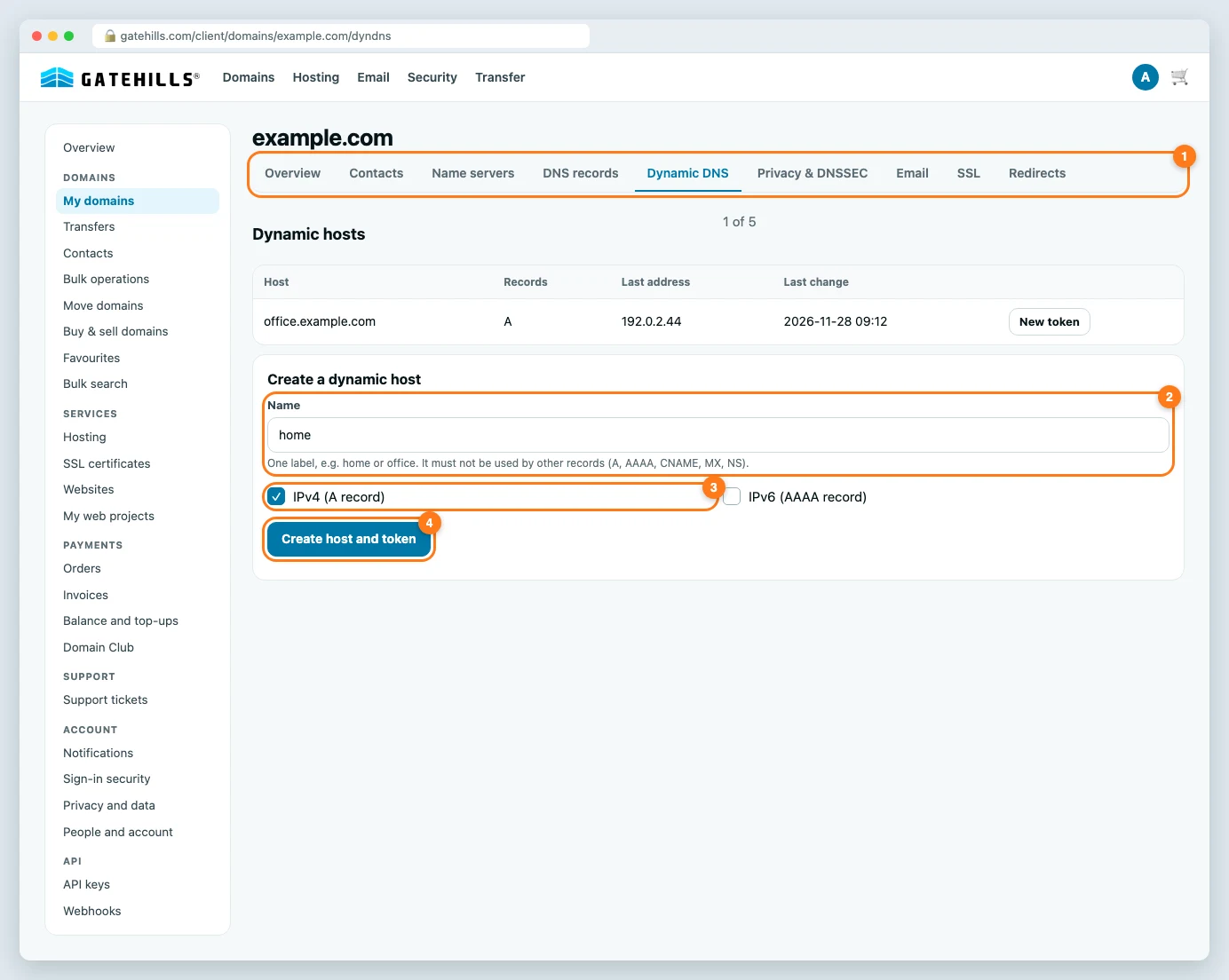
Create a dynamic host
- Open your domain
Sign in to the client area, choose “My domains” in the menu and click the domain name.
- Go to the Dynamic DNS tab
Click the “Dynamic DNS” tab (1). You see your “Dynamic hosts”, with the last address and the last change of each one.
- Choose a name
In “Create a dynamic host”, write one label in “Name” (2), for example “home” or “office”. The full name becomes “home.example.com”. The name must not be used by other records (A, AAAA, CNAME, MX, NS).
- Choose the record types
Tick “IPv4 (A record)”, “IPv6 (AAAA record)” or both (3). If you are not sure, keep only IPv4.
- Create the host
Click “Create host and token” (4). The box “Save this token now” appears with the “Server”, the “User name” and the “Password” (the token). Use “Copy” next to each value.
- Save the token
Copy the token into your router or password manager right away. It is shown only this time: we keep only a fingerprint of it. If you lose it, click “New token” next to the host.
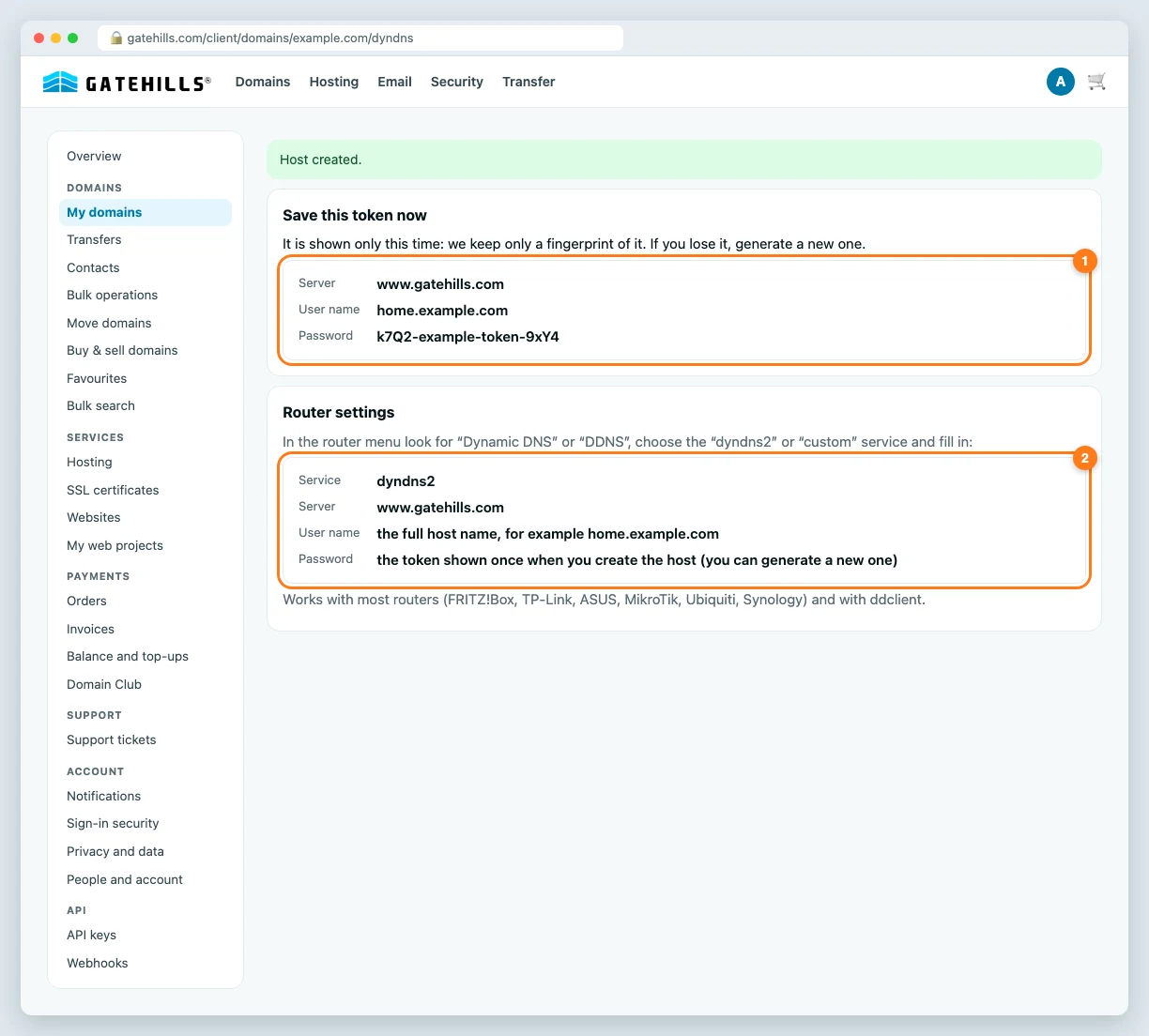
Set up your router or ddclient
In the router menu look for Dynamic DNS or DDNS and choose the dyndns2 or custom service. Then fill in:
- Server: the update server shown on the page (2), with HTTPS if your router offers it.
- User name: the full host name, for example
home.example.com. - Password: the token you saved.
It works with most routers (FRITZ!Box, TP-Link, ASUS, MikroTik, Ubiquiti, Synology). Right after creating a host, open Other configurations (ddclient, URL, terminal) in the token box: you find a ready-made ddclient configuration, an update URL for routers with a custom DynDNS field, and a command to test from a terminal.
What do the answers of the update server mean?
| Answer | Meaning | What to do |
|---|---|---|
| good 192.0.2.10 | The address changed and was saved | Nothing |
| nochg 192.0.2.10 | The address was already the same | Nothing; update only when the IP changes |
| badauth | User name or token wrong or missing | Check the full host name and the token, or create a new token |
| notfqdn | Host name missing or not valid | Use the full name, for example home.example.com |
| numhost | More than one host name in one request | Send one host per request: each token is for one host |
| nohost | The host does not match the token, or the domain can no longer use DDNS | Check the host name and that the domain is still on the Gatehills name servers |
| abuse | The host is temporarily blocked or disabled | Wait one hour and update less often, or contact support |
| dnserr | The address is not valid, private or reserved | Let the server use the public address of your connection |
| 911 | Temporary server error | Your router tries again later |
How long does a DDNS update take?
After a successful update (good), Gatehills publishes the new address on its name servers within about half a minute. Dynamic records have a TTL of 60 seconds, so other networks ask again after one minute at most. In practice the new IP is visible one or two minutes after your router sends it.
Is Dynamic DNS free?
Yes, it is free for active domains that use the Gatehills name servers.
How many dynamic hosts can I create?
Up to 5 per domain. The counter next to Dynamic hosts shows how many you use.
How fast is the new address visible?
Dynamic records have a short lifetime (about one minute), so the new address is visible almost immediately after your router sends it.
I lost the token. What do I do?
Click New token next to the host and confirm. A new token is shown once; enter it in your router, because the old one no longer works.
How do I delete a host?
Click Delete next to the host and confirm. Its DNS records disappear within a minute.
Can I use the domain itself (@) as a dynamic host?
Not at the moment: use a subdomain such as home or office. The page tells you which names are allowed.