
How to contact us with the contact form
- To contact Gatehills without an account, use the “Contact us” page linked at the bottom of every page of the site.
- Fill in name, email, subject and message: a security check runs automatically before sending.
- We reply by email, usually within one business day.
- Resellers, affiliates, registries and technology partners use the form on “Partners and resellers”.
- If you already have an account, a support ticket in the client area is faster.
You can contact Gatehills at any time with the public Contact us form: no account and no sign-in are needed. Write your name, email address, a subject and your message, then click Send message. The Gatehills team replies to the email address you entered, usually within one business day.
What is the Gatehills contact form?
The contact form is a public page of the site, at the address /en/contact. It is meant for sales questions, general questions and anyone who does not have a Gatehills account yet. Each message reaches our support team by email.
If you already have an account, a support ticket is faster. Our team sees your domains and orders, and the whole conversation stays in the client area.
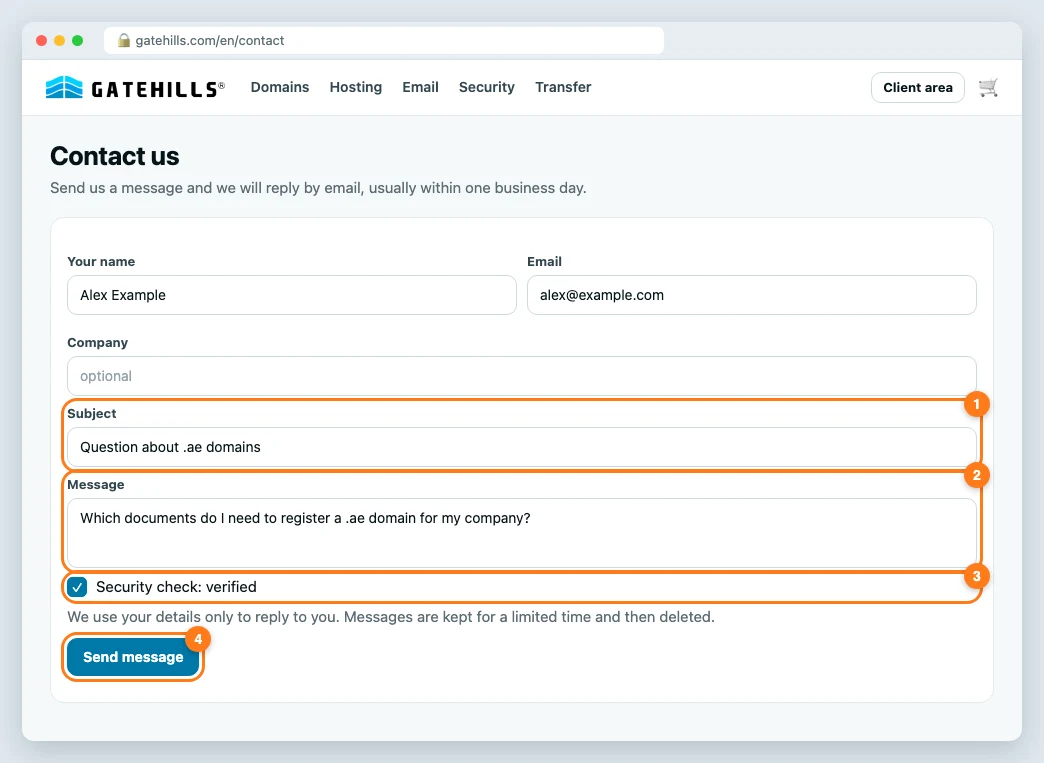
How do I contact Gatehills with the form?
Send a message
- Open Contact us
Click “Contact us” at the bottom of any page of the site.
- Write your details
Fill in “Your name” and “Email”: we reply to this address, so check it carefully. “Company” is optional.
- Write the subject
In “Subject” (1) sum up your question in a few words, for example the domain or the extension it is about. The subject can be up to 200 characters.
- Write the message
In “Message” (2) explain what you need, in at least 10 characters and at most 5,000. Never write passwords, authorization codes or card numbers.
- Pass the security check
The security check (3) usually completes by itself in a few seconds. If it asks you to confirm, follow the instructions in the box.
- Send
Click “Send message” (4). The page shows “Thank you: your message has arrived. We will reply by email.”
Contact form or support ticket: which one should I use?
| Contact form | Support ticket | |
|---|---|---|
| Account needed | No | Yes, you sign in to the client area |
| Best for | Sales and general questions, new customers | Questions about your domains, orders and services |
| Where you get the reply | By email | In the client area, with an email notice |
| Our team sees your domains | No | Yes |
| Attachments | No | Yes, up to 5 files of 10 MB each |
What happens after I send the message?
The page shows a confirmation as soon as the message is saved. You do not receive a copy by email. Our support team receives your message by email and answers you from there.
The reply usually arrives within one business day. Check your spam folder if you do not see it. If you wrote a wrong email address, we have no way to reach you: send the form again with the right address.
How do I propose a partnership?
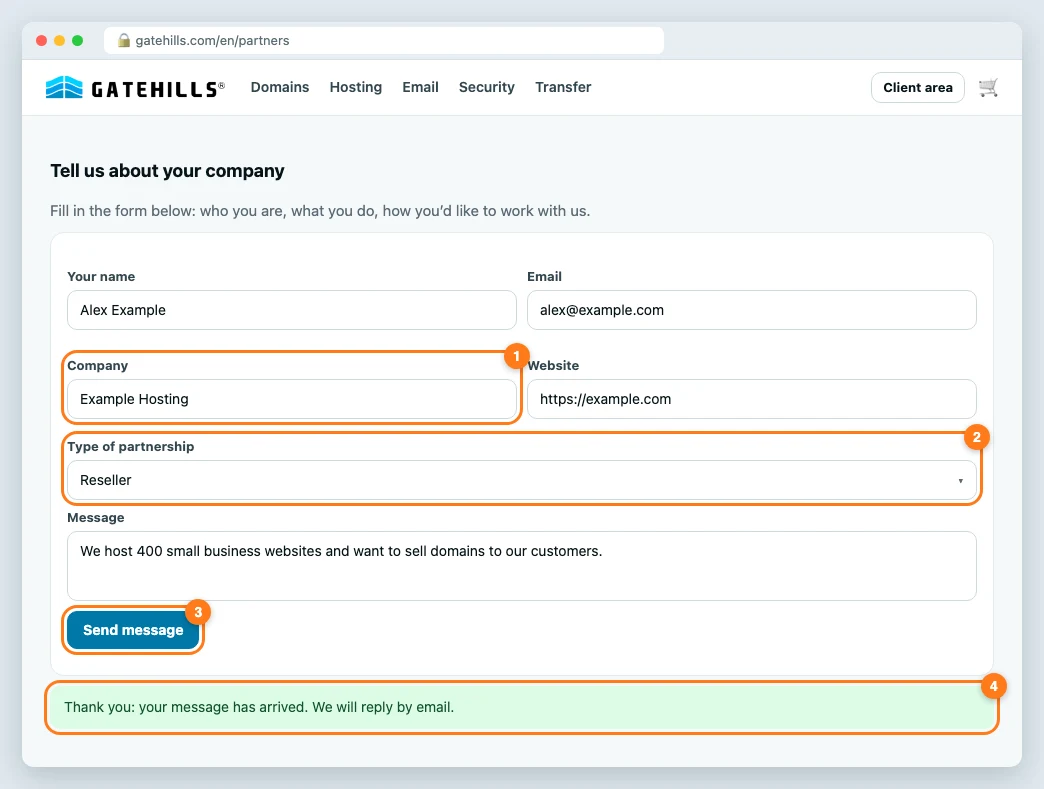
Do you want to resell domains, become an affiliate or work with us as a registry or technology partner? Open Partners and resellers at the bottom of the site and use the partnership form.
It works like the contact form, with two differences. Company (1) is required, and you choose the Type of partnership (2): Reseller, Affiliate, Registry, Technology partner or Other. You can also add your Website, as a full address that starts with https://. A person from our team answers and agrees the details with you.
What does the security check do?
The security check is Cloudflare Turnstile. It tells people apart from automated programs, usually without asking you anything. Each check is valid only once and only for a short time.
To stop spam, the site also accepts only a few messages per minute from the same connection. If you send too many in a row, wait a minute and try again.
What do you do with my details?
We use your name, email and message only to reply to you. Messages are kept for a limited time and then deleted automatically. For more on your data, see privacy and data.
How long does it take to get an answer?
We reply by email, usually within one business day.
Do I need an account to contact Gatehills?
No. The Contact us page is public. You only need a valid email address for our reply.
Do I get a copy of my message by email?
No. The confirmation appears on the page after sending; our reply arrives at the email address you wrote.
What do you do with my details?
We use them only to reply to you. Messages are kept for a limited time and then deleted.
The security check is not working. What can I do?
If you see "The security check is temporarily unavailable", wait a few minutes and try again. Ad blockers can also stop it: allow the page and reload.
I need to prove I own an account. Can I do it here?
No. For account matters, sign in and open a ticket. On the phone or in the chat, the operator checks your identity with a verification code: see sign-in security.
Related guides