
Hide your data with WHOIS privacy
- WHOIS privacy hides the registrant’s name, address, phone and email in the public WHOIS/RDAP lookup.
- It is free. You find it in “My domains” → your domain → “Privacy & DNSSEC”.
- People can still reach you through a “public forwarding address” that sends their messages to the registrant.
- Some registries do not allow privacy: for those extensions the data is published as their policy requires.
On Gatehills you turn on WHOIS privacy in the client area, on the Privacy & DNSSEC tab of the domain. It is free and takes one click. Your name, address, phone and email disappear from public lookups. A forwarding address passes messages on to the registrant. You stay the legal owner of the domain.
What is WHOIS privacy?
Anyone can look up a domain in WHOIS or RDAP and see who owns it. RDAP is the newer protocol that replaces WHOIS; both show the same registration data. ICANN describes it on its RDAP page.
With privacy on, your personal contact details are replaced by protected data. An anonymous email address forwards messages to you. Privacy changes only what is shown publicly: the registry and Gatehills still hold your real details.
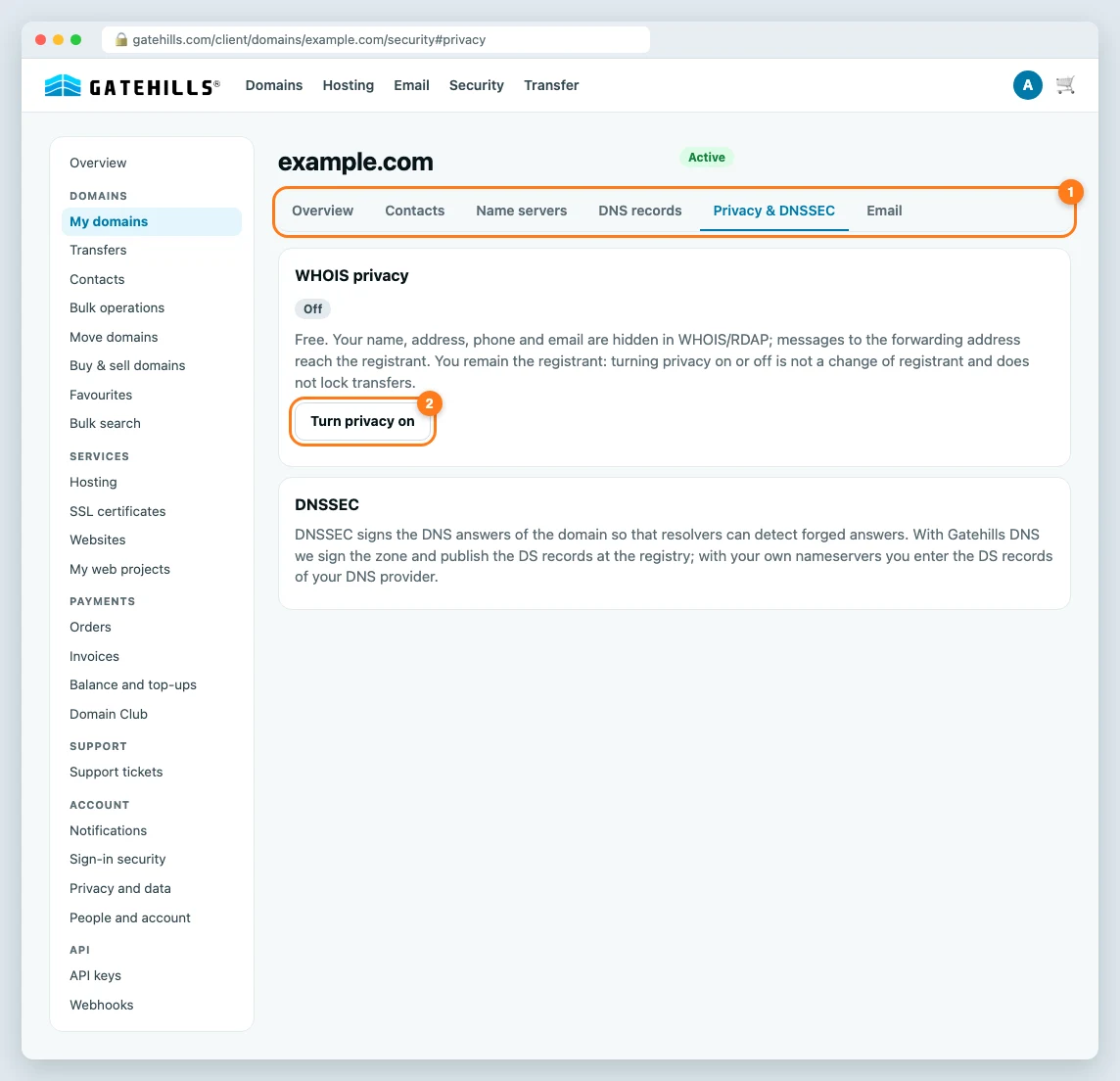
Turn WHOIS privacy on
- Open the domain
Choose “My domains” in the menu, click the domain and open the “Privacy & DNSSEC” tab (1). The privacy box is at the top.
- Check the status
The label shows “Active” or “Off”. On many extensions privacy may already be on for new domains.
- Turn it on
Click “Turn privacy on” (2). If the registry needs a moment, the label shows “Being activated at the registry” and then “Active”.
- Check the forwarding address
When privacy is on, the box shows the “Public forwarding address”. Messages sent to it reach the registrant’s real email.
What does a WHOIS lookup show?
| Data | Privacy off | Privacy on |
|---|---|---|
| Name and organisation | Shown | Hidden |
| Postal address | Shown | Hidden |
| Phone | Shown | Hidden |
| Your real email | Public forwarding address | |
| Registrar, dates and name servers | Shown | Shown |
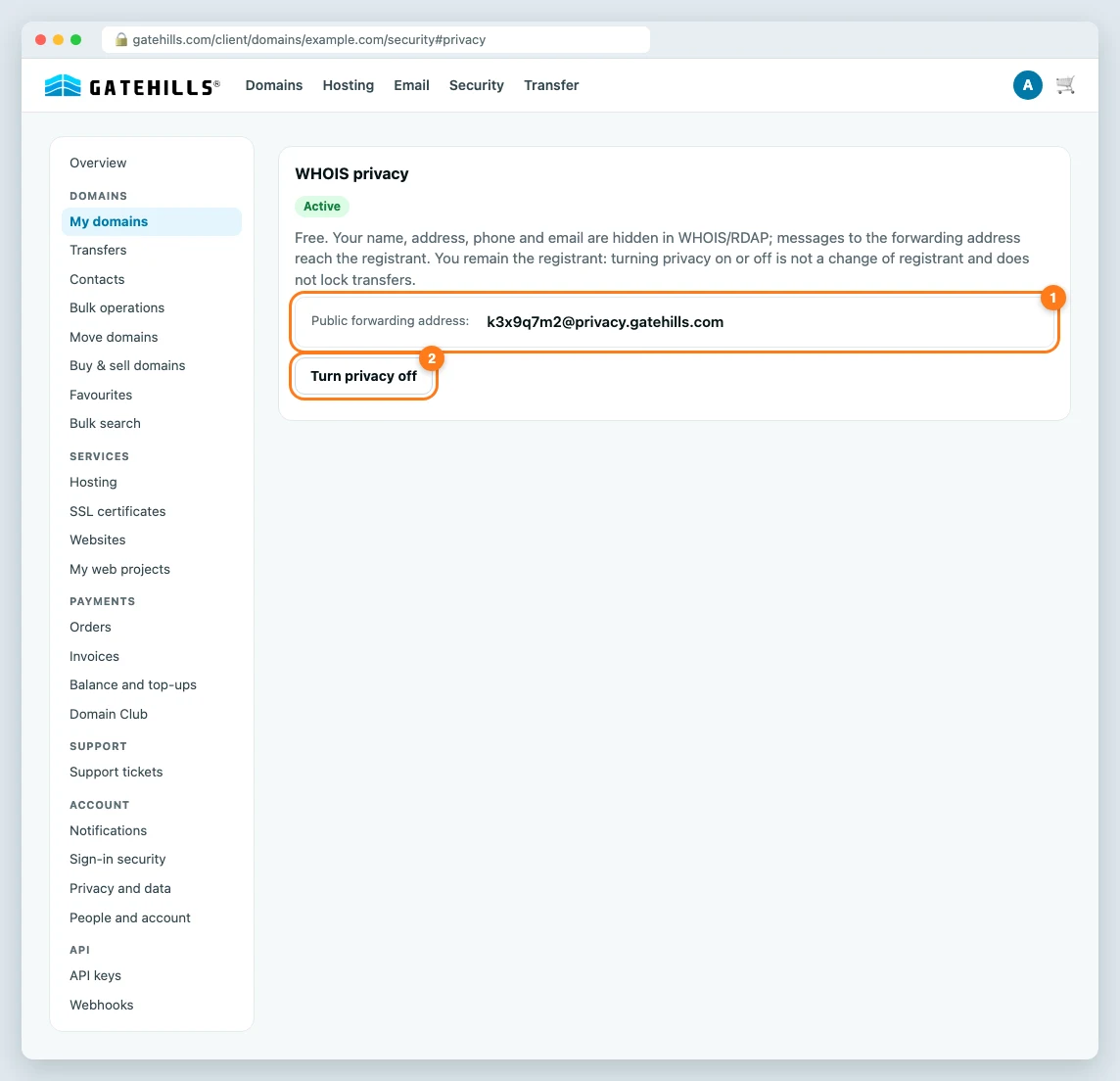
Turn privacy off
Click Turn privacy off (2). The label shows Being removed at the registry and then Off. From then on the WHOIS shows the real contact details of the domain.
Turning privacy on or off is never a change of registrant. It does not lock transfers and does not change the expiry date.
How long does the change take?
Usually the change is immediate. Some registries need a moment: the label then shows Being activated at the registry or Being removed at the registry until they confirm. Public lookup services may keep a cached copy for a short time, so check again later if you still see the old data.
Is WHOIS privacy paid?
No, it is free.
Will I still receive emails about my domain?
Yes. Messages sent to the public forwarding address reach the registrant’s email, and our notices go to your account as usual.
Does privacy affect a transfer to another registrar?
No. It does not lock transfers and it is not a change of registrant. See transfer a domain away.
Why is privacy not available for my domain?
The registry of that extension requires the registrant data to be published. In that case the box explains it and there is no button.
How can I check what others see?
Look up the domain with our WHOIS lookup after the label shows Active.
Am I still the owner of the domain?
Yes. The registrant stays the same and keeps all rights. Privacy only replaces the contact details shown in public lookups.