
How to open and follow a support ticket
- A support ticket is opened in “Support” → “Support tickets” in the Gatehills client area.
- You can link it to a domain or an order and attach up to 5 files of 10 MB each.
- We reply on the ticket page and notify you by email.
- A resolved ticket closes by itself after 7 days without a reply from you.
A support ticket is a written request to the Gatehills team, opened from your client area. You choose a topic, describe the problem and attach files. We reply on the same page and email you each time. The whole conversation stays in one place, linked to your account, your domains and your orders.
When should you open a support ticket?
Open a ticket for questions about billing, domains, DNS, hosting or email when you already have an account. Our team sees your account, so you do not need to explain who you are. A ticket is also the right channel when you need to send screenshots or documents.
If you do not have an account yet, or you cannot sign in, use the contact form instead. For a quick question, phone or chat may be faster; the operator then checks your identity with a code.
| Channel | Best for | Needs an account |
|---|---|---|
| Support ticket | Questions about your account, domains or orders, with attachments | Yes |
| Contact form | Questions before buying, or when you cannot sign in | No |
| Phone or chat | Short questions answered live | Yes, with the verification code |
Open a ticket
- Open Support tickets
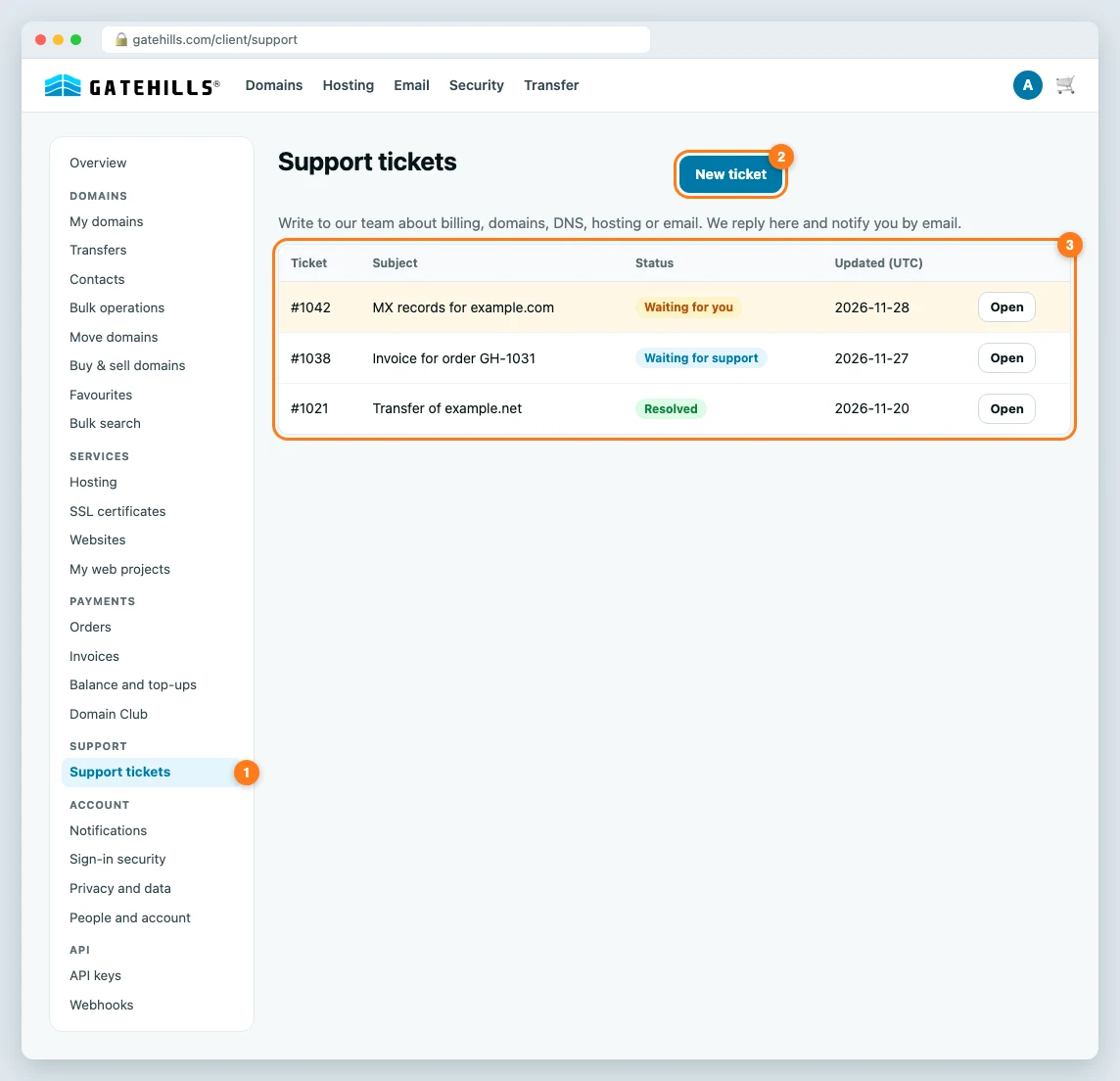
Sign in to the client area and choose “Support tickets” in the “Support” group of the menu (1).
- Start a new ticket
Click “New ticket” (2).
- Write the subject and choose the topic
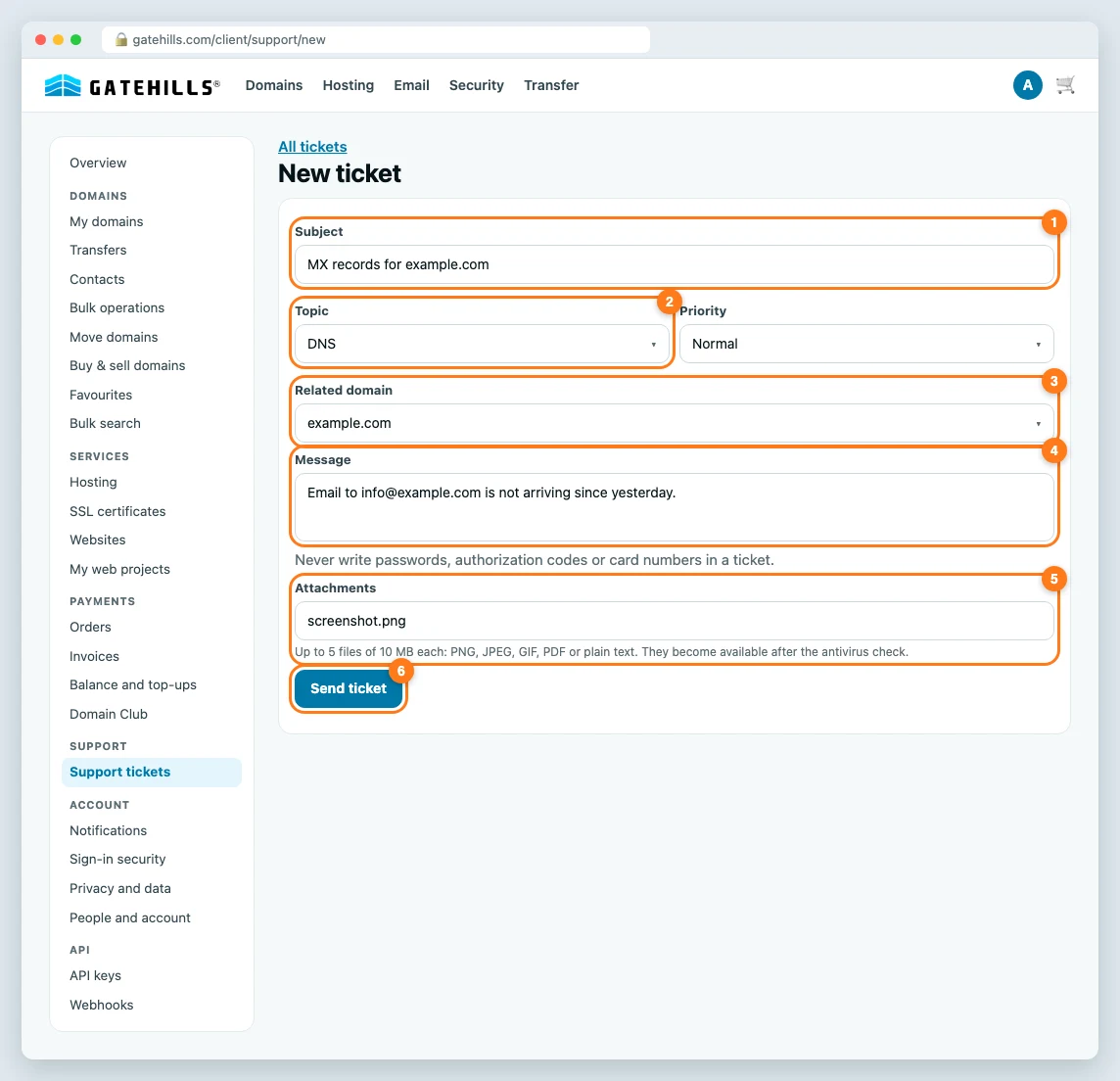
Write a short “Subject” (3 to 200 characters) and choose the “Topic”: Billing and payments, Domains, DNS, Web hosting, Email, Technical problem or Other. Leave “Priority” on Normal unless the problem blocks your website or email.
- Link a domain or an order
If the question is about one domain or one order, choose it in “Related domain” or “Related order”. This saves time: we do not need to ask which one.
- Describe the problem
In “Message” explain what happens, since when and what you have already tried. The message can be up to 20,000 characters. Never write passwords, authorization codes or card numbers in a ticket.
- Attach files and send
In “Attachments” add screenshots or documents if useful, then click “Send ticket”. The message “Ticket sent. We will reply as soon as possible.” confirms it.
How do I follow, reply to and close a ticket?
In the list (3) click Open next to a ticket to read the conversation. Our replies are marked Gatehills support. To answer, write in Reply, add any attachments and click Send reply. Dates on the page are in UTC.
When the problem is solved, click Close ticket and confirm. A closed ticket cannot receive new replies. If you need more help later, open a new ticket and mention the old number.
What does each status mean?
| Status | Meaning |
|---|---|
| Open | The ticket has been received and no one has replied yet. |
| Waiting for support | It is our turn to reply. |
| Waiting for you | We replied or asked for information: please answer. |
| Resolved | We think the problem is solved. Reply if it is not; otherwise the ticket closes by itself after 7 days. |
| Closed | The ticket is finished and cannot be reopened. |
How long does a support ticket stay open?
A ticket stays open until you close it or until it closes by itself. When we mark it Resolved, you have 7 days to reply. If you reply, the ticket reopens and goes back to Waiting for support. If you do not, it closes automatically.
The priority tells our team what to handle first. Urgent and High tickets are answered before Normal and Low ones. Use Urgent only when something important is down.
Each account can have up to 20 active tickets at a time. Resolved and closed tickets do not count. If you reach the limit, close the tickets you no longer need.
Phone and chat: the verification code
When you talk to us by phone or in the chat, the operator sends you a one-time verification code by email or in the app. You also see it in the Verification code for support box at the top of the Support tickets page and on Sign-in security. Read it to the operator: it proves you are the account holder.
We never ask for this code by email, and we never ask for your password. A message that asks for it is a phishing attempt: do not answer it. If the website shows the Open the chat button, you can also start a chat from there.
How will I know you replied?
We notify you by email and the status becomes Waiting for you. The notice also appears in your notifications.
Can I reopen a resolved ticket?
Yes. Reply within 7 days and the ticket goes back to Waiting for support. A Closed ticket cannot be reopened: open a new one.
Why does my attachment say "antivirus check in progress"?
Every file is scanned before it can be downloaded. It usually takes a moment; a file blocked by the antivirus is not delivered.
A secondary user cannot see Support tickets. Why?
Their role does not include the support function. The primary user can grant it in people and account.
When should I choose the Urgent priority?
When something important is down, for example your website or email no longer works. For questions and requests, Normal is enough.