
Privacy and data: download your data, consents and deletion
- To download your personal data, open “Account” → “Privacy and data” in the client area and click “Request a copy of my data”.
- You get a ZIP file with a JSON file and a readable summary, up to 3 requests in 24 hours.
- You decide whether to receive marketing emails and app notifications about offers.
- You can ask us to delete your access: our staff reviews the request and confirms by email.
On Gatehills you download your personal data from the Privacy and data page of the client area. Click Request a copy of my data, wait for our email, then download the ZIP file within 24 hours. The same page lets you give or withdraw consent to marketing emails and ask to delete your access.
The page puts your rights under the GDPR and the UAE data protection law (PDPL) in one place. The GDPR gives you the right of access (article 15) and the right to data portability (article 20). The official text of the GDPR is Regulation (EU) 2016/679, published on EUR-Lex.
Notices about your domains, orders and support requests are not marketing. They keep arriving whatever you choose here. To change how you receive them, see notifications.
What do you get when you download your personal data?
The copy is a ZIP file with two files:
- personal-data.json: all your data in a format a machine can read, so you can move it to another service;
- summary.html: a readable summary that opens in any browser, with no scripts and no external resources.
The file always has the same sections, even when a section is empty. This way you see what we hold and what we do not hold. It covers your profile and sign-in methods, your marketing consent, the accounts you belong to and your recent sign-in events. For the accounts where you are the primary user it also includes the billing profile, contacts, domains, orders, invoices and balance. Support tickets, API keys, searches, favourite domains and app devices are included too.
The copy never contains secrets: no passwords, no transfer authorisation codes and no support verification PIN.
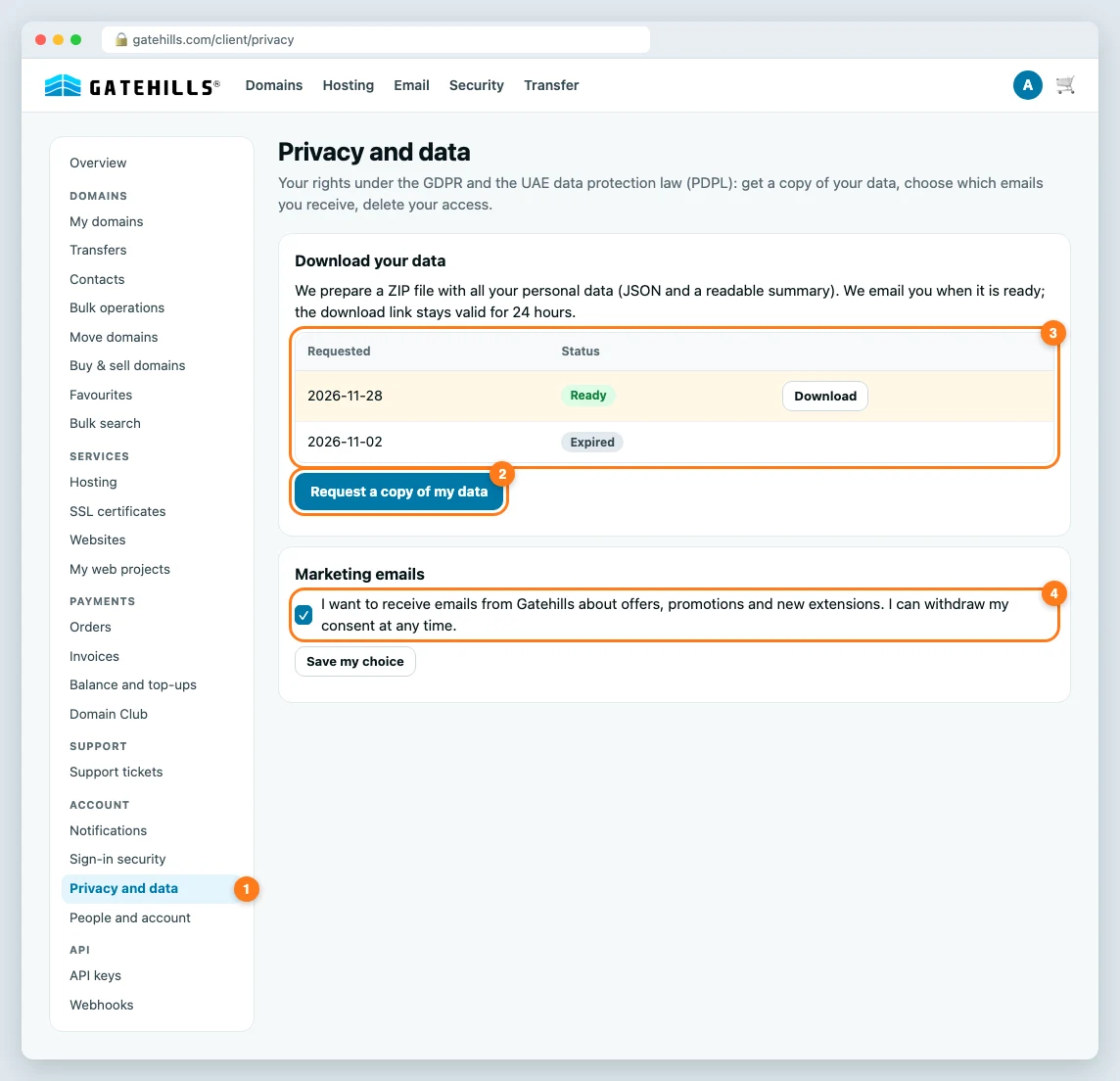
Download a copy of your data
- Open Privacy and data
In the client area choose “Privacy and data” in the “Account” group of the menu (1).
- Request the copy
In “Download your data” click “Request a copy of my data” (2). The request appears in the list as “Being prepared”.
- Wait for the email
We prepare the ZIP file in the background and email you when it is ready, usually within a few minutes.
- Download the file
Come back to the page: the status is “Ready”. Click “Download” (3). The link stays valid for 24 hours, then the status becomes “Expired” and you can request a new copy.
How long does the copy take, and how long is it available?
A background job prepares the file, so you can close the page after the request. The email arrives when the file is ready. The download works only from the client area, signed in as the same person: the email does not contain the file.
The download stays available for 24 hours. After that we delete the file content from our systems. You can request at most 3 copies in 24 hours.
| Status | What it means | What to do |
|---|---|---|
| Being prepared | We are building the ZIP file | Wait for the email |
| Ready | The file can be downloaded | Click “Download” within 24 hours |
| Expired | The 24 hours have passed and the file is deleted | Request a new copy |
| Not available, please request again | The file could not be prepared | Click “Request a copy of my data” again |
Marketing emails and app offers
In Marketing emails (4) tick the box if you want our emails about offers, promotions and new extensions. Untick it to stop them, then click Save my choice. Under the box you see the date you gave or withdrew consent.
App notifications about offers works the same way for push notifications from the Gatehills app. It is a separate choice from the marketing emails. You can also turn these notifications off in the app or in your phone settings.
When we change the wording of a consent, the page asks you to read it again and confirm.
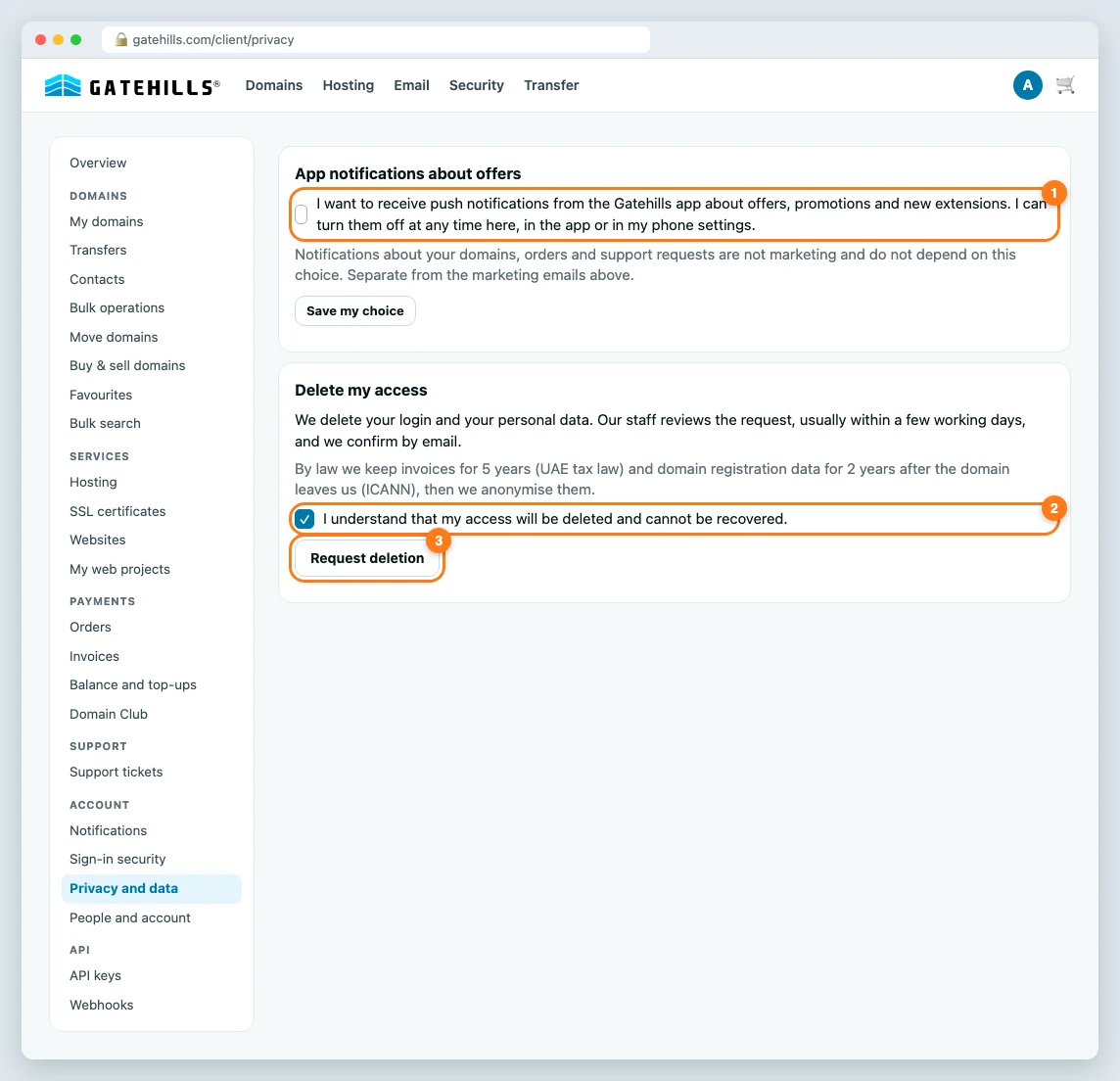
What happens when you delete your access?
Deletion is not immediate. Our staff reviews every request, usually within a few working days. They approve or reject it, always with a reason, and we email you the outcome.
When the request is approved, we close your open sessions and delete your sign-in. We delete or anonymise your personal data, your marketing consent and your data copies. Support tickets with their attachments and API keys are deleted or anonymised too. If you belong to other accounts, you leave them.
Some data must stay by law. We anonymise it when the retention period ends.
| Data | What happens | Why |
|---|---|---|
| Sign-in and personal profile | Deleted | Your request |
| Marketing consent and data copies | Deleted | Your request |
| Support tickets, attachments, API keys | Deleted or anonymised | Your request |
| Invoices and credit notes | Kept for 5 years | UAE tax law |
| Domain registration data | Kept for 2 years after the domain leaves us, then anonymised | ICANN rules |
Ask to delete your access
- Read what is kept
In “Delete my access” read what we keep by law: invoices for 5 years (UAE tax law) and domain registration data for 2 years after the domain leaves us (ICANN). After that they are anonymised.
- Confirm
Tick “I understand that my access will be deleted and cannot be recovered.” (2).
- Send the request
Click “Request deletion” (3). The page shows “Deletion requested on” with the date. Our staff reviews the request, usually within a few working days, and confirms by email.
- Change your mind
Until our staff starts the review you can click “Withdraw the request”.
What is in the ZIP file?
All the personal data we hold about you: personal-data.json for machines and summary.html, a readable summary you open in the browser.
I see "You have reached the limit of 3 requests in 24 hours". What now?
You can request at most 3 copies in 24 hours. Download the one already Ready, or try again the next day.
Will I stop receiving renewal reminders if I turn off marketing emails?
No. Renewal reminders and notices about your services are not marketing. Mandatory notices, such as expiry notices required by ICANN, always arrive by email. Other notices can be adjusted in the notification preferences.
The page says the consent text has changed. Why?
We updated the wording of the consent. Read it again, tick the box if you agree and click Save my choice once more.
I am a secondary user. Does deleting my access delete the account?
No. It deletes only your own sign-in and personal data. The domains stay in the account of the primary user. See people and account.
Can someone else download my personal data?
No. The file can be downloaded only from the client area, signed in with your own access, and only for 24 hours.