
Notifications: the bell, preferences, SMS and WhatsApp
- Notification preferences on Gatehills decide, for each topic, whether a notice also reaches you by email, app, SMS or WhatsApp.
- The bell at the top of the client area and “Notifications” in the menu show every notice, with the number of unread ones.
- SMS and WhatsApp are only for critical notices, after you confirm your number with a 6-digit code.
- Mandatory notices, such as the domain expiry notices required by ICANN, always arrive by email.
Your notification preferences on Gatehills control how you hear about domain expiry, payments, account security and service problems. Every notice always appears in the notification center (the bell) of the client area and in the app. For each of four topics you choose which extra channels to use: Email, App, SMS or WhatsApp.
A preference you have never saved counts as switched on. So, until you change something, you get every channel that is active for your account.
What is the notification center?
The notification center is the list of all notices sent to your account. You open it from the bell at the top of the client area or from Notifications in the menu. The number on the bell is the count of unread notices.
The list shows 30 notices per page, newest first. Notices are kept for 365 days and then deleted automatically. Read and unread status is shared by the whole account: when one person opens a notice, it is read for everyone.
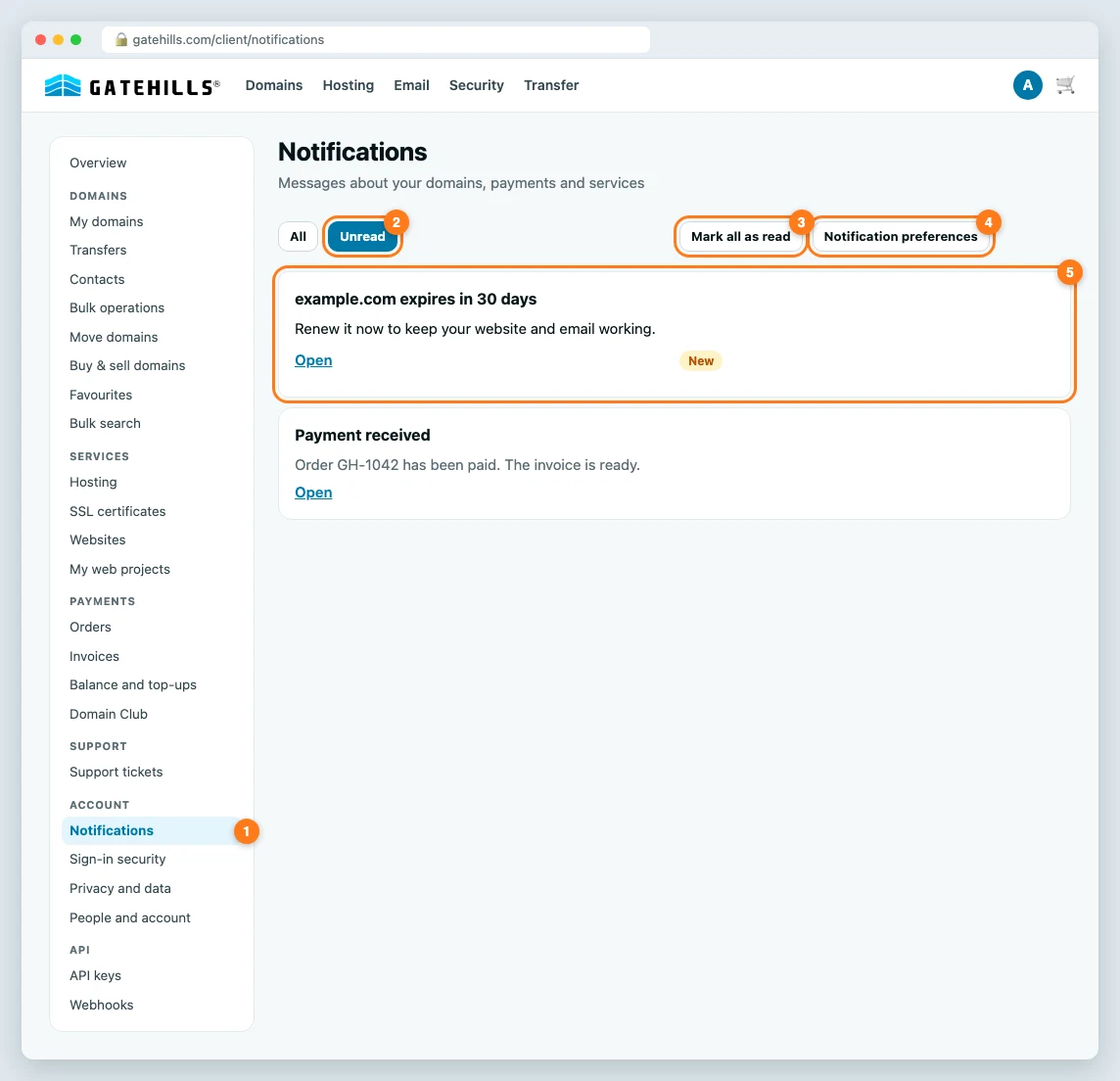
Read your notifications
- Open the notification center
Click the bell at the top of the client area, or choose “Notifications” in the “Account” group of the menu (1). The number next to it is how many you have not read yet.
- Show only the new ones
Click “Unread” (2) to hide the notices you have already read; “All” shows them all again. New notices have the “New” badge (5); critical ones have a red dot before the title.
- Open a notification
Click “Open” under the notice. It is marked as read and you go straight to the right page, for example the domain to renew.
- Mark everything as read
Click “Mark all as read” (3) to clear the counter in one go. Use “Older” and “Newer” at the bottom to browse past notices.
How do I change my notification preferences?
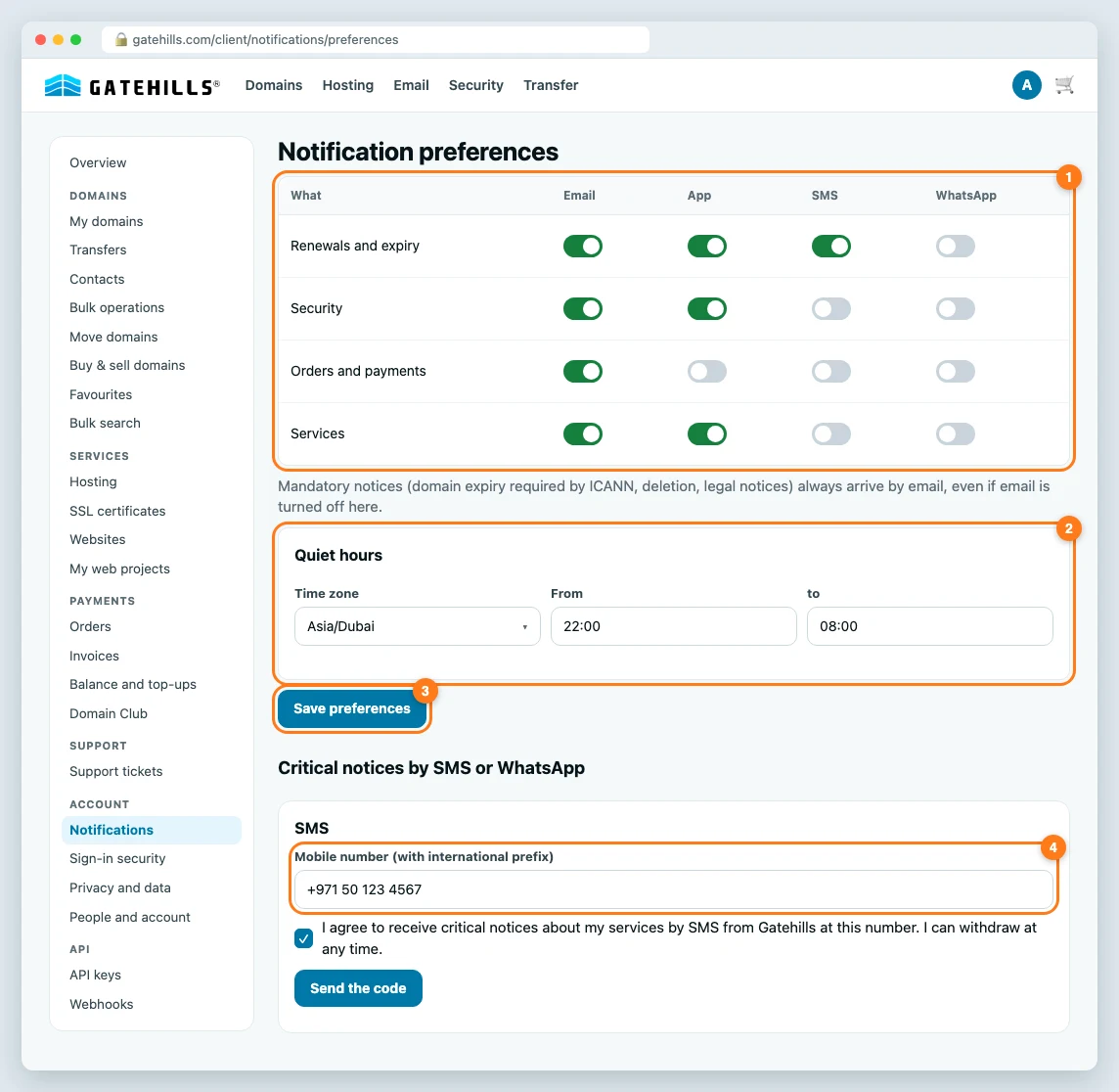
Choose how you receive notifications
- Open the preferences
On the Notifications page click “Notification preferences” (4 in the first image).
- Choose the channels
In the table (1) tick, for each topic, the channels you want: “Email”, “App”, “SMS”, “WhatsApp”.
- Set quiet hours
In “Quiet hours” (2) choose your “Time zone” and the hours. The default is 21:00 to 08:00, Dubai time. During these hours SMS and WhatsApp messages wait until the morning.
- Save
Click “Save preferences” (3). The page confirms "Preferences saved."
| Topic | What it covers | Who sees it |
|---|---|---|
| Renewals and expiry | Domains, hosting and certificates about to expire or expired | People who can view or manage domains or hosting |
| Security | Access and protection of the account | The account owner and people who manage members |
| Orders and payments | Orders, invoices, balance | People who can view or pay invoices |
| Services | Suspensions and technical notices about your services | People who can view or manage domains or hosting |
Each person in the account has their own notification preferences, time zone and quiet hours. Each person also sees only the topics that match the functions they were given. A user without access to invoices, for example, does not see Orders and payments notices.
Offers and promotions are not part of these topics. Marketing has its own consent, in Privacy and data.
What are quiet hours?
Quiet hours are the hours when Gatehills does not send you SMS or WhatsApp messages. They are calculated in the time zone you choose. A message created at night is held and sent as soon as quiet hours end.
Quiet hours do not delay email, app notifications or the bell. Those arrive straight away.
Which notices are critical or mandatory?
A critical notice needs action soon. Examples: a domain in its last 4 days before expiry, a domain that has expired, services that have stopped, a domain in redemption, an imminent deletion or an automatic renewal that failed. Only critical notices can go by SMS or WhatsApp.
A mandatory notice is required by rules or law. Domain expiry reminders fall under the ICANN Expired Registration Recovery Policy (ERRP). Mandatory notices always arrive by email, even if you turned email off for that topic, and they have no unsubscribe link.
| Channel | Which notices | Needs | Quiet hours |
|---|---|---|---|
| Bell (notification center) | All | Nothing: always on | No |
| All; mandatory ones always | Nothing | No | |
| App | All | Gatehills app installed and signed in | No |
| SMS | Critical only | Number confirmed with a code and consent | Yes |
| Critical only | Number confirmed with a code and consent | Yes |
Critical notices by SMS or WhatsApp
SMS and WhatsApp are used only for critical notices and never for advertising. To turn them on:
- In Critical notices by SMS or WhatsApp, write your Mobile number (with international prefix) (4), for example +971 50 123 4567.
- Tick the consent box and click Send the code.
- Enter the 6-digit code you receive and click Confirm.
The code is valid for 10 minutes and allows 5 attempts. You can ask for up to 5 codes a day for a number. You can stop at any time with Withdraw consent, or by replying STOP to the message. If a channel shows Not available yet., it is not active for now.
Push notifications in the app
The App column sends push notifications to your phone through the Gatehills app, once you have installed it and signed in. The text arrives in the language of your phone.
Can I unsubscribe from an email directly?
Yes. Notification emails that are not mandatory contain a link to stop that topic: you confirm with Unsubscribe. If you later tick Email again for that topic in the notification preferences, the unsubscribe is cancelled.
Why did I get an SMS in the morning and not at night?
Because of quiet hours: SMS and WhatsApp messages are not sent during the hours you chose, in your time zone, and wait until the morning.
Do secondary users get the same notifications?
Each person has their own notification preferences and sees only the topics that match the functions they were given. Read and unread status is shared by the whole account. See people and account.
I do not receive push notifications on my phone.
Check that the App channel is ticked for the topic, that you are signed in to the Gatehills app and that notifications for the app are allowed in your phone settings. See the Gatehills app.
How long are notifications kept?
Notices in the notification center are deleted automatically after 365 days.
Why does a verification code appear on the Notifications page?
A Gatehills operator sent it to you during a phone call or chat, to check your identity. Read it only to the operator you are talking to. See sign-in security.