
How to transfer a domain to another registrar
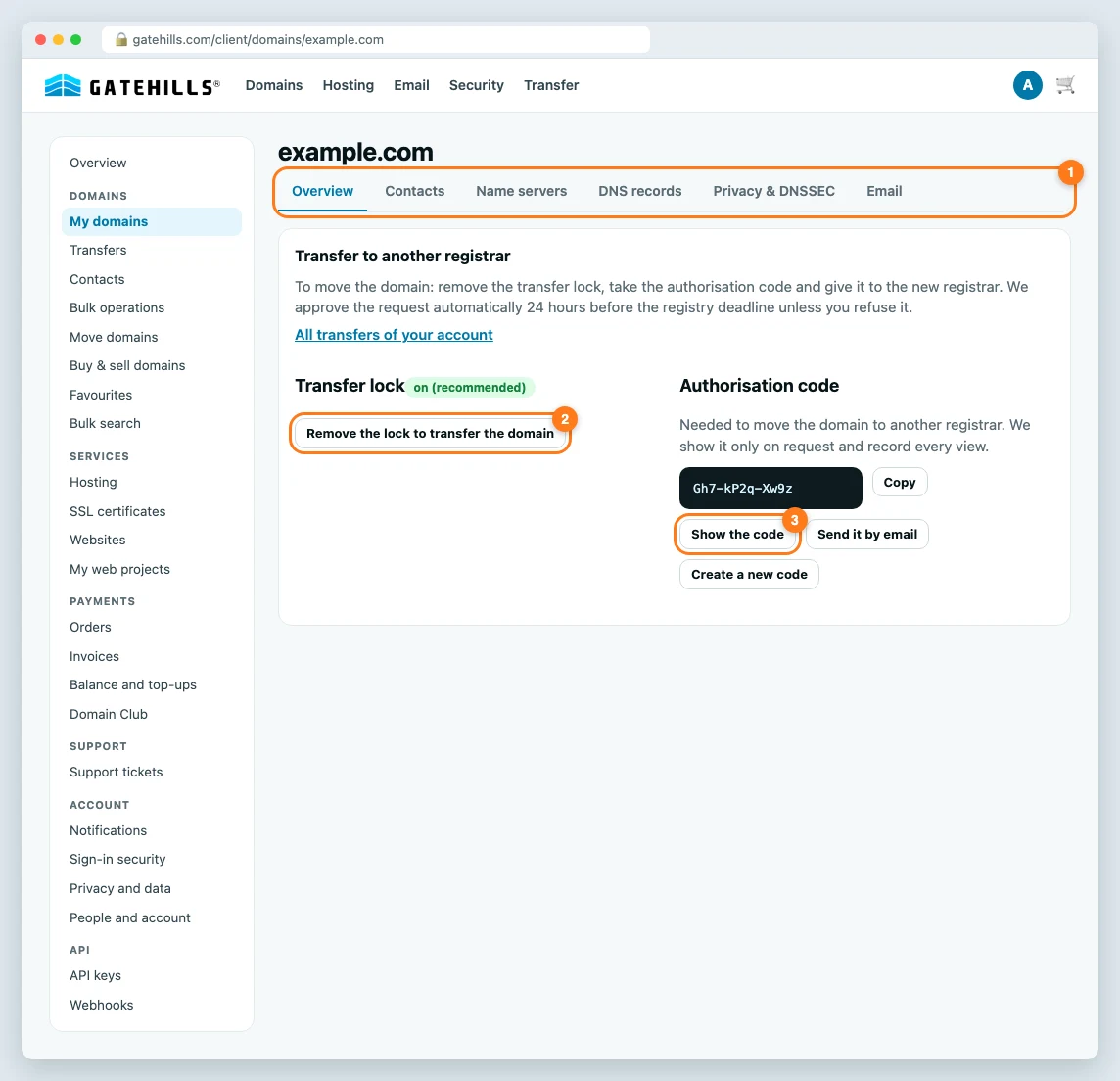
- To transfer a domain to another registrar, open the “Overview” tab of the domain and use the “Transfer to another registrar” box.
- Remove the “Transfer lock”, take the “Authorisation code” and give it to the new registrar.
- When the new registrar asks for the domain, you can approve or reject; if you do nothing, we approve 24 hours before the registry deadline.
- .uk domains have no code: you release them to the IPS tag of the new registrar.
To move a domain away from Gatehills, you need two things: the transfer lock turned off and the authorisation code (EPP code). Both are in the Transfer to another registrar box on the Overview tab. The new registrar then requests the domain; for generic domains this usually takes up to 5 days.
What is an authorisation code (EPP code)?
The authorisation code, also called EPP code or auth code, works like a password for the domain. The new registrar sends it to the registry to show that the registrant agrees to the transfer. The transfer lock is a status at the registry (clientTransferProhibited): while it is on, no transfer can start. Both rules come from the ICANN Transfer Policy.
Moving a domain to another registrar is your right. To protect you from theft, the domain is normally locked and the code that allows the transfer is shown only on request. Follow these steps when you have decided to leave, and keep the lock on at all other times.
| Situation | What to do |
|---|---|
| Registered or transferred less than 60 days ago | Wait: a red notice tells you so (ICANN rule) |
| Change of registrant in the last 60 days | The lock cannot be removed yet: the page shows the date |
| The domain expires soon | Renew it first, or transfer it in good time |
| A .uk domain | There is no code: release it to the IPS tag of the new registrar |
Transfer a domain away from Gatehills
- Open the domain
Go to “My domains”, click the domain name and stay on the “Overview” tab (1). Scroll to the “Transfer to another registrar” box.
- Check the notices
A red notice tells you if the domain cannot leave yet: for example within 60 days of registration or of the last transfer (ICANN rule), or if it expires soon. In that case renew it first, or transfer it in good time.
- Remove the transfer lock
Under “Transfer lock” click “Remove the lock to transfer the domain” (2). The status changes from “on (recommended)” to “off”.
- Get the authorisation code
Under “Authorisation code” click “Show the code” (3): the code appears on the page with a “Copy” button. If you prefer, click “Send it by email”: the code goes to the registrant's email address.
- Start the transfer at the new registrar
Give the code to the new registrar and follow their transfer procedure. The request then reaches Gatehills through the registry.
- Approve the request
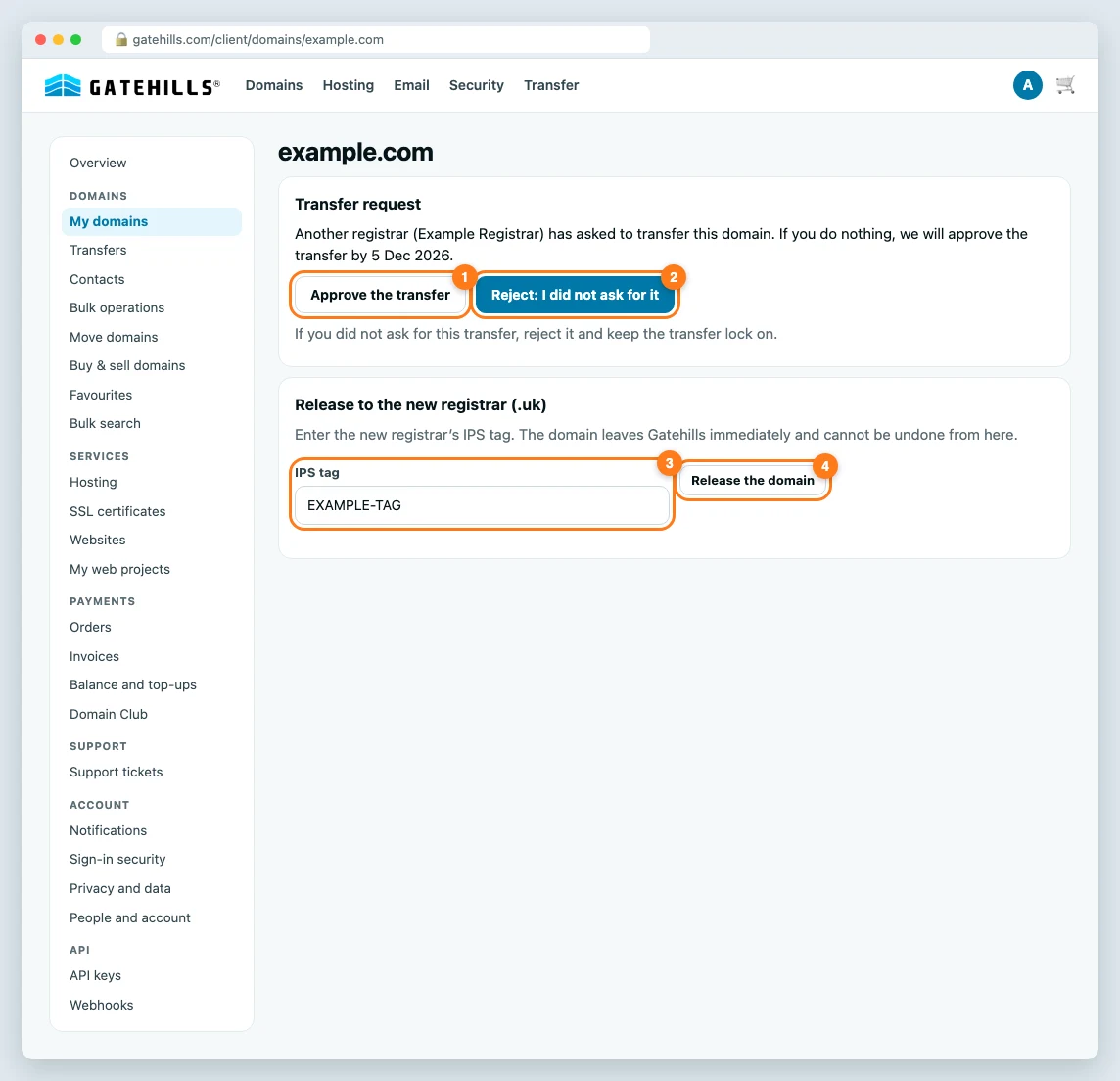
A “Transfer request” box appears on the domain and on the “Transfers” page. Click “Approve the transfer” to let the domain go, or do nothing: we approve it automatically 24 hours before the registry deadline.
A transfer request you did not ask for
If a Transfer request appears and nobody in your company started it, click Reject: I did not ask for it (2). The domain stays with Gatehills. Then turn the lock on again with Turn the lock on and, if you think someone knows the code, click Create a new code: the old code stops working at once.
.uk domains: release with the IPS tag
Nominet, the .uk registry, does not use authorisation codes. Ask the new registrar for its IPS tag, write it in the IPS tag field (3) of the Release to the new registrar (.uk) box and click Release the domain (4). The domain leaves Gatehills immediately, and this cannot be undone from the client area.
How long does it take to transfer a domain to another registrar?
It depends on the registry. For generic domains a transfer usually takes up to 5 days. When the request arrives, a Transfer request box appears on the domain and on the Transfers page.
If you click Approve the transfer, the transfer can be completed sooner. If you do nothing, Gatehills approves it automatically 24 hours before the registry deadline. A .uk domain is faster: after Release the domain it leaves Gatehills immediately.
How long does a transfer take?
It depends on the registry; for generic domains it usually takes up to 5 days. If you click Approve the transfer, it can be completed sooner.
The page says the code is not available. What should I do?
Click Create a new code and then Show the code again. If the problem persists, open a support ticket.
Is it safe to show the code?
Yes. The code is shown only to people who can manage the domain, and every view or email is recorded. It is not available during a support session.
Where can I see past transfers?
Open Transfers in the menu, or click All transfers of your account in the box. The history shows whether each request was approved by you, rejected or approved automatically.
Can I move the domain to another Gatehills account instead?
Yes, without leaving Gatehills: see move domains between accounts.