
How to move a domain to another Gatehills account
- A domain push moves a domain to another Gatehills account: use “Move domains” in the menu, for example to hand a domain over to a client.
- Only the primary user of each account can send, accept or decline offers.
- The other account has 7 days to accept. The domain stays at Gatehills: it is not a transfer between registrars.
- The DNS zone and redirects move with the domain; email forwarding is turned off and dynamic DNS tokens are revoked.
A domain push moves a domain from one Gatehills account to another without a transfer between registrars. The primary user offers the domain in Move domains; the primary user of the other account has 7 days to accept. The registration stays at Gatehills, and the DNS zone and redirects move with the domain.
What is a domain push?
Agencies and resellers often register domains for their clients and later hand them over. Instead of transferring the domain away and back, you offer it to the client's Gatehills account. The client accepts it in their client area and from then on manages it alone.
When you move a domain to another account, only the Gatehills account that manages it changes. The registrant stays the same, and so does the registration at the registry.
A transfer between registrars follows the ICANN Transfer Policy; a move between Gatehills accounts does not.
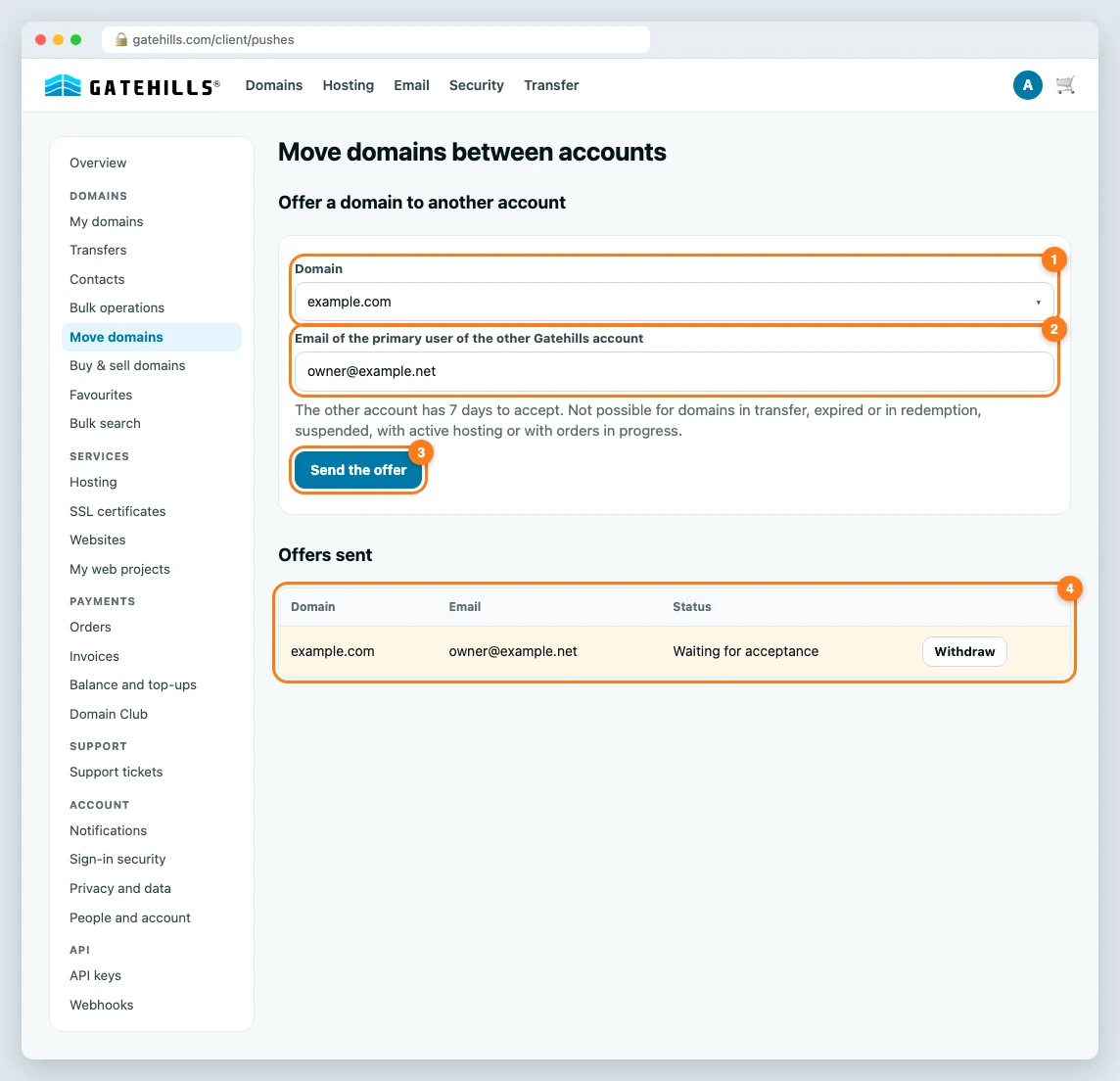
Offer a domain to another account
- Open Move domains
Sign in as the primary user and choose “Move domains” in the menu. The page “Move domains between accounts” opens.
- Choose the domain
Under “Offer a domain to another account”, choose the domain in “Domain” (1).
- Write the email of the other account
In “Email of the primary user of the other Gatehills account” (2) write the email address the other person uses to sign in to Gatehills as primary user.
- Send the offer
Click “Send the offer” (3). If an account with that primary email exists, its primary user is notified. The offer appears under “Offers sent” (4) as “Waiting for acceptance”.
- Withdraw it if needed
As long as the offer is waiting, you can cancel it with “Withdraw”. After 7 days without an answer the offer expires.
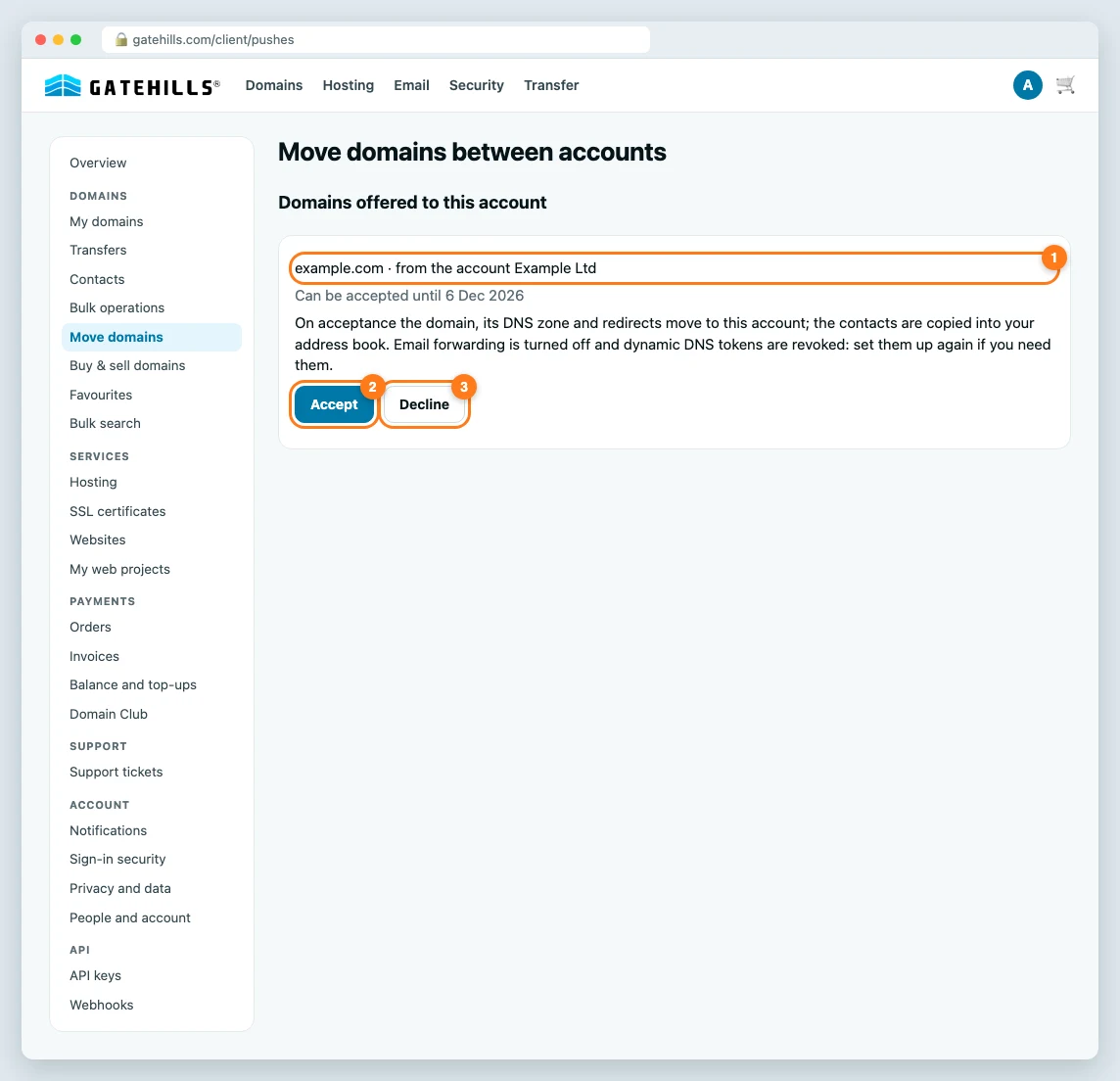
Accept or decline a domain offered to you
- Sign in as the primary user and open Move domains.
- Under Domains offered to this account you see the domain and the account that offers it (1), and the date until which you can accept.
- Read the rules shown in the box, then click Accept (2) to move the domain to your account, or Decline (3).
After you accept, the domain appears in My domains. Its DNS zone, DNSSEC, privacy and redirects keep working. The contacts are copied into your address book. Email forwarding is turned off and dynamic DNS tokens are revoked: set them up again if you need them.
Domain push, transfer or change of registrant: what is the difference?
| What changes | Domain push | Transfer to another registrar | Change of registrant |
|---|---|---|---|
| Who changes | The Gatehills account that manages the domain | The registrar | The legal holder of the domain |
| Where you do it | “Move domains” in the menu | “Overview” tab, “Transfer to another registrar” box | “Contacts” tab of the domain |
| Who must agree | The primary user of the other account, within 7 days | The registrant, with the authorisation code | The old and the new registrant are informed by email |
| 60-day transfer lock | No: only the account changes | Yes, after the transfer (ICANN rule) | Yes, unless the registrant waives it |
How long does a domain push take?
The domain moves as soon as the primary user of the other account clicks Accept. From then on it is listed in their My domains. The offer stays open for 7 days. If nobody answers, it expires and the domain stays in your account.
Does the registrant change when I move a domain?
No. Moving changes only the Gatehills account that manages the domain. The new account can change the registrant afterwards, with the usual rules. See contacts and registrant.
Is this the same as a transfer?
No. A transfer moves the domain to another registrar. Here the domain stays at Gatehills, with the same registration. To leave Gatehills, see transfer a domain to another registrar.
I do not see Move domains in the menu. Why?
Only the primary user of the account can move domains. Ask the primary user, or see people and account.
What happens if nobody answers?
The offer expires after 7 days and the domain stays in your account. You can send a new offer.