
How to receive events with webhooks
- Webhooks send a signed HTTPS POST to your server each time something happens: a domain is about to expire, is renewed, is transferred, a certificate is issued…
- You set them up in the client area under “Webhooks”, next to “API keys”: for reseller accounts and Domain Club members.
- Up to 5 endpoints per account, each with its own events and signing secret.
- Failed deliveries are retried automatically for about 2 days.
Gatehills webhooks tell your server about events the moment they happen: domain expiry and renewal, transfers, hosting and SSL certificates. You add up to 5 HTTPS endpoints in the client area, choose the events for each one and check the HMAC signature of every request. They are available to reseller accounts and Domain Club members.
With webhooks your billing system, CRM or script learns about events right away, without asking the API again and again.
Create a webhook endpoint
- Open Webhooks
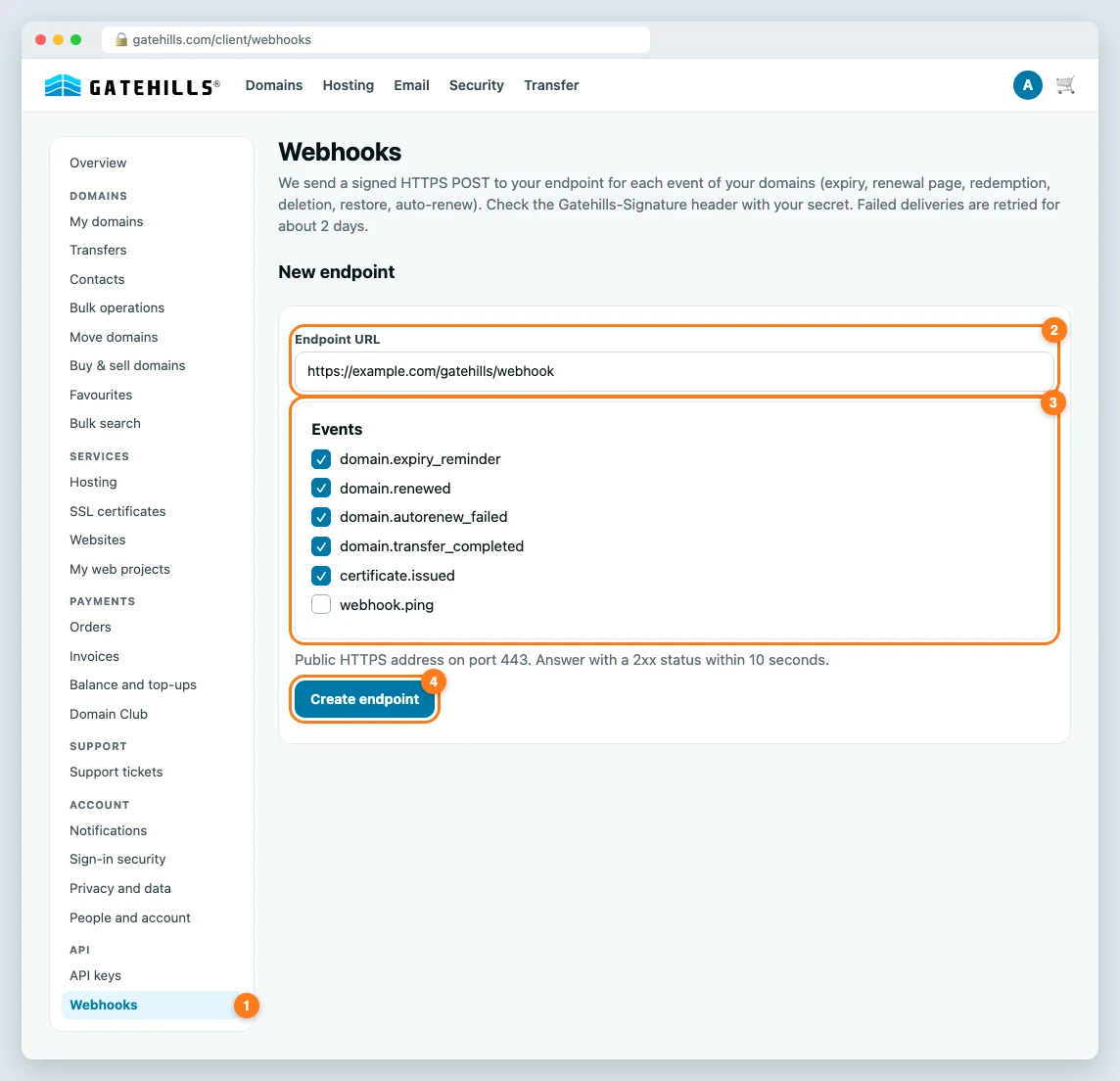
Sign in to the client area and click “Webhooks” in the menu (1). You need the same access as for API keys: a reseller account or an active Domain Club membership, and the “Manage API keys (resellers)” function.
- Enter the endpoint URL
Under “New endpoint”, write the “Endpoint URL” (2), for example “https://example.com/gatehills/webhook”. It must start with “https://”, use the standard port 443 and point to a public server.
- Choose the events
Under “Events” (3) tick the events you want to receive: domain expiry and renewal, transfers, hosting and SSL certificates. All are ticked at first except “webhook.ping”; untick the ones you do not need. Choose at least one.
- Create and copy the secret
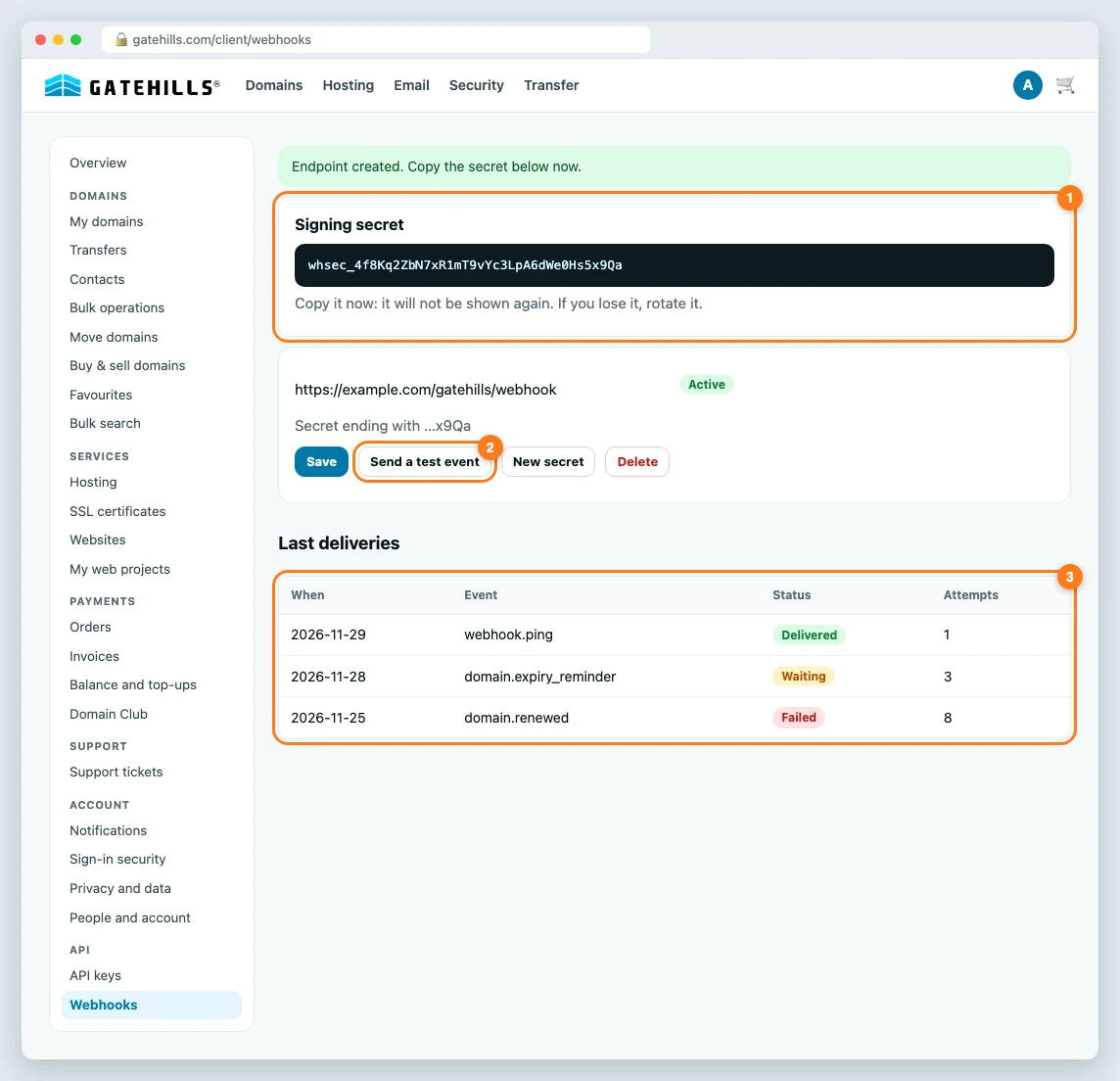
Click “Create endpoint” (4). The “Signing secret” (starting with “whsec_”) appears once: copy it now and store it on your server.
- Send a test
On the endpoint card click “Send a test event”. A “webhook.ping” event arrives within a minute; check it in “Last deliveries”.
Check the signature
Every request is a POST with a JSON body and these headers:
Gatehills-Event: the event type, for exampledomain.expired.Gatehills-Delivery: the event ID, the same in every retry. Use it to ignore duplicates.Gatehills-Signature:t=TIMESTAMP,v1=SIGNATURE, wherev1is the HMAC-SHA256 oft + "." + bodywith your secret.
Compute the signature on the raw body, compare it with v1 and reject requests with a t older than 5 minutes. Answer with any 2xx status within 10 seconds. The body contains only data about the domain or service (dates, amounts, names), never emails or phone numbers.
Manage your endpoints
- Change the events or pause: tick or untick the events, or untick Active, then click Save. A paused endpoint shows Paused and receives nothing.
- New secret: creates a new signing secret, shown once. The old one stops working immediately, so update your server right away.
- Delete: removes the endpoint.
- Last deliveries: shows When, Event, Status (Waiting, Delivered, Failed) with the HTTP code of your server, and the number of Attempts. A failed delivery is retried after 1 minute, then with growing pauses for about 2 days; after that it is marked Failed.
What are webhooks?
Webhooks are automatic HTTP requests that one service sends to another when something happens. Instead of asking the Gatehills API every few minutes whether a domain has been renewed, your server receives a message at the moment of the event.
Each request is signed with HMAC-SHA256, a keyed hash defined in RFC 2104. Only Gatehills and your server know the secret. A valid HMAC signature therefore proves that the request comes from Gatehills and was not changed on the way.
| Group | Example events |
|---|---|
| Domains | domain.expiry_reminder, domain.expired, domain.renewed, domain.autorenew_failed, domain.restored |
| Transfers | domain.transfer_submitted, domain.transfer_completed, domain.transfer_failed, domain.transferred_out |
| Hosting | hosting.activated, hosting.expiry_reminder, hosting.suspended, hosting.moved |
| SSL certificates | certificate.issued, certificate.expiry_reminder, certificate.failed, certificate.revoked |
| Test | webhook.ping, sent only when you click “Send a test event” |
How often is a failed delivery retried?
A delivery fails when your webhook endpoint does not answer with a 2xx status within 10 seconds. A redirect also counts as a failure. Gatehills then tries again with growing pauses.
| Attempt | When it is sent |
|---|---|
| 1 | Within about a minute of the event |
| 2 | 1 minute after the first failure |
| 3 | 5 minutes later |
| 4 | 30 minutes later |
| 5 | 2 hours later |
| 6 | 6 hours later |
| 7 | 12 hours later |
| 8 | 24 hours later |
After 8 failed attempts, about 45 hours after the first one, the delivery is marked Failed and is not sent again. The number of attempts appears in Last deliveries.
Which events are available?
Domain events (expiry reminders, expired, renewal page, redemption, deletion, restore, renewed, auto-renewal done or failed), transfers in and out, hosting events (activation, expiry, suspension, moves…) and SSL certificate events (issued, expiring, failed, revoked…), plus webhook.ping for tests.
Can I receive the same event twice?
Yes, if your server did not confirm in time the event is sent again. Gatehills-Delivery stays the same in every attempt, so you can recognise duplicates.
How many endpoints can I have?
Up to 5 per account. Each one has its own events and secret.
What happens if my Domain Club membership ends?
The endpoints stay but receive no events and cannot be changed until you renew. See Domain Club.
Do I need an API key for webhooks?
No, webhooks only need the secret. But you usually use them together with an API key to act on the events. See API keys.
How do I avoid processing the same event twice?
Save the Gatehills-Delivery value of every event you have handled. If a request arrives with a value you already have, answer with a 2xx status and do nothing else.
Does Gatehills follow redirects from my endpoint?
No. A 3xx answer counts as a failed delivery. Give the final https:// address of your endpoint.