
How to look up a domain in WHOIS / RDAP
- A WHOIS lookup on Gatehills shows the public registration data of any domain: registrar, dates, status, name servers and DNSSEC.
- In the site menu open “Domains” → “WHOIS”, type the domain and click “Look up”.
- It is free and you do not need an account. The data comes live from the registry of the extension.
- Personal data of the owner is usually hidden for privacy.
A WHOIS lookup tells you who manages a domain, when it expires, its status and its name servers. Gatehills runs it for free and without an account: you type the domain and the data comes live from the registry of the extension through RDAP, the modern protocol that replaces the old WHOIS.
Use it when you want to know whether a domain is taken, which registrar manages it, its domain expiry date or which name servers it uses.
Look up a domain
- Open the lookup page
In the site menu open “Domains” and choose “WHOIS”. The page is also linked as “WHOIS / RDAP” at the bottom of every page.
- Type the domain
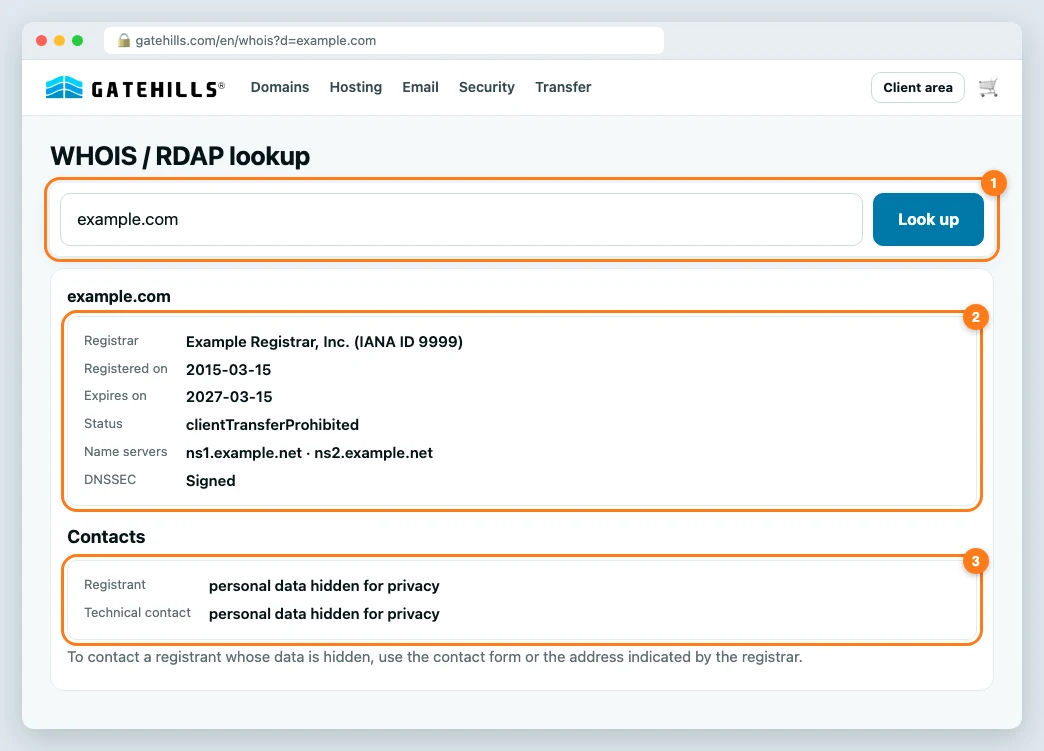
In the search box (1) write the full domain name with its extension, for example “example.com”. Do not add “www” or “https://”.
- Start the lookup
Click “Look up”. After a few seconds the result appears under the search box.
- Read the registration data
In the result (2) you see the “Registrar” (with its IANA ID), “Registered on”, “Expires on”, “Last updated”, the “Status” codes, the “Name servers” and whether DNSSEC is “Signed” or “Not signed”. Below you also find the contact to “Report abuse to the registrar”, if the registry publishes it.
- Check the contacts
Under “Contacts” (3) you see the registrant and the other contacts. When you read personal data hidden for privacy, the registry does not publish them: the registrar still holds them.
When the domain is free
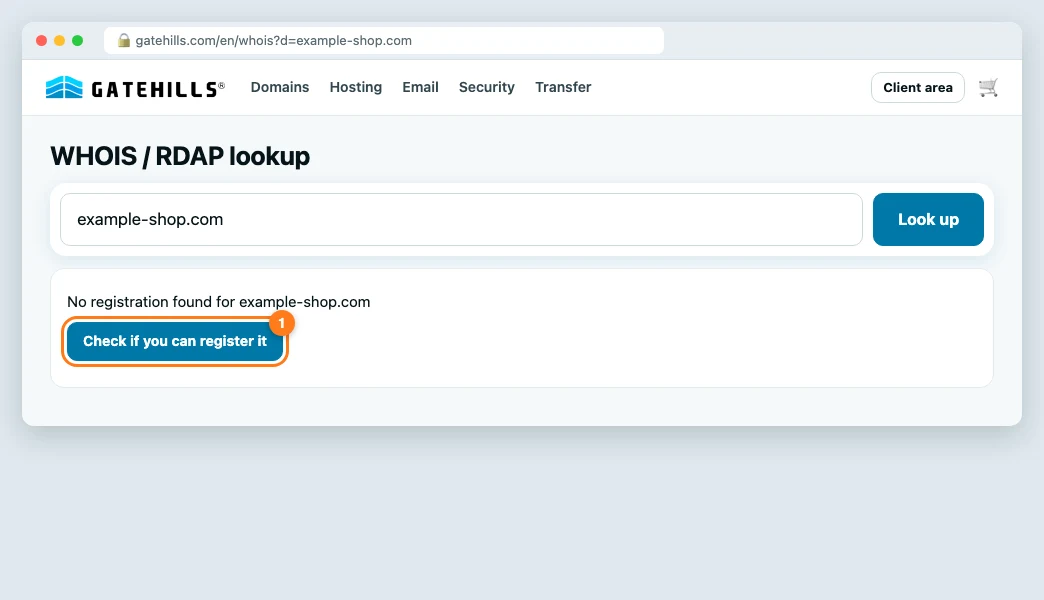
If the registry has no record, the page says No registration found for followed by the name. Click Check if you can register it (1) to open the domain search with that name and see the price.
| Status | What it means |
|---|---|
| active / ok | The domain is registered and works normally. |
| clientTransferProhibited | Transfer lock is on: the domain cannot be moved to another registrar until the owner removes it. |
| clientHold / serverHold | The domain does not resolve: the website and email do not work. |
| redemptionPeriod | The domain expired and was deleted; only the current owner can still restore it. |
| pendingDelete | The domain is about to be released and may become free in a few days. |
What is a WHOIS lookup?
A WHOIS lookup reads the public registration record of a domain name. Every registry keeps this record for the domains of its extension: registrar, creation and expiry dates, status codes and name servers.
WHOIS is the original protocol for these queries and dates from the early internet. RDAP (Registration Data Access Protocol) is its modern replacement. It works over HTTPS and returns structured data with the same fields for every registry. For generic extensions such as .com, ICANN has made RDAP the official source of registration data.
| WHOIS | RDAP | |
|---|---|---|
| Connection | Plain text on port 43 | HTTPS, encrypted |
| Answer | Free text, laid out differently by each registry | Structured data with the same fields everywhere |
| Non-Latin domain names | Limited support | Supported |
| Today | Being retired for many extensions | Current standard |
Where does the data come from?
Gatehills does not keep a copy of the data. For each lookup our server finds the RDAP service of the extension in the official IANA list and asks that registry directly. The answer usually arrives within a few seconds, so you see the data as the registry has it at that moment.
Result pages are not indexed by search engines. If an extension has no RDAP service yet, the lookup cannot show data for it.
Is the WHOIS lookup free?
Yes. It is free and you do not need to sign in. To prevent abuse there is a limit on the number of lookups from the same connection.
Why can't I see the owner's name?
Under privacy laws such as the GDPR, the names, emails and phone numbers of individuals are not published. The registrar still holds them and the registry may show only the country or the organisation.
How can I contact the owner of a domain?
Use the contact form or the address indicated by the registrar in the result. If you want to buy a domain that is taken, also check the aftermarket: buy a domain on the aftermarket.
Can I hide my own data in WHOIS?
Yes, for the domains you register with Gatehills, where the extension allows it. See WHOIS privacy.
What does DNSSEC Signed mean?
The domain's DNS answers are digitally signed, which protects visitors from forged answers. See protect your domain with DNSSEC.
How up to date is the data?
It is read live from the registry at the moment of the lookup. A change made by the registrar, such as a renewal or new name servers, appears as soon as the registry has recorded it.
What is the difference between WHOIS and RDAP?
Both show the same registration data. RDAP is the newer protocol: it uses HTTPS and returns structured data. Gatehills uses RDAP for every lookup.
Related guides