
Manage a domain: renewal, restore and deletion
- Domain management starts in “My domains” → your domain: the “Overview” tab sums up status, expiry, renewal, name servers, privacy and DNSSEC.
- From the “Renewal” box you renew for one or more years or turn “Automatic renewal” on or off.
- A domain deleted after expiry can still be restored for a limited time with “Restore the domain”.
- Red messages at the top tell you if the domain is suspended and what to do.
On Gatehills, domain management happens on the Overview tab of each domain in the client area. There you renew for one or more years, turn automatic renewal on or off, restore a domain deleted after expiry, or delete it. Red and yellow messages at the top tell you when something needs your action.
Domain management: what can I do on the Overview tab?
Every domain has its own page with several tabs: Overview, Contacts, Name servers, DNS records, Privacy & DNSSEC, Email and others. This guide covers the Overview tab, where you keep the domain alive: renewal, restore, deletion and the alerts that need your attention.
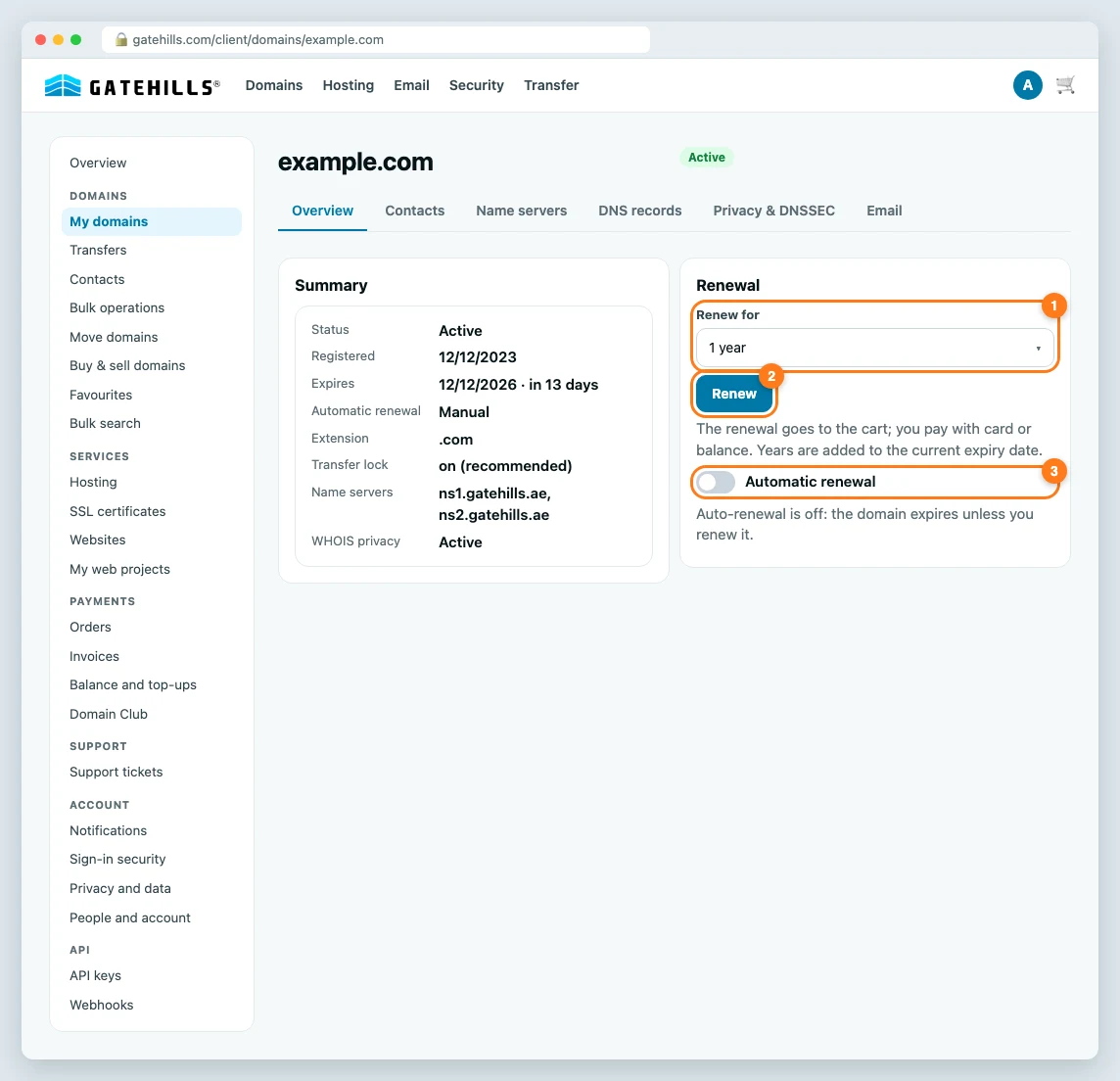
Renew a domain or turn on auto-renewal
- Open the domain
Choose “My domains” in the menu and click the domain name. The “Overview” tab opens.
- Check the summary
The “Summary” box shows “Status”, “Expires” with the days left, “Automatic renewal”, the extension, “Transfer lock”, “Name servers”, “WHOIS privacy” and DNSSEC. Click “Manage” or “Change” next to a line to go to the right place.
- Choose the years
In the “Renewal” box choose the period in “Renew for” (1). The list shows only the periods allowed: some extensions have a minimum period, and the remaining registration cannot go beyond the maximum of the extension (usually 10 years).
- Renew
Click “Renew” (2). The renewal goes to the cart and you pay with card or balance; the years are added to the current expiry date, so you lose nothing by renewing early.
- Turn on automatic renewal
Click the “Automatic renewal” switch (3). When it is on, about 30 days before expiry we renew the domain from your balance or, if that is not enough, from your default card. Click it again to turn it off.
How does automatic renewal work?
With Automatic renewal on, we renew the domain about 30 days before expiry. We use your balance first and, if it is not enough, your default card. The renewal price per year is shown on the page when it is available.
Renewing early never loses days: the years are added to the current expiry date. The total cannot go beyond the maximum of the extension, usually 10 years.
After the expiry date: grace period and restore
If a domain expires, open What happens after the expiry date at the bottom of the page: it shows the dates of the grace period (you can still renew at the normal price), of redemption (the registry has deleted the domain, but you can recover it with a restore) and of the final deletion. The exact dates depend on the extension. For more on renewals and reminders, see renewals. For generic extensions, ICANN sets minimum rules in its Expired Registration Recovery Policy.
| Phase | What you can do | Price |
|---|---|---|
| Grace period | Renew as usual; the domain may stop working | Normal renewal price |
| Redemption (Deleted, recoverable) | Restore the domain with Restore the domain | Restore price: registry fee plus one year |
| Final deletion (Being deleted) | Nothing: the domain can no longer be recovered | — |
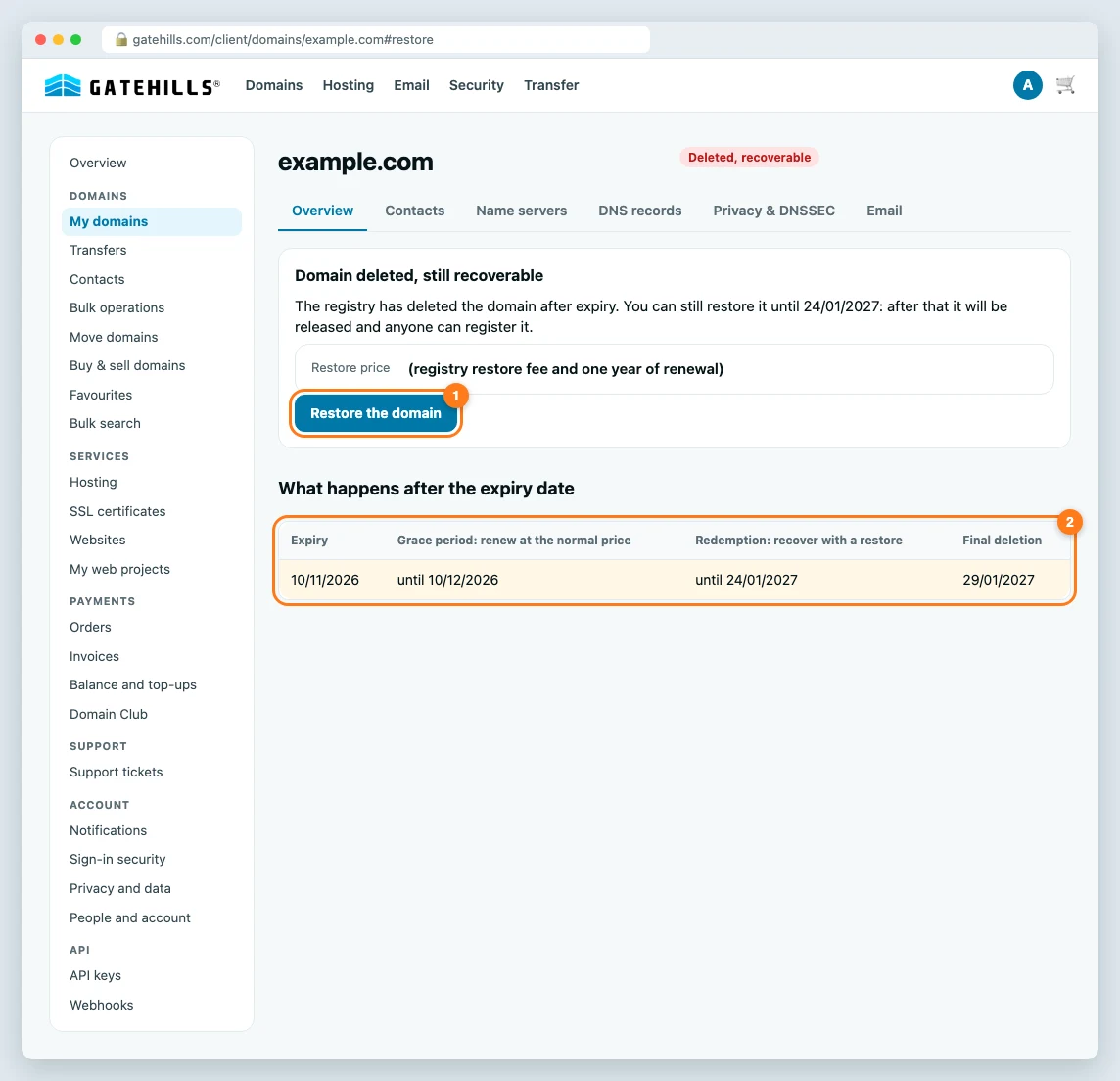
Restore a domain in redemption
- Open the domain
In “My domains” the domain shows the status “Deleted, recoverable”. Open it: the box “Domain deleted, still recoverable” shows until when you can restore it.
- Check the price
The “Restore price” is shown in the box; it includes the registry restore fee and one year of renewal.
- Restore
Click “Restore the domain” (1). The restore goes to the cart: complete the payment with card or balance. Until you pay, the page reminds you that the restore is in your cart.
- Wait for the confirmation
Once the registry has restored the domain, it goes back to “Active” with one more year. If the restore is not sold online for that extension, the page says so: contact support.
Delete a domain
At the bottom of the Overview tab, open Delete domain, type the domain name exactly in the field and click Delete permanently, then confirm. Website and email stop working at once. Within 5 days of registration the domain disappears immediately and the registration may be refunded after approval; later it goes into redemption and can only be recovered with a paid restore. You can delete only active or expired domains, and only if the registry of the extension allows it.
Suspended domains and the confirmation email
- Email confirmation (ICANN rule): for a new registrant, the registrant must click the link in the email we send. A yellow message shows the deadline. After 15 days without confirmation the domain is suspended; as soon as the registrant clicks the link, it is reactivated automatically. Use Send the confirmation email again if the email was lost.
- Suspended by Gatehills: the message The domain has been suspended by Gatehills appears. Contact support for details.
- Registrant to complete or Contact details to correct: choose a registrant or fix the contacts with the button in the message, otherwise renewals and changes may fail.
Do I lose days if I renew early?
No. The years you buy are added to the current expiry date.
When does auto-renewal charge me?
About 30 days before expiry, from your balance or, if that is not enough, from your default card. The page shows the renewal price per year when it is available.
Can someone in my team renew or delete domains?
Only if the primary user gives them the domain management function. Without it they see the page in read-only mode. See people and account.
How do I transfer the domain to another registrar?
Use the Transfer to another registrar section on the same tab: transfer lock and authorisation code. See transfer a domain away.
I deleted a domain by mistake. Can I get it back?
While it is in the Deleted, recoverable status, yes, with Restore the domain. Once it is Being deleted, it can no longer be recovered.
What is the difference between the grace period and redemption?
In the grace period the domain still belongs to you and you renew it at the normal price. In redemption the registry has deleted it: you can only get it back with a restore, which costs more.